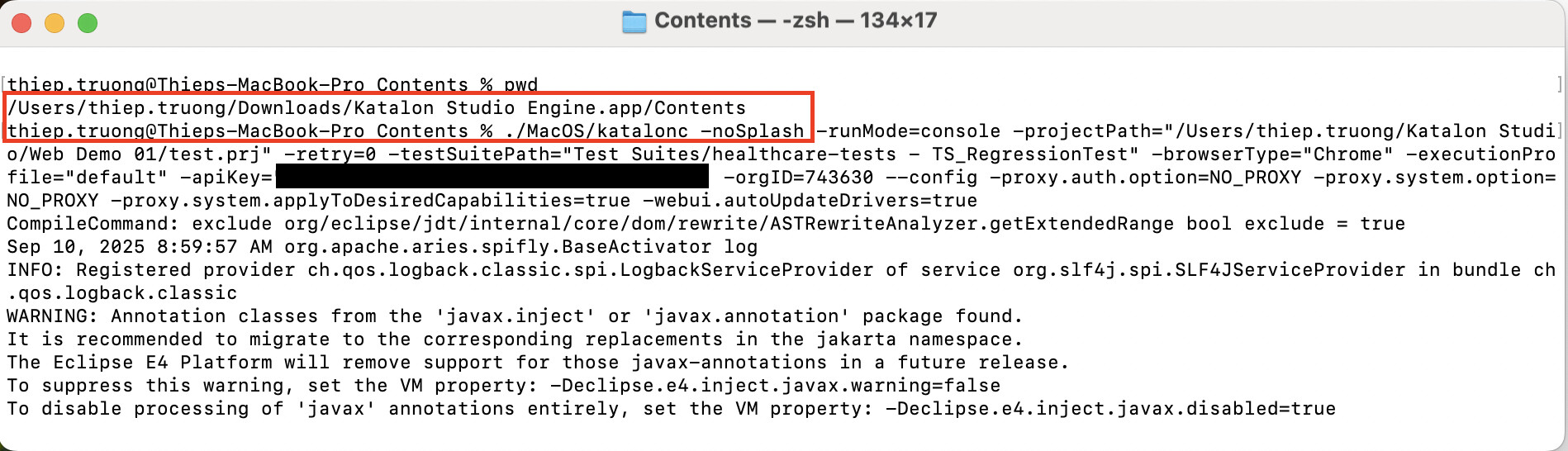
Hi! I’ve been trying to use Katalon Runtime Engine on my MacBook Air. The command that I copied from Katalon Studio doesn’t seem to be working when I try to run it in the Terminal app on my MacBook Air.
the issue seems on the Path Project that contains space
can you try to change the path value to use escape string like: -projectPath="/Users/trentanderson/Katalon\ Studio/Test\ Project\ Trent/Test\ Project\ Trent.prj"
or if it’s doesn’t works, maybe the issue is because of the Permission Issue on MacOS, you can check that out on this menu: System Preferences → Security & Privacy → General → Allow Anyway
you need to move KRE to the correct location. After extracting your tar.gz file, move the entire Katalon Studio Engine folder to your Applications directory:
Extract the tar.gz file completely
Move Katalon Studio Engine.app to /Applications/
The final path should be: /Applications/Katalon Studio Engine.app
Navigate to the Correct Directory
Instead of trying to run the command from your current location, you need to navigate to the specific MacOS directory within the KRE application bundle:
cd "/Applications/Katalon Studio Engine.app/Contents/MacOS"
Then run your command using:
./katalonc --args [your options here]
Enable KRE in Security Settings
Since you’re on macOS, you must enable KRE in your system security settings:
Go to System Preferences → Security & Privacy → General
You should see a message about Katalon Studio Engine being blocked
Click “Allow Anyway” or “Open Anyway”
You may need to repeat this process after the first launch attempt
Handle macOS Security Restrictions
If you encounter the “Apple cannot check it for malicious software” error:
Try right-clicking on the Katalon Studio Engine.app in Applications
Select “Open” from the context menu
Click “Open” in the security dialog that appears
This will whitelist the application for future use
Correct Command Structure
The proper syntax for macOS should look like:
cd "/Applications/Katalon Studio Engine.app/Contents/MacOS" ./katalonc -noSplash -runMode=console -projectPath="[your project path]" [other options]
Verification Steps
After properly installing, verify the setup by:
Checking that KRE is in Applications: ls /Applications/ | grep Katalon
Navigating to the MacOS directory: cd "/Applications/Katalon Studio Engine.app/Contents/MacOS"
Testing the katalonc executable: ./katalonc --help
The issue is not resolved. I tried moving the Katalon Runtime Engine folder to the Applications folder. There didn’t seem to be anything to adjust specifically for this in the Privacy & Security section of System settings.
I suppose, the katalonc command expects the companion library to be found at a relative path with the current working directory being the base for resolution of relative → absolute path.
If you execute the command in the Contents directory, then the katalonc would resolve the path relative to the Contents dir. The resolution result would not be able to find the companion shared library.
If your free trial has expired, you can still earn a Katalon Runtime Engine license through our Kudos Rewards Program by participating in the Katalon Community Forum.
By contributing helpful posts, providing solutions, or engaging with others, you’ll earn Kudos points that can be redeemed for rewards, including free licenses and other perks.


 , I get this.