Why does Katalon Studio randomly erase test cases?

Katalon Studio 8.5.5-a47e123f is randomly erasing my test cases. Once in a while after I double click on a test case in the Test Cases folder, it opens the test case in a new tab, but the tab is empty.
I have tried closing and reopening the test case and shutting down and restarting Katalon Studio, but that test case remains empty.

Background: I created my first test case as a recording of a web session, where I deliberately touched every control. I then used Script mode to edit the test case down to just the sequence of actions I wanted. Once I had a master test case, I have been Copy and Pasting entries in the Test Cases list of the Tests Explorer to create new test cases.

The typical sequence is:

  1. Right click on a test case in the Test Cases list and click Copy
  2. Right click on any test case in the Test Cases list and click Paste to create a “test case - Copy”
  3. Rename the copied test case
  4. Edit the new instance of the test case to test slightly different functionality
  5. Click Save for the modified new test case.
  6. Once in a while close some test case tabs when there are getting to be too many.
    Sometimes Step 3 is done after Step 5.
    Do the above sequence a number of times (10-20?).

Once in a while (it has happened at least twice this morning) I will open up one of the older scripts and the edit window that should include all the script steps is blank.

I have tried to reproduce the case doing the above steps and variations on them but have not yet been able to reliably reproduce the bug. It may depend on how many tabs are open or how much copying has recently been done.

But the contents really are gone. When right-clicking on the test case, I chose Open Enclosing Folder which took me to “Katalon Studio//Test Cases”. The .tc file for the empty script looks like all the others, with proper contents, but when I went to the “Katalon Studio//Scripts” folder, all the other scripts are 3KB, but the two empty scripts are 0 bytes. So something caused them to become empty.

Anybody know what sequence of steps I should avoid to avoid this bug?

Also, could someone pass this on to Katalon Support for me, please?

Thanks!
Mark

Hi anh Duy, could you take a look at Mark’s case here? Many thanks anh!

You renamed test cases.

See the following post:


I would warn All Katalon Users.

DO NOT RENAME YOUR TEST CASE!

You may lose your code.

Instead of renaming an existing Test Case, create a new Test Case with a favorable name, and copy the script source from the old one to the new one. This way is safe.
… You don’t like it? Well, neither do I.
But it’s better than loosing the code entirely.


Katalon Studio updates all references to the Test Case which you are to rename, as the following screenshot tells:

Imagine, you renamed a Test Case which is refered by many other Test Cases and Test suites, and got a failure. A total disaster.

2 Likes

I usually first make a copy of the test case so I can restore it if needed. Pretty much the same thing Kaz suggested.

Before renaming I make the copy:
CheckLogin
CheckLogin - Copy

After renaming I delete the copy if the renaming worked:
CheckProductionLogin
CheckLogin - Copy

this is not an excuse for Katalon stuff to not fix such shitty issue.
i am getting tired, as a comunity member, to wipe the *** of katalon development staff for critical issues.
i am still here for fun, but this is no longer funny
@vu.tran let me know if escalation is needed.
fyi, we, as users, we may have some other channels to ‘promote’ your products

1 Like

Katalon team have been aware of this problem over last 10 months and has left it unresolved. They seem to be busy developing something else. So I suppose that they would NOT be able to fix this problem in the near future. This problem may accidentally occur to anyone.

:bomb: WARNING Someday your test case code may be erased by Katalon Studio.

How to help yourself? ---- Start using Git before the disaster.

I always use Git to make a fly-weight local backup of the project. The local Git repository will always rescue me from the glitches of Katalon Studio.

  1. I make local Git repositories for each of all Katalon projects of mine.
  2. Just before renaming a Test Case, I will commit the current “healthy” files into the main branch.
  3. I will create a temporary branch.
  4. I will check out into the temporary branch
  5. Then I will try renaming a Test Case.
  6. I will make very sure if renaming a Test Case hasn’t caused any troubles in the project. I will run full set of Test Cases to see the status of the project.
  7. When assured, I will commit all changes into the temprary branch;
  8. I will check out the main branch;
  9. I will merge the temporary branch into the main branch.
  10. I will make sure the main branch is OK, then delete the temporary branch
  11. At the step 6 if I found anythng wrong , I will check out the main branch where my healthy set of files remain unbroken. I will drop the dirty temporary branch away.

Git saves us all !

1 Like

I can verify this is still an issue in May of 2025. As a new user, I had not stumbled upon this thread until it had happened more than once. Using the work around is only effective if I remember to do it every time. And I don’t. So as a user evaluating this for my company, this is an issue that will cost us time, which costs us money, which is a very bad thing.
If there is a more recent workaround or fix for this that somehow is not in version 10.2.0 I would love to see it before my demo copy expires and I have to report to management. There is no way in hell they will approve this product with this bug.

They wrote they did something to fix the problem at v10.2.0

v10.2.0

Fixes

  • Script code vanishes when a test case is renamed.

But now you wrote:

@kcbrier1

Are you sure that even v10.2.0 has this problem unfixed yet?

@kcbrier1

Please show us the Error log.

In the Katalon Studio’s tool bar, choose “Help” > “Error Log”

Then the .log file will open in a text editor.

I believe that the .log contains a Java Stack Trace message that tells the exact reason why your Test Case script was erased. That would help Katalon to try to fix this problem.

Please attach the entire body of .log here; do not trim it at all.

Nope. I can reproduce it consistently. Sigh.

Please answer to the question:

Please share the .log here.

Hi @kcbrier1,

We are sorry for your inconvenience. Please help to provide us the steps to reproduce your issue and error log in KS v10.2.0.
Our team will take a look on it.

Thanks

Thanks!
Hope this helps:
I have a demo license I am evaluating for a client.

Open Katalon Studios with existing test objects and work for about 30 minutes.
Make a copy of a test case (so I don’t lose my work)
Open the copy of the test case
Make changes to the test case
Right click on name of test case and select rename
Accept prompt to save all
input a new name for the test case
Repeat this a few times (see log)
Rename a test case that isn’t open
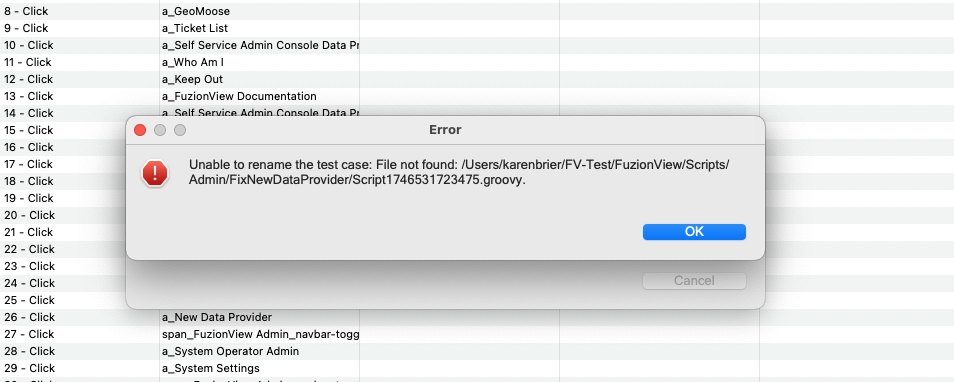
get error message unable to rename the test case file not found (see attached)
Click ok
Exit Katalon studio (as this is an indication to me that the software has lost its cookies again)
Restart katalon studio
One of the test cases will be blank. In this case it was the one before I tried to rename the unopened test case,

I have noticed that after 45+ minutes of heavy use - creating, recording, spying, saving, renaming, test cases and test suites,etc - the app will start to have odd and unexpected behavior. Copy and paste of action steps will stop working. Rename will error out consistently. Record feature loses focus and switches to other windows. Editing parameters in popups doesn’t save my changes even when I click ok. If I continue working the app may freeze and I have to force quit.

My workaround is that I have checked my work into version control and try to remember to reboot Katalon Studio every hour or so to avoid losing my work.
I’m not a developer anymore, but this feels like the kind of problems we used to incur with handling resources.

I’m running on a Macbook Air

Hardware Overview:

Model Name: MacBook Air

Model Identifier: Mac14,2

Model Number: MLY33LL/A

Chip: Apple M2

Total Number of Cores: 8 (4 performance and 4 efficiency)

Memory: 8 GB

System Firmware Version: 11881.101.1

OS Loader Version: 11881.101.1

Serial Number (system): M94PQQD2T2

Hardware UUID: 07076038-8B1A-5BEE-8F40-FC9C12BACE05

Provisioning UDID: 00008112-001E54D426A3C01E

Activation Lock Status: Enabled

System Software Overview:

System Version: macOS 15.4.1 (24E263)

Kernel Version: Darwin 24.4.0

Boot Volume: Macintosh HD

Boot Mode: Normal

Computer Name: Karen’s MacBook Air

User Name: Karen Brier (karenbrier)

Secure Virtual Memory: Enabled

System Integrity Protection: Enabled

Time since boot: 8 days, 18 hours, 18 minutes

(attachments)


KatalonErrorLog.rtf (236 KB)

@kcbrier1

Which version of Katalon Studio are you using? Is it v10.2.x, or not?

I looked into the KatalonErrorLog.rtf which @kcbrier1 shared.

I found a lot of curious stuff.

The first thing I noticed, a Java StackTrace of WebSocketTimeException:

org.eclipse.jetty.websocket.core.exception.WebSocketTimeoutException: Connection Idle Timeout
	at org.eclipse.jetty.websocket.core.WebSocketConnection.onIdleExpired(WebSocketConnection.java:230)
	at org.eclipse.jetty.io.AbstractEndPoint.onIdleExpired(AbstractEndPoint.java:389)
	at org.eclipse.jetty.io.IdleTimeout.checkIdleTimeout(IdleTimeout.java:172)
	at org.eclipse.jetty.io.IdleTimeout.idleCheck(IdleTimeout.java:113)
	at java.base/java.util.concurrent.Executors$RunnableAdapter.call(Executors.java:539)
	at java.base/java.util.concurrent.FutureTask.run(FutureTask.java:264)
	at java.base/java.util.concurrent.ScheduledThreadPoolExecutor$ScheduledFutureTask.run(ScheduledThreadPoolExecutor.java:304)
	at java.base/java.util.concurrent.ThreadPoolExecutor.runWorker(ThreadPoolExecutor.java:1136)
	at java.base/java.util.concurrent.ThreadPoolExecutor$Worker.run(ThreadPoolExecutor.java:635)
	at java.base/java.lang.Thread.run(Thread.java:840)
Caused by: java.util.concurrent.TimeoutException: Idle timeout expired: 30000/30000 ms
	at org.eclipse.jetty.io.IdleTimeout.checkIdleTimeout(IdleTimeout.java:167)
	... 7 more

In the log file, this Exception repeated hundreds times. There are other kinds of Exceptions that I have never seen before.

It seems to me that the Katalon Studio installation of @kcbrier1 is quite unusual. To me, it seems broken. How is it broken? Why? ---- I have no idea. Nobody would be able to tell.

I think, @kcbrier1 should remove the current Katalon Studio installation, reinstall v10.2.x cleanly.

@kcbrier1

In order to reinstall Katalon Studio, you should NOT use “in-app update”, as it is known to be buggy.

You should download the installer

and install it

Hi @kcbrier1,
As a workaround to recover a missing script, you can find the old script at:

/Users/karenbrier/FV-Test/FuzionView/Scripts/Admin/<“your old test case name”>/Script1746531723475.groovy
You can copy this file to the correct script directory to restore your script.
Also, you can use this file to restore your script.

1 Like

I thought the log file would tell you that. Apologies.
10.2.0
build 10.2.0-ab0efa286c
Installed May 13, 2025

That’s brilliant - thank you!