I am going to retell my previous post with more details.
I used Katalon Studio v10.3.2 Free on macOS 15.6.1
Problem to solve
In my Katalon Studio projects, I often make sub folders in the Test Cases tree to locate my test cases. I do change the name of my testcases. I do change the name of sub folders. I even move my testcases from a folder to another. I repeat such “refactoring” to seak for the best state of the Test Cases tree. During such refactoring, I encountered serious defects of Katalon Studio.
Description of the issue
step1
Initially, I had a testcase Test Cases/main/TC1. The code was as follows:
import com.kms.katalon.core.util.KeywordUtil

def v = new Date().getTime()
if (v % 2 != 0) {
    KeywordUtil.markFailed("${v} is not even")
} else {s
    KeywordUtil.logInfo("${v} is even")
}

Random rand = new Random()
Thread.sleep(rand.nextInt(999))
The script itself is not important here. What matters is that the Test Case Test Cases/main/TC1 had some Groovy Script code.

Here’s a fact you might not know: Katalon Studio’s GUI gives the illusion that a test case is a single object containing a Groovy script and metadata like “descriptions,” “tags,” and “variables.” However, on the filesystem, test cases are implemented as a combination of two folders (Test Cases and Scripts) and the files they contain. I inspected the file/folder tree of the project using the tree command:
$ tree Scripts Test\ Cases
Scripts
└── main
    └── TC1
        └── Script1761087607376.groovy
Test Cases
└── main
    └── TC1.tc

5 directories, 2 files
Here you can clearly see that the Test Case Test Cases/main/TC1 is represented by two files: Test Cases/main/TC1.tc and Scripts/main/TC1/Script1761087607376.groovy.
What is
1761087607376as a part of the file name? It is a timestamp representing the moment when the script file was created. Katalon Studio uses this timestamp to uniquely identify each script file.
Also, please note that a folder that represents a folder under the Scripts folder should contain only a single Groovy script file. If there are multiple Groovy script files in a folder under the Scripts, Katalon Studio will only recognize one of them, and the others will be ignored. Which one is recognized?I don’t know the rule. Only the Katalon developers would know.
step2
I copied the Test Cases/main/TC1 to make another test case Test Cases/TC1.

I copied manually on the Katalon Studio GUI. I right-clicked over the Test Cases/main/TC, selected the “Copy” menu. Then I left-clicked the Test Cases foldr, right-click it, chose the “Paste” menu. Then I got a new test case Test Cases/TC1. It contained the same Groovy script code as the original Test Cases/main/TC1.
Now, how the filesystem looks like?
$ tree Scripts Test\ Cases
Scripts
├── main
│   └── TC1
│       └── Script1761087607376.groovy
└── TC1
    └── Script1761087607376.groovy
Test Cases
├── main
│   └── TC1.tc
└── TC1.tc

6 directories, 4 files
OK. There is no surprise.
step3
I moved the Test Cases/TC1 into the Test Cases/main folder. I did it by drag-and-drop on the Katalon Studio GUI. I dragged the Test Cases/main/TC1 and dropped it onto the Test Cases folder. This operation caused a name collision. The Test Case folder can not hold two test cases with the same name TC1. Katalon Studio created a new test case named Test Cases/TC1 (1), which corresponds to the previous Test Cases/main/TC1. Now the Test Cases/main folder contains no test cases.
I did not open the new Test Cases/TC1 (1) with the Test Case Editor yet.
I checked the filesystem. I expected to find the Groovy script file Scripts/TC1 (1)/Script1761087607376.groovy. Surprisingly, it was missing!
$ tree Scripts Test\ Cases
Scripts
├── main
└── TC1
    └── Script1761087607376.groovy
Test Cases
├── main
├── TC1 (1).tc
└── TC1.tc

5 directories, 3 files
I double-clicked the Test Cases/TC1_(1) to open it with the Test Case Editor. The editor showed an empty script area. The Groovy script code was lost!

I checked the filesystem again.
$ tree Scripts Test\ Cases
Scripts
├── main
├── TC1
│   └── Script1761087607376.groovy
└── TC1 (1)
    └── Script1761132105250.groovy
Test Cases
├── main
├── TC1 (1).tc
└── TC1.tc

6 directories, 4 files
Ah, now I found a new Groovy script file Scripts/TC1_(1)/Script1761132105250.groovy. Its content was something like this:
import static com.kms.katalon.core.checkpoint.CheckpointFactory.findCheckpoint
import static com.kms.katalon.core.testcase.TestCaseFactory.findTestCase
import static com.kms.katalon.core.testdata.TestDataFactory.findTestData
import static com.kms.katalon.core.testobject.ObjectRepository.findTestObject
import static com.kms.katalon.core.testobject.ObjectRepository.findWindowsObject
import com.kms.katalon.core.checkpoint.Checkpoint as Checkpoint
import com.kms.katalon.core.cucumber.keyword.CucumberBuiltinKeywords as CucumberKW
import com.kms.katalon.core.mobile.keyword.MobileBuiltInKeywords as Mobile
import com.kms.katalon.core.model.FailureHandling as FailureHandling
import com.kms.katalon.core.testcase.TestCase as TestCase
import com.kms.katalon.core.testdata.TestData as TestData
import com.kms.katalon.core.testng.keyword.TestNGBuiltinKeywords as TestNGKW
import com.kms.katalon.core.testobject.TestObject as TestObject
import com.kms.katalon.core.webservice.keyword.WSBuiltInKeywords as WS
import com.kms.katalon.core.webui.keyword.WebUiBuiltInKeywords as WebUI
import com.kms.katalon.core.windows.keyword.WindowsBuiltinKeywords as Windows
import internal.GlobalVariable as GlobalVariable
import org.openqa.selenium.Keys as Keys
Obviously this was completely different from the Script1761087607376.groovy file. This means, I lost the code contained in the Test Cases/main/TC1. This is too bad. Katalon Studio threw my valuable code away.
step4
I did a few more steps. I moved the Test Cases/TC1 (1) back to the Test Cases/main folder by drag-and-drop.

I checked the filesystem again.
$ tree Scripts Test\ Cases
Scripts
├── main
│   └── TC1 (1)
│       └── Script1761132105250.groovy
└── TC1
    └── Script1761087607376.groovy
Test Cases
├── main
│   └── TC1 (1).tc
└── TC1.tc

6 directories, 4 files
The Groovy script file Script1761132105250.groovy was moved into the folder Scripts/main/TC1 (1). This is OK. No surprise.
step5
I renamed the Test Cases/main/TC1 (1) to the Test Cases/main/TC1 by a manual operation on the Katalon Studio.

I checked the filesystem again.
$ tree Scripts Test\ Cases
Scripts
├── main
│   └── TC1
│       └── Script1761132105250.groovy
└── TC1
    └── Script1761087607376.groovy
Test Cases
├── main
│   └── TC1.tc
└── TC1.tc

6 directories, 4 files
This is OK. No surprise.
step6
I clicked the Test Cases/TC1 and drag-and-drop it into the Test Cases/main folder. I expected that Katalon Studio would create a new Test Cases/main/TC1 (1) as it did in the step3.
Yes, Katalon Studio created the Test Cases/main/TC1 (1). The Test Cases/TC1 disappered.

I checked the filesystem.
$ tree Scripts Test\ Cases
Scripts
└── main
    └── TC1
        ├── Script1761087607376.groovy
        └── Script1761132105250.groovy
Test Cases
└── main
    ├── TC1 (1).tc
    └── TC1.tc

5 directories, 4 files
What is this! I am totally confused. I found the Scripts/main/TC1 folder contained 2 Groovy script files! I believe that this situation must not be possible!
step7
The final question: if I open the Test Cases/main/TC1 and the Test Cases/main/TC1 (1) with the Test Case Editor, which Groovy script will be shown?
See the following screenshot where I opened 2 test cases Test Cases/main/TC1 and Test Cases/main/TC1 (1) side by side.

As you see, both test cases shows the empty scripts. I lost my state-of-the-art script completely.
step8
I edited and saved the Test Cases/main/TC1 (1) to add a line of code:
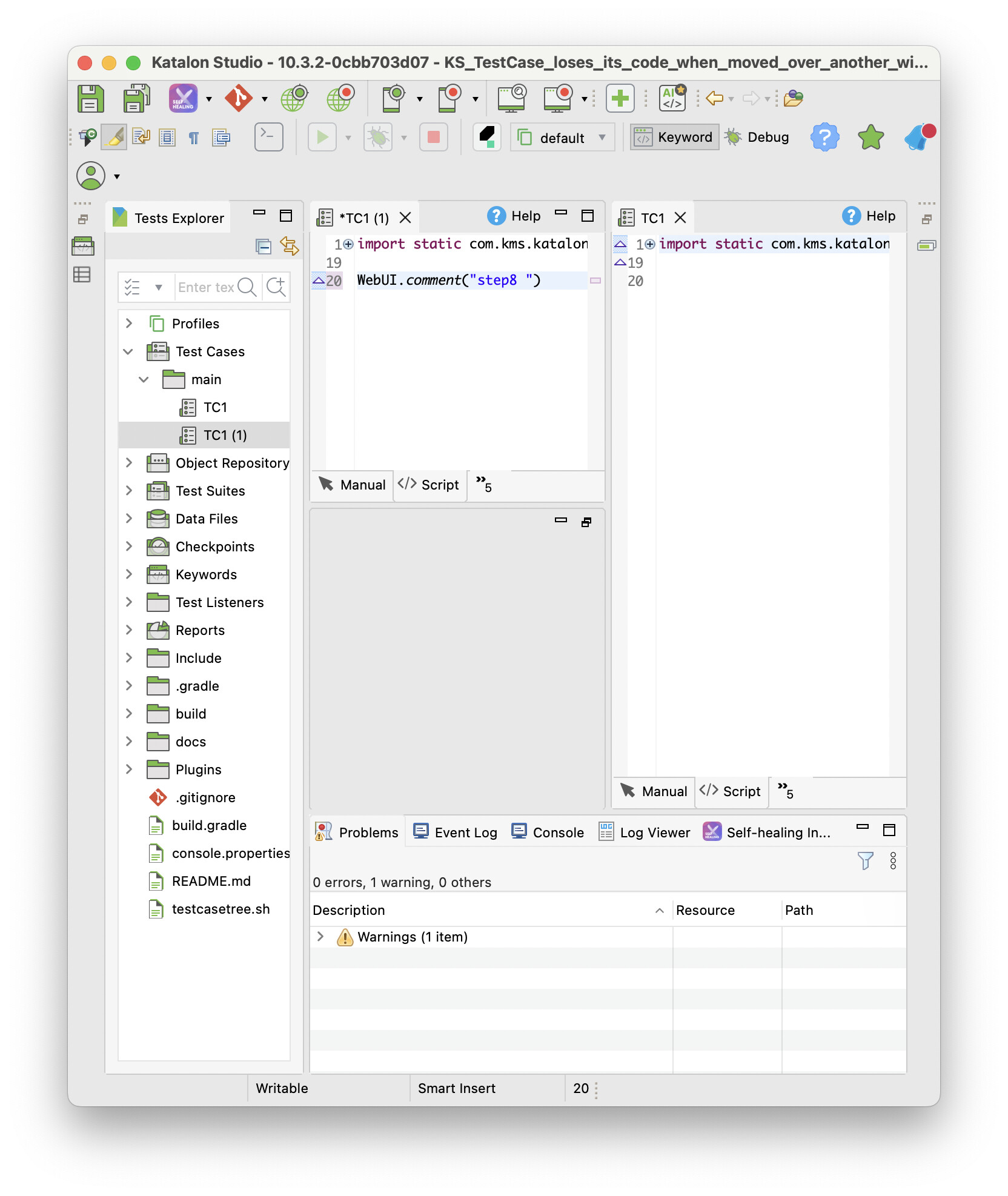
I checked the filesystem again.
$ tree Scripts Test\ Cases
Scripts
└── main
    ├── TC1
    │   ├── Script1761087607376.groovy
    │   └── Script1761132105250.groovy
    └── TC1 (1)
        └── Script1761135512422.groovy
Test Cases
└── main
    ├── TC1 (1).tc
    └── TC1.tc

6 directories, 5 files
Katalon Studio newly created the Test Cases/main/TC1 (1)/Script1761135512422.groovy.
step9
I checked the timestamp of the files in the Test Cases/main/TC1 folder:
$ ls -la Scripts/main/TC1
total 16
drwxr-xr-x@ 4 kazuakiurayama  staff   128 10 22 17:16 .
drwxr-xr-x@ 4 kazuakiurayama  staff   128 10 22 21:18 ..
-rw-r--r--@ 1 kazuakiurayama  staff   245 10 22 08:01 Script1761087607376.groovy
-rw-r--r--@ 1 kazuakiurayama  staff  1243 10 22 20:21 Script1761132105250.groovy
I edited and saved the Test Cases/main/TC1 (1) to add a few lines of code:

And I checked the timestamp of the files in the Test Cases/main/TC1 folder again:
$ ls -la Scripts/main/TC1
total 16
drwxr-xr-x@ 4 kazuakiurayama  staff   128 10 22 17:16 .
drwxr-xr-x@ 4 kazuakiurayama  staff   128 10 22 21:18 ..
-rw-r--r--@ 1 kazuakiurayama  staff   245 10 22 08:01 Script1761087607376.groovy
-rw-r--r--@ 1 kazuakiurayama  staff  1410 10 23 08:41 Script1761132105250.groovy
I could clearly see that the Script1761132105250.groovy file was updated, while the Script1761087607376.groovy file remained unchanged. This means that the Test Cases/main/TC1 is linked to the Script1761132105250.groovy file. The Script1761087607376.groovy will be left there as an orphaned file.
step10
I looked into the orphaned Test Cases/main/TC1/Script1761087607376.groovy file using a text editor outside Katalon Studio.
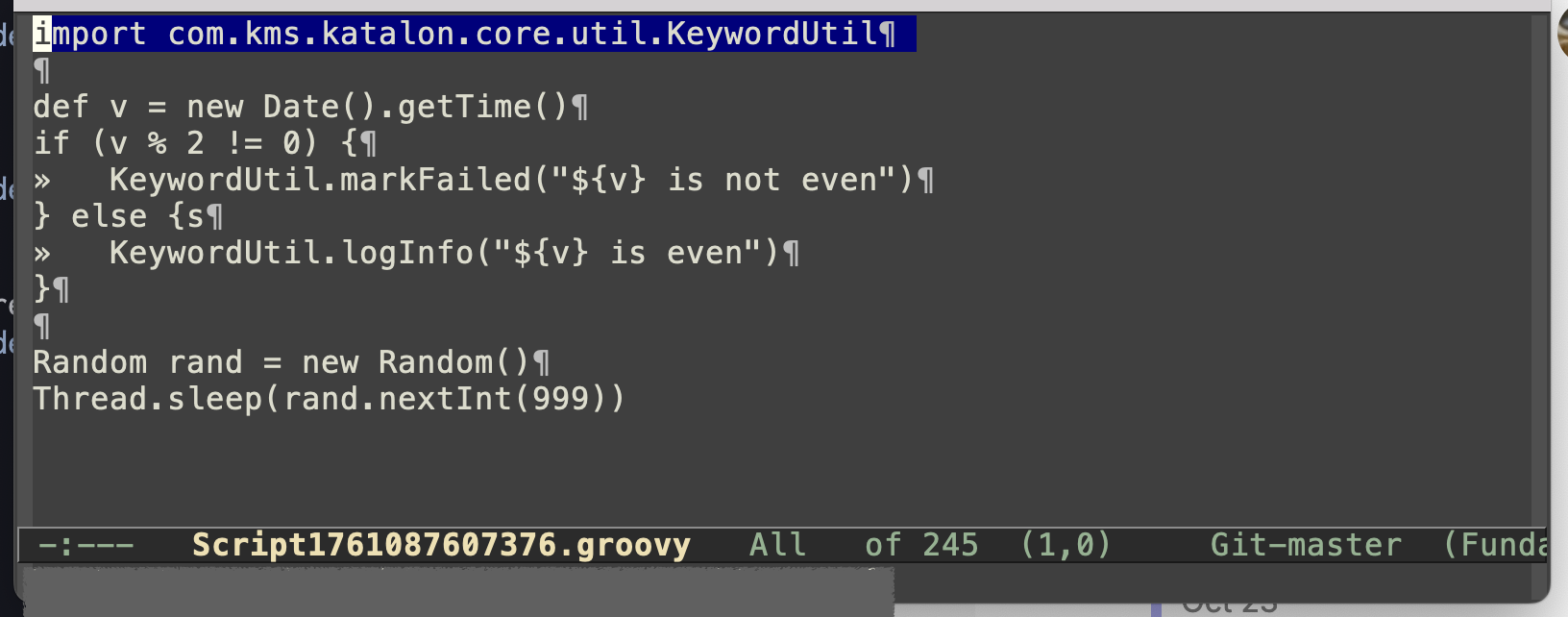
Ah! My script was still there in the filesystem! But Katalon Studio will never recognize this file again. This is really sad.
Conclusion
Katalon,
Please fix these bugs. Review the step3 and the step6. These bugs have been left unresolved long for years (see http://forum.katalon.com/t/bug-failed-renaming-test-case-deletes-content/9835). I hope you will take this issue seriously and fix it as soon as possible. Many Katalon Studio users may have lost their valuable test case codes unknowingly because of these bugs.
