Hi folks, 
The keyword Mobile.startExistingApplication() works normally when we use it on Real devices but to use it on BrowserStack devices , we need to add some particular desired capabilities which are unique for each application and its platform, Android or IOS. Follow us along in this guide to learn how to do so 
| Android | iOS | |
|---|---|---|
| Desired Capabilities to be used | appPackage, appActivity | bundleId |
| Syntax at Test Case/Scripts level | Mobile.startExistingApplication('value of appPackage ') | Mobile.startExistingApplication('value of bundleId ') |
| Example | Mobile.startExistingApplication('io.appium.android.apis ') | Mobile.startExistingApplication('com.petri.calculator.calculator ') |
| Video demo | Android setup | iOS setup |
| Demo apk/ipa used | ApiDemos.apk appPackage: io.appium.android.apis appActivity: io.appium.android.apis.ApiDemos |
calculator.ipa bundleId: com.petri.calculator.calculator |
1. Difference between startApplication() and startExistingApplication Katalon keywords
| startApplication | startExistingApplication | |
|---|---|---|
| Working | Start up an application. | This keyword is to start an Appium driver and to activate an installed application by its given application ID. |
| Keyword syntax | Mobile.startApplication(appFile, Boolean) where, Boolean=true/false - “true” if uninstalling the application automatically after run and “false“ to not uninstall the application after run. |
Mobile.startExistingApplication(parameter) where, parameter is: - appID for Real devices - appPackage/BundleId for BrowserStack devices |
| Documentations | https://docs.katalon.com/docs/katalon-studio/keywords/keyword-description-in-katalon-studio/mobile-keywords/mobile-start-application#ariaid-title1 | https://docs.katalon.com/docs/katalon-studio/keywords/keyword-description-in-katalon-studio/mobile-keywords/mobile-start-existing-application#ariaid-title1 |
2. Steps in brief for both Android and iOS applications
2.1. Android applications (.apk)
-
- Katalon Studio > Project Settings > Desired Capabilities > Remote:

- In the Test Case, the Mobile.startExistingApplication() should have the value of the appPackage as the parameter, like below syntax:
Mobile.startExistingApplication(‘appPackage’)

- How to get the mentioned Desired Capabilities:
“device“ and “app“ desired capability should be pulled from BrowserStack using: BrowserStack - Capabilities for running mobile app tests on BrowserStack
“appPackage“ & “appActivity“ is known to the developer of the Application as well as we can try to generate them by following the steps in this guide: 2 Ways to find appPackage and appActivity name of your App - AutomationTestingHub
You can also run a normal test case through browserStack device and can get the appPacakge value, like below:

2.2. iOS applications (.ipa)
-
- Katalon Studio > Project Settings > Desired Capabilities > Remote:

- In the Test Case, the Mobile.startExistingApplication() should have the value of the bundle ID as the parameter, like below syntax:
Mobile.startExistingApplication(‘bundleId’)
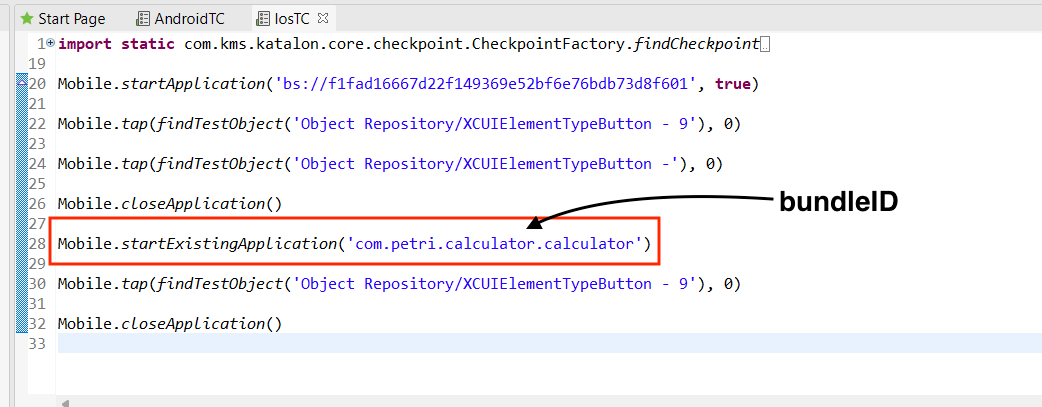
- How to get the mentioned Desired Capabilities:
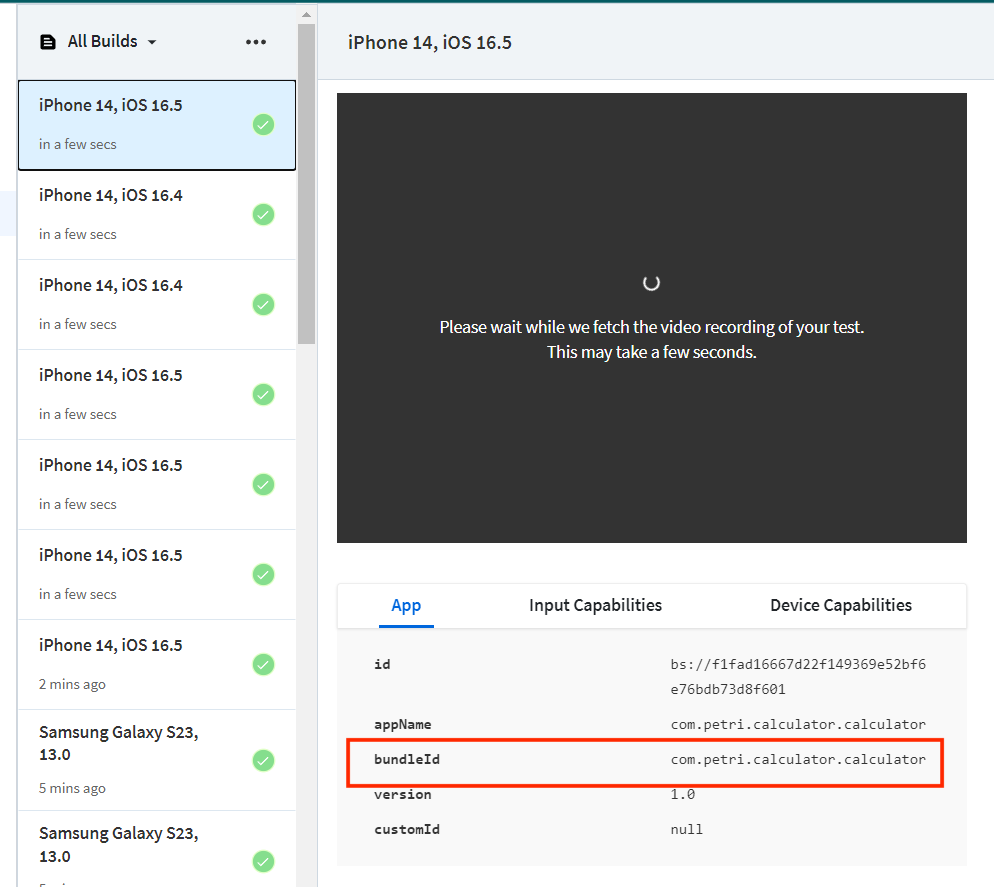
You can also run a normal test case through browserStack device and can get the bundleId value, like below:
If you find this topic helpful, then don’t forget to leave us a big heart! 
To see other KShare topics, simply navigate to the support tag
