Katalon Studio v10.0.0 runs slower than v9.7.6 --- a measurement report

Problem to solve

In August 2025 when Katalon Studio v10.3.x is current, in the Katalon Community,
people started discussing that the latest version of Katalon Studio runs slower than before.

I thought that I should find which exact version of Katalon Studio got slower.
Nobody has measured it. So I will do that.

Environment

  • using a machine Mac Book Air, 2-18, 1.6GHz Intel Core i5, 17GB memory, macOS Sonoma14.7.6
  • used Chrome browser v139.0.7258.155
  • ChromeDriver is updated to the latest using “Tools > Update WebDrivers > Chrome”
  • I disabled “Project > Katalon Platform > Integration > Enable Katalon Platform Integration”
  • I set “Project > Execution > Default wait for element timeout (in seconds)” to have 30 seconds
  • I set “Project > Execution > WebUI > Default Smart Wait” to be Enabled

Measurement Criteria

Result

Comparing versions

I ran the “Test Suites/healthcare-tests -TS_RegressionTest” at least 3 times for each KS version. This is meant to collect enough number of samples.

KS version time taken
10.3.1 1min 21s
10.3.1 1min 21s
10.3.1 1min 24s
10.3.0 1min 27s
10.3.0 1min 26s
10.3.0 1min 32s
10.3.0 1min 32s
10.2.4 85.948s = 1min 25.948s
10.2.4 89.028s = 1min 29.028s
10.2.4 84.740s = 1min 24.740s
10.0.0 84.270s = 1min 24.270s
10.0.0 85.543s = 1min 25.534s
10.0.0 85.285s = 1min 25.285s
^^^^^^^^ ^^^^^^^^^^
9.7.6 72.118s = 1min 12.118s
9.7.6 71.211s = 1min 11.211s
9.7.6 69.830s = 1min 09.830s
9.0.0 75.949s = 1min 15.949s
9.0.0 72.187s = 1min 12.187s
9.0.0 73.694s = 1min 13.794s
8.6.9 77.127s = 1min 17.127s
8.6.9 76.216s = 1min 16.216s
8.6.9 73.872s = 1min 13.872s

I found a leap between v9.7.6 and v10.0.0. Katalon Studio v10.0.0 runs slower than the previous versions.

Comparing v9.7.6 and v10.0.0 in detail

Let’s look at the log of 2 versions in detail:

v9.7.6

v10.0.0

With v9.7.6, the test suite took 69.830s. With v10.0.0, it took 85.285s.

69.830 : 85.285 = 1 : 1.23

How much significant this time ratio 1.23 is?

We should look at the time taken for each individual steps.

The step WebUI.openBrowser(G_SiteURL) took 10 or 11 seconds. In both of v9.7.6 and v10.0.0, openBrowser took long time. No big difference.

On the contrary, the step setText(findTestObject("Page_Login/txt_UserName", Username)) took 0.908s in v9.7.6; the same step took 1.525s in v10.0.0. Concerning this step, v10.0.0 ran far slower than v9.7.6.

The test suite calls WebUI.openBrowser() 3 times, which took 10s * 3 = 30s.

So I can calcurate how long v9.7.6 and v10.0.0 took while subtracting the time taken for openBrowser.

69.830 - 30 : 85.285 - 30 = 39.830 : 55.285 = 1.375

The v9.7.6-v10.0.0 speed ratio now gets larger: 1.23 → 1.375

The Test Cases/Main Test Cases/TC1_Verify Successful Login contains a single call to WebUI.openBrowser() and 5 times of calls to other action keywords (click, setText, verifyElementPresent). This test case script is a small one; not typical. The real users would have much larger scripts with hundreds of calls to action keywords.

Please imagine, a Test Case contains a single call to WebUI.openBrowser() and 1000 times of calls to other action keywords, then how will the speed ratio become?

I believe, the ration will become larger. For example, 1.50.

Conclusion

Katalon Studio v10 runs slower than v9. But I haven’t studied the reason of the speed difference yet. Possibly that would be a task of Katalon developers.

@duyluong

4 Likes

I tried disabling SmartWait in v10.0.0.

I don’t find any noticable difference.

Therefore I infer that SmartWait is not the cause of the slowness of v10.0.0.

2 Likes

v9.7.6 bundled selenium-server-standalone-3.141.59.jar.

v10.0.0 upgraded Katalon Studio to Selenium 4.22.

I noticed that WebUI.setText and WebUI.click keywords got slower as of v10.0.0.

So, I just guess, upgrading to Selenium 4.22 resulted the slowness.

See the following issue in the Selenium project:

and this:

It seems that the slowness of Selenium 4 is inevitable.

1 Like

Some observations I have - using a somewhat slow app and KSE 10.1.0 for Windows and the Edge Chromium browser (Smart Wait and Smart Locators both on, Time Capsule is turned off):

There appears to be an overhead in starting test execution that is constant between running a test suite or a single test case. This overhead is not accounted for in the test suite or test case execution stats. For example, I click ‘Run’ to start executing a single script (a very short script btw) and it takes approx 36 seconds for the browser to visibly open - Katalon records the openBrowser step as taking 3.93 seconds and the overall time as 68.552 seconds, which omits the 36 seconds I spent waiting beforehand!

Another point which is rather odd - I have waits in the script to deal with the app under test but this login script actually hangs at maximiseWindow step. This step takes 38.9 seconds. One might assume the script would speed through this step and instead wait at the designated wait step. The default wait for an element to appear is 30 seconds but maximiseWindow doesn’t have a timeout, implicit or explicit.

This simple login test script ends up taking over 100 seconds when run individually - it would be less when running as part of a finished test suite but you can see this performance is frustrating when scripting!

1 Like

@Dan_Bown

Thank you for your comment. But I am afraid your observation doesn’t link to this topic which focuses on the v10.0.0 vs v9.7.6 speed comparison.

I think your observation deserves its own topic. Would you create a new one?

Thank you, didn’t mean to distract from the subject but my main point was that you may also have a chunk of time that isn’t recorded in the Katalon log ie the time spent waiting for the script or suite to actually start and that may or may not be different between 9.x and 10.x. Happy to pursue this elsewhere

Yes. this topic should be addressed. The more nice-to-have features implemented in the product, the longer the time will take waiting for scripts and suites to start even if we actually don’t use them.

I think that only Katalon developers can work on this topic. I am afraid, users can make very little input as users have no way to diagnose the internal of KS in action.

2 Likes

Hello,

thank you for all of this.

I did the same test with the same settings (extept for hardware configurations):
Environment

  • HP EliteBook 840 G8 - 11th Gen Intel(R) Core™ i5-1145G7 @ 2.60GHz (2.61 GHz), 16,0 GB RAM, Windows 11 Enterprise 24H2

  • used Chrome browser v 139.0.7258.139

  • ChromeDriver is updated to the latest using “Tools > Update WebDrivers > Chrome”

  • I disabled “Project > Katalon Platform > Integration > Enable Katalon Platform Integration”

  • I set “Project > Execution > Default wait for element timeout (in seconds)” to have 30 seconds

  • I set “Project > Execution > WebUI > Default Smart Wait” to be Enabled and then I set “Project > Execution > WebUI > Default Smart Wait” to be Disabled

Measurement Criteria

Results

Summary

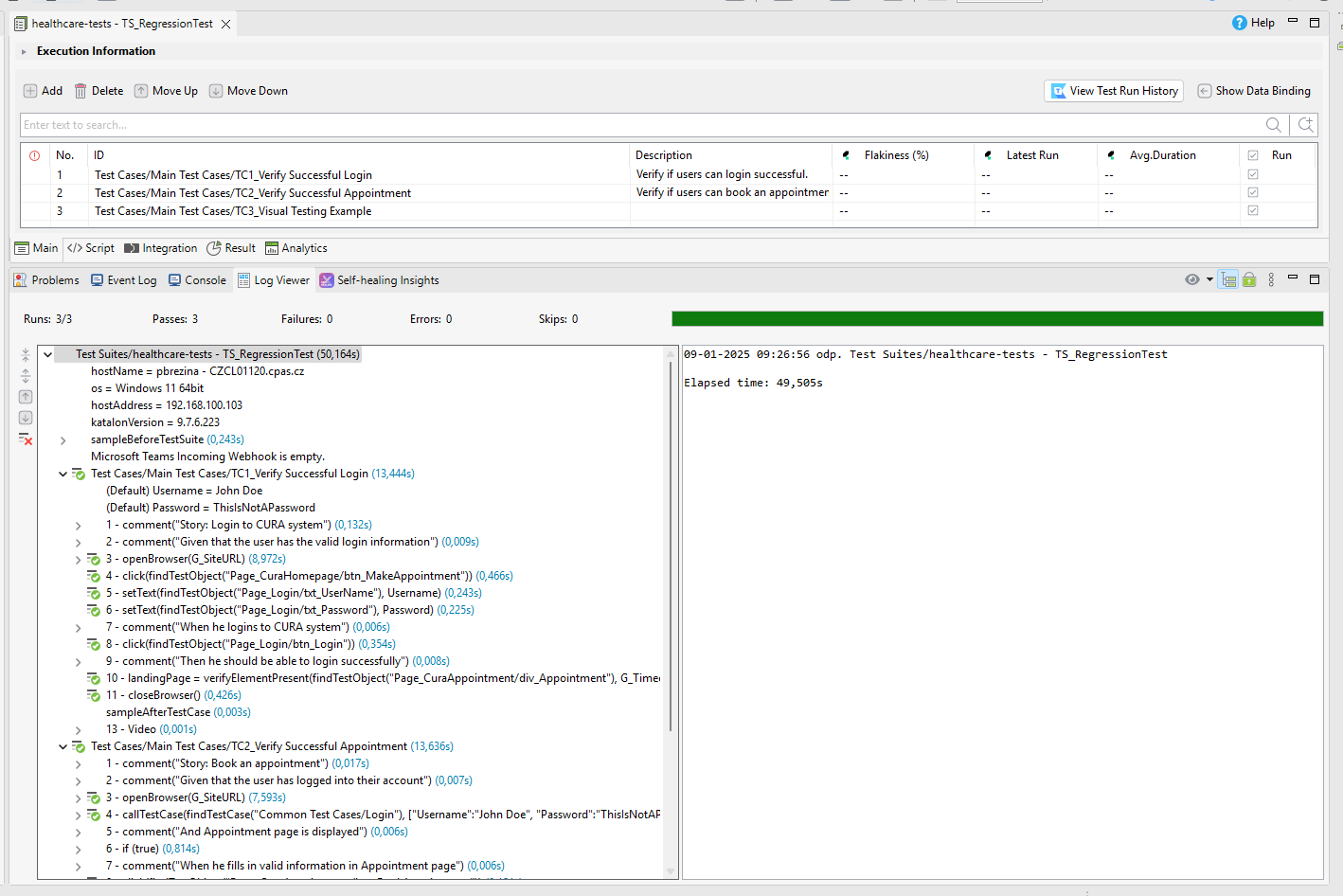
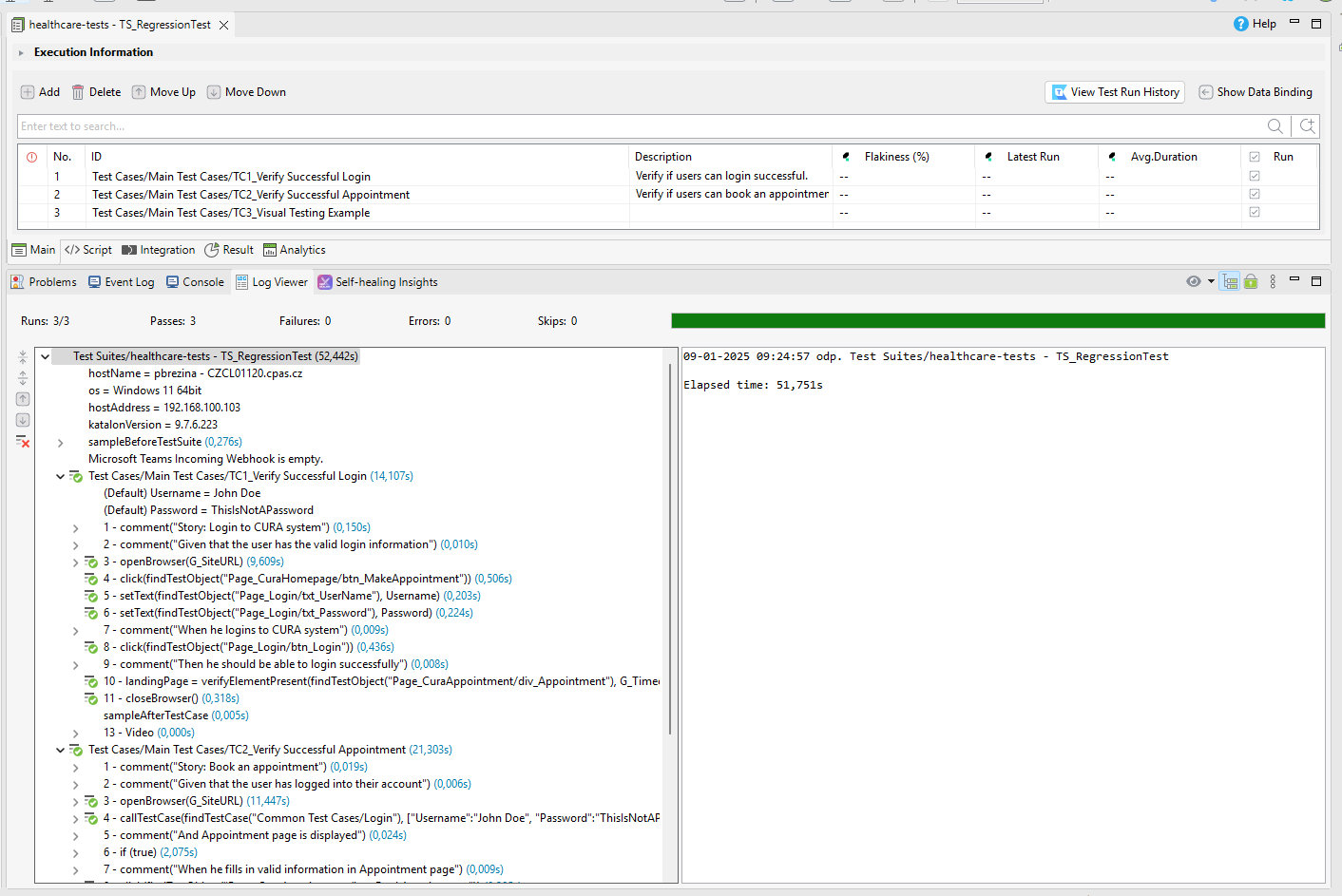
Katalon Studio 9.7.6 - SmartWait Enabled - Elapsed time: 51,751s
Katalon Studio 9.7.6 - SmartWait Disabled - Elapsed time: 49,505s

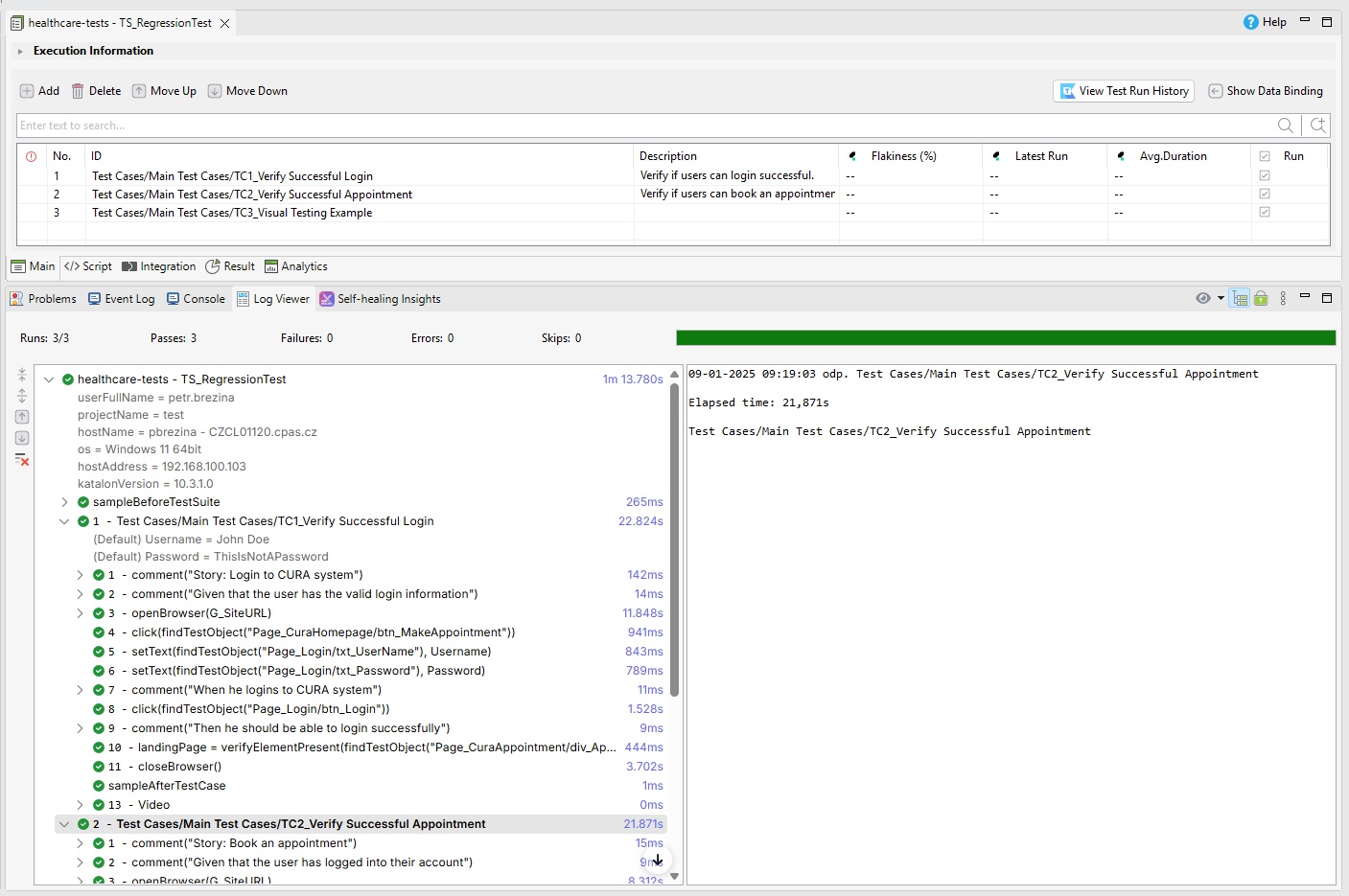
Katalon Studio 10.3.1 - SmartWait Enabled - Elapsed time: 1m - 13,780s
Katalon Studio 10.3.1 - SmartWait Disabled - Elapsed time: 59,533s

Detail

  • Katalon Studio 9.7.6 - SmartWait Enabled - Elapsed time: 51,751s

  • Katalon Studio 9.7.6 - SmartWait Disabled - Elapsed time: 49,505s

  • Katalon Studio 10.3.1 - SmartWait Enabled - Elapsed time: 1m - 13,780s

You can see in my test results that the problem is not even between Katalon Studio 9.7.6 vs Katalon 10.3.1 and also with SmartWait Enabled vs SmartWait Disabled especially in Katalon Studio 10.3.1.

You can also see that every single interaction in Katatalon Studio 10.3.1 SmartWait Enabled takes 1 or 2 seconds more.

This was a really simple test and even though the test durations in Katalon Studio 10.3.1 increased by almost 25% :frowning:

Thank you

1 Like

@petr.brezina

Thank you for your analysis. It is very interesting.

As a next step, we need to compare the all versions in between 10.0.0 to 10.3.1 with SmartWait enabled/disabled. Possibly we would be able to identify which exact version has got slower than the previous versions. Once I could identify the version in doubt, I would be able to study the source code (especially of SmartWait-related things) to find out the cause.

1 Like

@petr.brezina

You did the same inspection as mine except the hardware and OS environment. You noticed that SmartWait affects the speed significantly, but I didn’t.

Does SmartWait slow the processing on Windows but not on Mac?

Unlikely, but I need to check.

1 Like

I did one more examination. See

To my surprise, my exam proved KS v10.3.1 ran far slower on Windows than on Mac.

1 Like

Katalon Studio v9.7.6 runs on Selenium 3.
Katalon Studio v10.0.0 runs on Selenium 4.

It is known that Selenium 4 runs slower than Selenium 3. Their issue is already closed as “Not Planned”. This means, Selenium 4 will stay slower than Selenium 3.

2 Likes