Hi there
If you have already subscribed to a Katalon license, you’re eligible to submit tickets via Zendesk for better onboard. Please check post-purchase email for more detailed instructions.
Regards
Jass
Hi there
If you have already subscribed to a Katalon license, you’re eligible to submit tickets via Zendesk for better onboard. Please check post-purchase email for more detailed instructions.
Regards
Jass
Do i need to have both Runtime Node locked license + Devops license to run the scripts in Azure?
I didn’t get any email about Zendesk
Hi there,
Thanks for your question.
To run your scripts on Azure, the Katalon Runtime Engine DevOps licenses can help you totally. Therefore, you don’t need to have the Katalon Runtime Engine Node-Locked licenses.
In addition, I would like to introduce you the way to create a ticket on Zendesk
Please take a look at attached images for details
Hello @puneeth
I have the same problem with the chrome driver even though I have"–config -webui.autoUpdateDrivers=true" in the Execution Arguments of the Katalon task in the YAML file.
Did you manage to solve this issue? If yes, can you please tell me your solution?
Thank you!
i managed to solve this issue by using the appropriate Azure pool which has the required version of browser.
I suggest u too try the same.
Please do let me know for anything more.
Thanks.
Thank you for the tip.
I am using the default Azure pool from Microsoft windows-latest and in their GitHub, it says that the version of chrome and chrome driver are the same(81.0.4044.138).
Actually the chrome driver version is 79 on this pool.
If I use “–config -webui.autoUpdateDrivers=true” my test will run on the 83 chrome driver version.
If I use
Now I looking for a way to specify in my pipeline to use the 81.0.4044.138 version of chrome driver. Do you have any ideas on this matter?
U have to change your windows pool.
just try using “vs2017-win2016” in your YML file. it should work
I already did what you suggested also and I am receiving the same error for Chrome. For now, I changed the browser type to Firefox, but this is not a permanent solution because I have to run my tests also on Chrome.
I will investigate this in the next days also. I will post the cause and the solution here if I will find out whatțs the problem, but if you have any other ideas I am open to hear them. 
@puneeth and @delia.ionita, I spent few hours trying to resolve that same chromedriver update issue over here.
Here is the solution:
Download chromedriver version 81.0.4044.138 here, save it in project level (“Include/drivers/chromedriver_win64”) then it will override Katalon default chromedriver.
Once that version begin failing due to the same incompatibility issue, you should know it’s time to remove it from your project and get back using Katalon’s version (remember to stick -config --webui.autoUpdateDrivers=true) to guarantee latest version when it comes.
Hi @soikmd2,
Thank you very very much! Your solution solved my problem!
Hi @anhtuan,
I’ve noticed in this whole post you’ve helped a lot of people, including me. I thank for that.
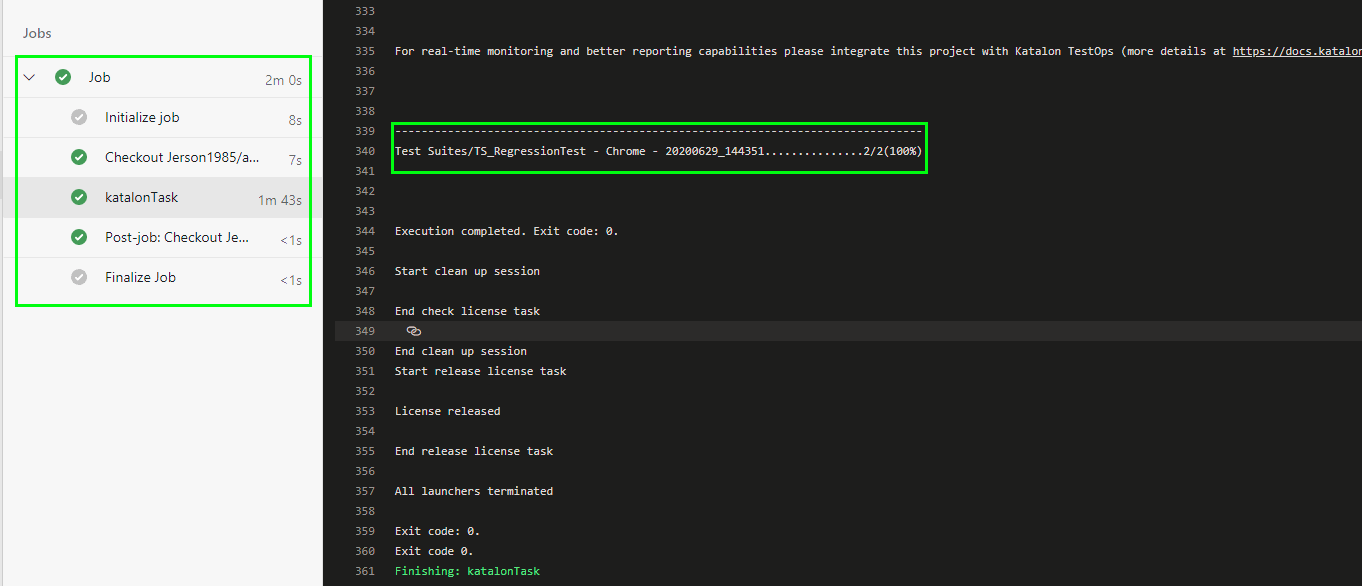
I was able to set it up and run it successfully from Azure DevOps using the sample project. However, I can’t seem to find the results of the run. I thought I would be able to see the results in Katalon Studio under the section “Reports”. My question is, where should I find the results of the run from Azure DevOps? Thank you in advance and hope you could clear this out for me.
You can find your result in Katalon TestOps. You will have to create: an organization, then a team, then a project for your team. After this you will have to link your local project to the one from TestOps.
Hi @jerson.martinez.
I think you should use Katalon TestOps to see report after run your test in Katalon Studio. You can integrate Katalon Studio with Katalon TestOps by this docs.
Thanks!
Hi @delia.ionita,
Thanks for you reply. I did that already. Whenever I Run the test suite from Katalon Studio I do see the results in TestOps, but when I do it from Azure DevOps I see that everything is Passed:
Hi @anhtuan,
As I was telling @delia.ionita in my previous reply, I already enabled this option in Katalon Studio. Do I have to add any Report argument in my "Arguments section?
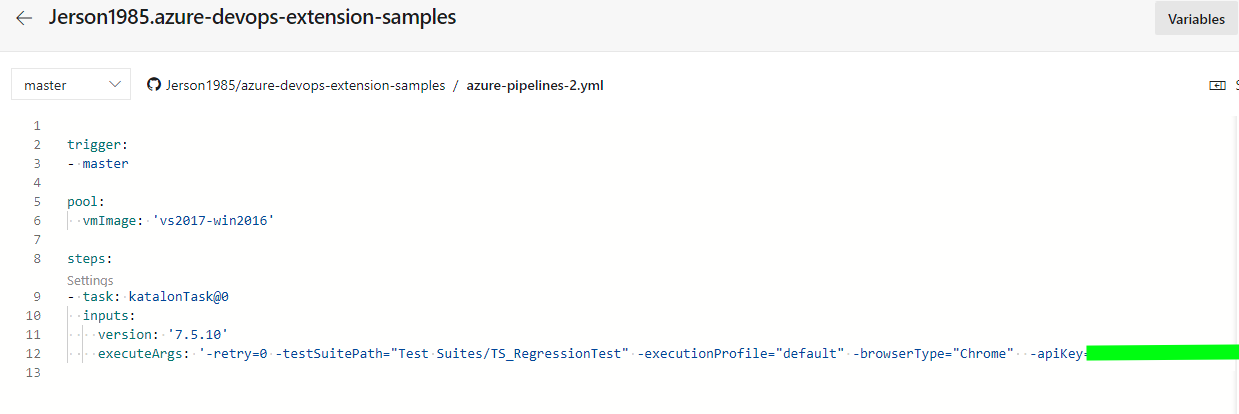
This is my setup in Azure DevOps
Hi @jerson.martinez,
If you don’t see anything in Katalon TestOps, I think your Katalon Studio project should enable Enable Katalon TestOps Integration in Project Setting -> Katalon TestOps (Katalon Studio).
I am also facing the issue and tried with this command –config -webui.autoUpdateDrivers=true but no luck… can we execute the test cases in Devops Agent pool without ChromeBrowser… Please find the below error and it says unable to open browser with URL… Request advise on the same
2020-06-30T07:15:07.0194872Z ##[debug]Evaluating condition for step: ‘Execute Katalon Studio project’
2020-06-30T07:15:07.0195671Z ##[debug]Evaluating: succeeded()
2020-06-30T07:15:07.0195796Z ##[debug]Evaluating succeeded:
2020-06-30T07:15:07.0196144Z ##[debug]=> True
2020-06-30T07:15:07.0196559Z ##[debug]Result: True
2020-06-30T07:15:07.0196858Z ##[section]Starting: Execute Katalon Studio project
2020-06-30T07:15:07.0322065Z ==============================================================================
2020-06-30T07:15:07.0322163Z Task : Execute Katalon Studio Tests
2020-06-30T07:15:07.0322203Z Description : Execute Katalon Studio project
2020-06-30T07:15:07.0322257Z Version : 0.1.7
2020-06-30T07:15:07.0322297Z Author : Katalon LLC
2020-06-30T07:15:07.0322332Z Help :
2020-06-30T07:15:07.0322364Z ==============================================================================
2020-06-30T07:15:07.3593013Z ##[debug]agent.TempDirectory=C:\Agents\DevOpsTst_DefaultCollection2010\Agent0_work_temp
2020-06-30T07:15:07.3708335Z ##[debug]loading inputs and endpoints
2020-06-30T07:15:07.3716940Z ##[debug]loading ENDPOINT_AUTH_PARAMETER_SYSTEMVSSCONNECTION_ACCESSTOKEN
2020-06-30T07:15:07.3733520Z ##[debug]loading ENDPOINT_AUTH_SCHEME_SYSTEMVSSCONNECTION
2020-06-30T07:15:07.3738353Z ##[debug]loading ENDPOINT_AUTH_SYSTEMVSSCONNECTION
2020-06-30T07:15:07.3741942Z ##[debug]loading INPUT_EXECUTEARGS
2020-06-30T07:15:07.3745235Z ##[debug]loading INPUT_VERSION
2020-06-30T07:15:07.3752238Z ##[debug]loaded 5
2020-06-30T07:15:07.3771353Z ##[debug]Agent.ProxyUrl=undefined
2020-06-30T07:15:07.3773728Z ##[debug]Agent.CAInfo=undefined
2020-06-30T07:15:07.3774107Z ##[debug]Agent.ClientCert=undefined
2020-06-30T07:15:07.3775459Z ##[debug]Agent.SkipCertValidation=undefined
2020-06-30T07:15:08.1101536Z ##[debug]version=7.5.5
2020-06-30T07:15:08.1104687Z version: 7.5.5
2020-06-30T07:15:08.1105977Z ##[debug]location=null
2020-06-30T07:15:08.1106486Z location: null
2020-06-30T07:15:08.1111056Z ##[debug]executeArgs=katalonc -noSplash -retry=0 -testSuitePath=“Test Suites/VeriTouchTestSuite” -executionProfile=“default” -browserType=“Chrome” -apiKey=“a188ce22-5df8-4692-a6d6-4b7871fd69a2” --config -proxy.auth.option=NO_PROXY -proxy.system.option=NO_PROXY
2020-06-30T07:15:08.1111650Z execute: katalonc -noSplash -retry=0 -testSuitePath=“Test Suites/VeriTouchTestSuite” -executionProfile=“default” -browserType=“Chrome” -apiKey=“a188ce22-5df8-4692-a6d6-4b7871fd69a2” --config -proxy.auth.option=NO_PROXY -proxy.system.option=NO_PROXY
2020-06-30T07:15:08.1111824Z ##[debug]x11Display=null
2020-06-30T07:15:08.1112373Z x11 display: null
2020-06-30T07:15:08.1113618Z ##[debug]xvfbConfiguration=null
2020-06-30T07:15:08.1114006Z xvfbConfiguration: null
2020-06-30T07:15:08.1114948Z dirPath: C:\Agents\DevOpsTst_DefaultCollection2010\Agent0_work\4\s
2020-06-30T07:15:08.8858288Z ksProjectPath: C:/Agents/DevOpsTst_DefaultCollection2010/Agent0/_work/4/s/SampleTest.prj
2020-06-30T07:15:09.7382607Z GET https://raw.githubusercontent.com/katalon-studio/katalon-studio/master/releases.json 200.
2020-06-30T07:15:09.7400125Z Katalon Folder: C:\Windows\ServiceProfiles\NetworkService.katalon\7.5.5
2020-06-30T07:15:10.1784735Z Katalon Executable File: C:\Windows\ServiceProfiles\NetworkService.katalon\7.5.5\Katalon_Studio_Engine_Windows_64-7.5.5\katalonc.exe
2020-06-30T07:15:10.1785217Z Execute Katalon Studio: C:\Windows\ServiceProfiles\NetworkService.katalon\7.5.5\Katalon_Studio_Engine_Windows_64-7.5.5\katalonc.exe -runMode=console -projectPath=“C:/Agents/DevOpsTst_DefaultCollection2010/Agent0/_work/4/s/SampleTest.prj” katalonc -noSplash -retry=0 -testSuitePath=“Test Suites/VeriTouchTestSuite” -executionProfile=“default” -browserType=“Chrome” -apiKey=“a188ce22-5df8-4692-a6d6-4b7871fd69a2” --config -proxy.auth.option=NO_PROXY -proxy.system.option=NO_PROXY
2020-06-30T07:15:10.1811630Z Execute “cmd /c “C:\Windows\ServiceProfiles\NetworkService.katalon\7.5.5\Katalon_Studio_Engine_Windows_64-7.5.5\katalonc.exe -runMode=console -projectPath=“C:/Agents/DevOpsTst_DefaultCollection2010/Agent0/_work/4/s/SampleTest.prj” katalonc -noSplash -retry=0 -testSuitePath=“Test Suites/VeriTouchTestSuite” -executionProfile=“default” -browserType=“Chrome” -apiKey=“a188ce22-5df8-4692-a6d6-4b7871fd69a2” --config -proxy.auth.option=NO_PROXY -proxy.system.option=NO_PROXY”” in C:\Windows\SERVIC~2\NETWOR~1\AppData\Local\Temp\tmp-95248iHnr6Hl1kP6.
2020-06-30T07:15:12.5926872Z Katalon workspace folder is set to default location: C:\Windows\SERVIC~2\NETWOR~1\AppData\Local\Temp\session-1eb3ad93
2020-06-30T07:15:12.5927144Z
2020-06-30T07:15:12.8243766Z Starting Groovy-Eclipse compiler resolver. Specified compiler level: unspecified
2020-06-30T07:15:12.8243972Z
2020-06-30T07:15:12.8244030Z 177 2.4.7.xx-201611170128-e46 = ACTIVE
2020-06-30T07:15:12.8244065Z
2020-06-30T07:15:13.1292065Z
2020-06-30T07:15:13.1293288Z
2020-06-30T07:15:13.1294073Z
2020-06-30T07:15:13.1329050Z INFO: Katalon Version: 7.5.5
2020-06-30T07:15:13.1329354Z
2020-06-30T07:15:13.1417277Z INFO: Command-line arguments: -runMode=console -projectPath=C:/Agents/DevOpsTst_DefaultCollection2010/Agent0/_work/4/s/SampleTest.prj katalonc -retry=0 -testSuitePath=Test Suites/VeriTouchTestSuite -executionProfile=default -browserType=Chrome -apiKey=******** --config -proxy.auth.option=NO_PROXY -proxy.system.option=NO_PROXY
2020-06-30T07:15:13.1418036Z
2020-06-30T07:15:13.1443118Z INFO: User working dir: C:\Windows\SERVIC~2\NETWOR~1\AppData\Local\Temp\tmp-95248iHnr6Hl1kP6
2020-06-30T07:15:13.1443788Z
2020-06-30T07:15:13.1467187Z INFO: Error log: C:/Windows/ServiceProfiles/NetworkService/AppData/Local/Temp/session-1eb3ad93/.metadata/.log
2020-06-30T07:15:13.1467875Z
2020-06-30T07:15:13.1499023Z INFO: Katalon TestOps server URL: https://analytics.katalon.com
2020-06-30T07:15:13.1499723Z
2020-06-30T07:15:13.1535722Z INFO: Katalon Store server URL: https://store.katalon.com
2020-06-30T07:15:13.1536548Z
2020-06-30T07:15:13.1562475Z INFO: User home: C:\Windows\ServiceProfiles\NetworkService
2020-06-30T07:15:13.1562943Z
2020-06-30T07:15:13.1588160Z INFO: Java vendor: Oracle Corporation
2020-06-30T07:15:13.1588972Z
2020-06-30T07:15:13.1661948Z INFO: Java version: 1.8.0_181
2020-06-30T07:15:13.1662144Z
2020-06-30T07:15:13.1662198Z INFO: Local OS: Windows Server 2016 64bit
2020-06-30T07:15:13.1662229Z
2020-06-30T07:15:13.1662256Z
2020-06-30T07:15:13.4590355Z INFO: CPU load: 75%
2020-06-30T07:15:13.4590556Z
2020-06-30T07:15:13.4612313Z INFO: Total memory: 8191 MB
2020-06-30T07:15:13.4613126Z
2020-06-30T07:15:13.4639418Z INFO: Free memory: 4804 MB
2020-06-30T07:15:13.4640270Z
2020-06-30T07:15:13.4726295Z Start getting machine ID on Windows
2020-06-30T07:15:13.4726474Z
2020-06-30T07:15:13.5134841Z Start appending additional signatures
2020-06-30T07:15:13.5135349Z
2020-06-30T07:15:13.5312021Z hardwareSerialNumber
2020-06-30T07:15:13.5312529Z
2020-06-30T07:15:13.5334519Z osDependentUsername network service
2020-06-30T07:15:13.5334702Z
2020-06-30T07:15:13.5356580Z End appending additional signatures 7fa80f9a-53fa-4fd0-b18b-cdad7cb5f31d__network service
2020-06-30T07:15:13.5357138Z
2020-06-30T07:15:13.5381310Z End getting machine ID on Windows 31d5a3eb40c0b9c35047c1a028e34b0b
2020-06-30T07:15:13.5381667Z
2020-06-30T07:15:13.5402420Z INFO: Machine ID: 31d5a3eb40c0b9c35047c1a028e34b0b
2020-06-30T07:15:13.5403500Z
2020-06-30T07:15:13.5403724Z
2020-06-30T07:15:13.5427744Z
2020-06-30T07:15:13.5428119Z
2020-06-30T07:15:13.5428172Z
2020-06-30T07:15:13.5487259Z Activating…
2020-06-30T07:15:13.5487647Z
2020-06-30T07:15:13.5546609Z Start activating offline…
2020-06-30T07:15:13.5546752Z
2020-06-30T07:15:13.5576851Z Search for valid offline licenses in folder: C:\Windows\ServiceProfiles\NetworkService.katalon\license
2020-06-30T07:15:13.5577127Z
2020-06-30T07:15:13.5577801Z
2020-06-30T07:15:13.5657989Z The number of valid offline licenses: 0
2020-06-30T07:15:13.5658266Z
2020-06-30T07:15:13.5682817Z Offline activation failed.
2020-06-30T07:15:13.5683446Z
2020-06-30T07:15:13.5684593Z Start activating online…
2020-06-30T07:15:13.5684656Z
2020-06-30T07:15:16.6977087Z Delete folder: bin
2020-06-30T07:15:16.6977288Z
2020-06-30T07:15:16.7002178Z Delete folder: Libs
2020-06-30T07:15:16.7002294Z
2020-06-30T07:15:16.7002330Z
2020-06-30T07:15:16.7032599Z Cleaning up workspace
2020-06-30T07:15:16.7033211Z
2020-06-30T07:15:16.7053237Z Opening project file: C:/Agents/DevOpsTst_DefaultCollection2010/Agent0/_work/4/s/SampleTest.prj
2020-06-30T07:15:16.7053330Z
2020-06-30T07:15:25.0467445Z Generating global variables…
2020-06-30T07:15:25.0467655Z
2020-06-30T07:15:27.8031146Z Parsing custom keywords…
2020-06-30T07:15:27.8032056Z
2020-06-30T07:15:29.5253925Z Project ‘SampleTest’ opened
2020-06-30T07:15:29.5305214Z
2020-06-30T07:15:29.5309490Z
2020-06-30T07:15:29.5310231Z Start reloading plugins…
2020-06-30T07:15:29.5310958Z
2020-06-30T07:15:30.4031693Z Katalon version: 7.5.5
2020-06-30T07:15:30.4032765Z Plugin info URL: https://store.katalon.com/api/products/ks?appVersion=7.5.5&appType=ENGINE&licenseType=TRIAL
2020-06-30T07:15:30.4033010Z
2020-06-30T07:15:30.4033122Z
2020-06-30T07:15:32.2162361Z Start check license task
2020-06-30T07:15:32.2163485Z
2020-06-30T07:15:32.3691737Z chromedriver is located at default location: C:\Windows\ServiceProfiles\NetworkService.katalon\7.5.5\Katalon_Studio_Engine_Windows_64-7.5.5\configuration\resources\drivers\chromedriver_win32\chromedriver.exe. In case your browser is updated to a newer version, please use this command to update chromdriver: --config -webui.autoUpdateDrivers=true
2020-06-30T07:15:32.3692196Z
2020-06-30T07:15:33.7443831Z Katalon TestOps: Unexpected response, URL: https://analytics.katalon.com/api/v1/katalon/test-reports/update-result?projectId=56377, Status: 403, Response: {“error”:“access_denied”,“error_description”:“Either this resource does not exist, or the current user does not have permissions to access this resource”}
2020-06-30T07:15:33.7444549Z
2020-06-30T07:15:34.9473340Z Katalon TestOps: Unexpected response, URL: https://analytics.katalon.com/api/v1/katalon/test-reports/update-result?projectId=56377, Status: 403, Response: {“error”:“access_denied”,“error_description”:“Either this resource does not exist, or the current user does not have permissions to access this resource”}
2020-06-30T07:15:34.9474571Z
2020-06-30T07:15:35.1948941Z
2020-06-30T07:15:35.1954029Z --------------------------------------------------------------------------------
2020-06-30T07:15:35.1954292Z Test Suites/VeriTouchTestSuite - Chrome - 20200630_101532…0/2(0%)
2020-06-30T07:15:35.1955086Z --------------------------------------------------------------------------------
2020-06-30T07:15:35.1955234Z
2020-06-30T07:15:35.1955836Z
2020-06-30T07:15:37.8449211Z 2020-06-30 10:15:37.827 INFO c.k.katalon.core.main.TestSuiteExecutor - START Test Suites/VeriTouchTestSuite
2020-06-30T07:15:37.8449746Z
2020-06-30T07:15:37.9190358Z 2020-06-30 10:15:37.902 INFO c.k.katalon.core.main.TestSuiteExecutor - hostName = ISTTURBUILD-P04$ - ISTTURBUILD-P04.vphq.veripark.com
2020-06-30T07:15:37.9308371Z
2020-06-30T07:15:37.9537545Z 2020-06-30 10:15:37.906 INFO c.k.katalon.core.main.TestSuiteExecutor - os = Windows Server 2016 64bit
2020-06-30T07:15:37.9538317Z 2020-06-30 10:15:37.907 INFO c.k.katalon.core.main.TestSuiteExecutor - hostAddress = 192.168.100.72
2020-06-30T07:15:37.9538643Z 2020-06-30 10:15:37.909 INFO c.k.katalon.core.main.TestSuiteExecutor - katalonVersion = 7.5.5.1
2020-06-30T07:15:37.9538853Z
2020-06-30T07:15:38.9030682Z 2020-06-30 10:15:38.789 INFO c.k.katalon.core.main.TestCaseExecutor - --------------------
2020-06-30T07:15:38.9031758Z 2020-06-30 10:15:38.789 INFO c.k.katalon.core.main.TestCaseExecutor - START Test Cases/VeriTouch/Service Request/NewProspect
2020-06-30T07:15:38.9032360Z Start recording video for test case ‘Test Cases/VeriTouch/Service Request/NewProspect’.
2020-06-30T07:15:38.9032927Z
2020-06-30T07:15:40.1284764Z 2020-06-30 10:15:40.125 DEBUG testcase.NewProspect - 1: openBrowser("")
2020-06-30T07:15:40.1285920Z
2020-06-30T07:15:40.4454454Z 2020-06-30 10:15:40.444 INFO c.k.k.core.webui.driver.DriverFactory - Starting ‘Chrome’ driver
2020-06-30T07:15:40.4455614Z
2020-06-30T07:15:40.4623324Z 2020-06-30 10:15:40.459 INFO c.k.k.c.w.util.WebDriverPropertyUtil - User set preference: [‘args’, ‘"–no-sandbox","–disable-infobars"’]
2020-06-30T07:15:40.4624051Z
2020-06-30T07:15:40.4885793Z 2020-06-30 10:15:40.487 INFO c.k.k.core.webui.driver.DriverFactory - Action delay is set to 0 milliseconds
2020-06-30T07:15:40.4886440Z
2020-06-30T07:15:40.4886891Z
2020-06-30T07:15:41.1071951Z 2020-06-30 10:15:41.097 WARN c.k.k.core.webui.driver.DriverFactory - tried to access method com.google.common.util.concurrent.SimpleTimeLimiter.(Ljava/util/concurrent/ExecutorService;)V from class org.openqa.selenium.net.UrlChecker
2020-06-30T07:15:41.1463188Z
2020-06-30T07:15:41.1920114Z 2020-06-30 10:15:41.135 ERROR c.k.k.core.keyword.internal.KeywordMain - ? Unable to open browser with url: ‘’ (Root cause: com.kms.katalon.core.exception.StepFailedException: Unable to open browser with url: ‘’
2020-06-30T07:15:41.2688901Z at com.kms.katalon.core.webui.keyword.internal.WebUIKeywordMain.stepFailed(WebUIKeywordMain.groovy:64)
@anhtuan
I have all my automation test running on Azure VM’s. When I run any suites I will up size the vm’s & once it’s done I down size them. I have Azure run books to do that for me. Is there any way I can create a webhook & run from Katalon studio to up size or down size the vm’s?
How can I run webhook from Katalon or
How can I Automate this process via Katalon studio? I want to run Powershell runbook scripts from Katalon studio to upscale or downscale Azure vm’s. Is this something can I do it in Katalon at the moment?
All feed backs are appreciated. Thank you in advance
Hi Team, Can some one suggest us on the process to be followed,on Katalon integration with Devops and executing the test cases in Test Plan option by adding build no, Release pipeline and Stage…Have tried to execute the test case and getting the below validation. Request check and provide the solution
Automated test run - VeriTouchAutomation
Identifying tests:Found 0 automated test(s)
Validating stage
Triggering test run
Please share some thoughts on this