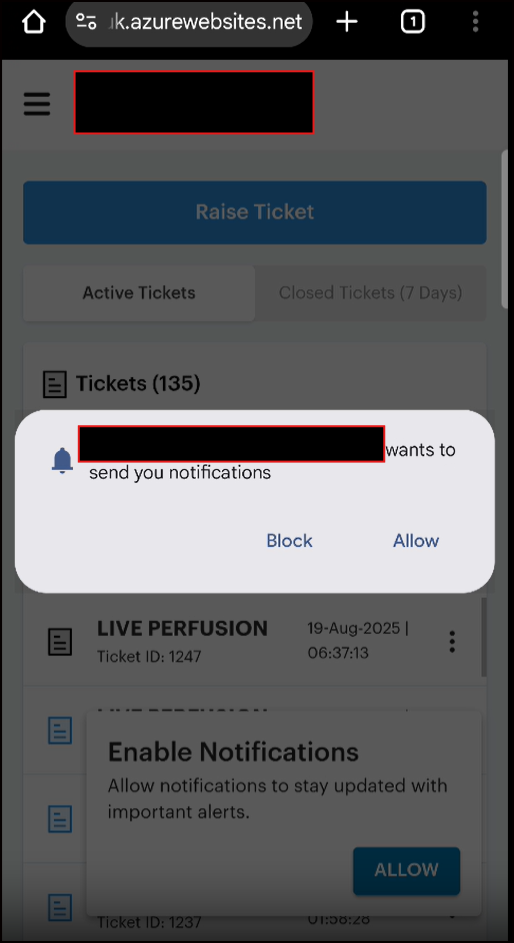
You’re trying to automate the browser notification permission dialog on a mobile browser in Katalon Studio 10.3. You’ve successfully handled camera and microphone permissions but are facing challenges with the notification permission popup.
The issue is that browser notification permissions are handled differently than native Android permissions. Browser notification dialogs are JavaScript-based popups that require a different approach than system-level permissions.
Root Cause
Browser notification permission dialogs (like the one shown in your screenshot) are not native Android system dialogs — they’re browser-specific popups that can be:
- Pre-configured using Chrome desired capabilities before the browser launches
- Handled via JavaScript during test execution
- Dismissed/Allowed by interacting with the dialog elements directly
The autoGrantPermissions capability you used for camera/microphone works for native Android permissions, but notification permissions are browser-level permissions that require Chrome-specific configuration.
Solutions
Solution 1: Pre-Configure Chrome to Auto-Grant Notifications (Recommended)
This is the cleanest approach — configure Chrome to automatically grant notification permissions before your test runs.
Steps:
- Go to Project > Settings > Desired Capabilities > WebUI > Chrome (or Chrome headless if testing headless)
- Click Add and configure the following:
| Name |
Type |
Value |
| prefs |
Dictionary |
Click More (…) and add the values below |
In the Dictionary Property Builder, add:
| Name |
Type |
Value |
| profile.default_content_settings.notifications |
Number |
1 |
Alternatively, edit the Chrome properties file directly:
Go to <your test project location>\settings\internal\com.kms.katalon.core.webui.chrome.properties and add:
{
  "CHROME_DRIVER": {
    "prefs": {
      "profile.default_content_settings.notifications": 1
    }
  }
}
Explanation:
1 = Allow notifications2 = Block notifications0 = Ask (default)
Source: Set up Desired Capabilities for WebUI Testing in Katalon Studio
Solution 2: Handle the Notification Dialog by Clicking “Allow” Button
If pre-configuration doesn’t work, you can interact with the dialog directly in your test script.
Script Mode Example:
import static com.kms.katalon.core.testobject.ObjectRepository.findTestObject
import com.kms.katalon.core.webui.keyword.WebUiBuiltInKeywords as WebUI

// Open browser with mobile emulation
WebUI.openBrowser('')

// Navigate to your application
WebUI.navigateToUrl('https://k.azurewebsites.net')

// Wait for the notification dialog to appear
WebUI.waitForElementPresent(findTestObject('Object Repository/notification_allow_button'), 10)

// Click the "Allow" button
WebUI.click(findTestObject('Object Repository/notification_allow_button'))

// Continue with your test
WebUI.click(findTestObject('Object Repository/login_button'))
To create the test object for the “Allow” button:
- In Katalon Studio, go to Object Repository
- Create a new test object called
notification_allow_button
- Use the following XPath or CSS selector:
XPath:
//button[contains(text(), 'Allow')]
CSS Selector:
button:contains('Allow')
Solution 3: Dismiss the Dialog Using JavaScript
If the dialog is blocking your test, you can dismiss it programmatically:
import com.kms.katalon.core.webui.keyword.WebUiBuiltInKeywords as WebUI

// Execute JavaScript to dismiss notification permission request
WebUI.executeJavaScript("""
  if (Notification.permission !== 'granted') {
    // This will dismiss the notification request
    window.close();
  }
""", null)
Solution 4: Combine Android Permission Management with Chrome Preferences
For a comprehensive approach that handles both native and browser permissions:
Custom Keyword:
@Keyword
public static void setupMobilePermissions() {
    // Enable Android native permissions
    DesiredCapabilities.android().setCapability("autoGrantPermissions", true)

    // Configure Chrome to auto-grant notifications
    Map<String, Object> prefs = new HashMap<>()
    prefs.put("profile.default_content_settings.notifications", 1)

    DesiredCapabilities.chrome().setCapability("prefs", prefs)
}
Reference: Manage Android’s Permission in Katalon Studio
Recommended Next Steps
- Try Solution 1 first — it’s the most reliable and requires no test code changes
- If Solution 1 doesn’t work, use Solution 2 to interact with the dialog directly
- Test on both desktop and mobile emulation to ensure compatibility
 Professional Workarounds: