Katalon.core.exception "Unable to click on object"

Hi Team,
I’m trying to automate a test, but I have this error “Katalon.core.exception.StepFailedException: Unable to click on object”

09-02-2019 01:17:27 PM Test Cases

Elapsed time: 16,715s

Test Cases. Dashboard FAILED.

Reason:

com.kms.katalon.core.exception.StepFailedException: Unable to click on object ‘Object Repository/Dashboard Sh/Page/a_S’

at com.kms.katalon.core.webui.keyword.internal.WebUIKeywordMain.stepFailed(WebUIKeywordMain.groovy:64)

at com.kms.katalon.core.webui.keyword.internal.WebUIKeywordMain.runKeyword(WebUIKeywordMain.groovy:26)

at com.kms.katalon.core.webui.keyword.builtin.ClickKeyword.click(ClickKeyword.groovy:86)

at com.kms.katalon.core.webui.keyword.builtin.ClickKeyword.execute(ClickKeyword.groovy:67)

at com.kms.katalon.core.keyword.internal.KeywordExecutor.executeKeywordForPlatform(KeywordExecutor.groovy:56)

at com.kms.katalon.core.webui.keyword.WebUiBuiltInKeywords.click(WebUiBuiltInKeywords.groovy:616)

at com.kms.katalon.core.webui.keyword.WebUiBuiltInKeywords$click$3.call(Unknown Source)

at 2. Dashboard.run(2. Dashboard:26)

at com.kms.katalon.core.main.ScriptEngine.run(ScriptEngine.java:194)

at com.kms.katalon.core.main.ScriptEngine.runScriptAsRawText(ScriptEngine.java:119)

at com.kms.katalon.core.main.TestCaseExecutor.runScript(TestCaseExecutor.java:337)

at com.kms.katalon.core.main.TestCaseExecutor.doExecute(TestCaseExecutor.java:328)

at com.kms.katalon.core.main.TestCaseExecutor.processExecutionPhase(TestCaseExecutor.java:307)

at com.kms.katalon.core.main.TestCaseExecutor.accessMainPhase(TestCaseExecutor.java:299)

at com.kms.katalon.core.main.TestCaseExecutor.execute(TestCaseExecutor.java:233)

at com.kms.katalon.core.main.TestCaseMain.runTestCase(TestCaseMain.java:114)

at com.kms.katalon.core.main.TestCaseMain.runTestCase(TestCaseMain.java:105)

at com.kms.katalon.core.main.TestCaseMain$runTestCase$0.call(Unknown Source)

at TempTestCase1567423044544.run(TempTestCase1567423044544.groovy:21)

Caused by: org.openqa.selenium.ElementClickInterceptedException: Element <a href=“https://…/list/”> is not clickable at point (120,371) because another element <div class=“preloader”> obscures it

I’m a beginner with Katalon, thanks to all
Caused by: org.openqa.selenium.ElementClickInterceptedException: Element &lt;a href=“https://…/list/”&gt; is not clickable at point (120,371) because another element &lt;div class=“preloader”&gt; obscures it

Your element was obscured by some other element.

This element is visible when its attempting the click, it sounds like a loading spinner of some sorts which will be preventing the other element.

What you will need to do is add a waitForElement… step before the click action so that when it performs the click, the “loader” is not obscuring it.

Thank you very much, now is ok

the medthod “wait for element” before the click is ok on Firefox, but on Chrome I have the same error with the wait element

Which wait method are you using, Visible, present etc?

the method that I use is “wait for element clickable”

hmm that should work fine, could you share your script and the error your recieving now with the wait method added

I guess you could also add this step for the loader so it doesnt perform the click till the loader is not visible

previously the error was “element could not be scrolled into view”, but I solved from “project - setting - web ui” and modify the “time between”. Thank you hpulsford, wait for a moment and i’ll send the script and error

Screen shot of the page would also be helpfull

now is ok, thank you very much!

Your welcome - if its inconsistent, try and figure out the issue sooner rather than later :slight_smile:

sure :slight_smile:

Can you assist me i getting the same here is my i am getting the below error:
Test Cases/ACCOUNT CONFIGURATION and MANAGEMENT - Nostro Account Configuration and Management/Account Maintenance fields validation/Verify account creation fields of the maker screen FAILED.
Reason:
com.kms.katalon.core.exception.StepFailedException: Unable to click on object ‘Object Repository/Createing Nostro Account/CreatNostroAccount/Page_Arab Bank Recon Portal/Sign in now’
at com.kms.katalon.core.webui.keyword.internal.WebUIKeywordMain.stepFailed(WebUIKeywordMain.groovy:64)
at com.kms.katalon.core.webui.keyword.internal.WebUIKeywordMain.runKeyword(WebUIKeywordMain.groovy:26)
at com.kms.katalon.core.webui.keyword.builtin.ClickKeyword.click(ClickKeyword.groovy:76)

and this my source code:

WebUI.openBrowser(’’)

WebUI.navigateToUrl(‘https://abrecon.abdev.eu-de.containers.appdomain.cloud/sign-in’)

WebUI.setText(findTestObject(‘Createing Nostro Account/CreatNostroAccount/Page_Arab Bank Recon Portal/username’), ‘maker’)

WebUI.setEncryptedText(findTestObject(‘Object Repository/Createing Nostro Account/CreatNostroAccount/Page_Arab Bank Recon Portal/password’),
‘y8zLaEtGetk=’)

WebUI.waitForElementClickable(findTestObject(‘Createing Nostro Account/CreatNostroAccount/Page_Arab Bank Recon Portal/Sign in now’),
0)

WebUI.click(findTestObject(‘Object Repository/Createing Nostro Account/CreatNostroAccount/Page_Arab Bank Recon Portal/Sign in now’))

WebUI.click(findTestObject(‘Object Repository/Createing Nostro Account/CreatNostroAccount/Page_Arab Bank Recon Portal/Accounts’))

Hello,

As it must be case where you must have page with dynamic value try to use attribute and object to identify as unquie in page it will slove the problem.

Hello sir,
I am getting an error while running a script. Please find the below details. Any help is greatly appreciated as I am a newbie to katalon.

Error message:
Unable to wait for object to be clickable

Here is my script:
WebUI.openBrowser(‘’)
WebUI.navigateToUrl(‘https://missionbio.com/’)
WebUI.waitForElementClickable(findTestObject(‘Page_Single Cell Technology Mission Bio/a_SNV’), 40)
WebUI.click(findTestObject(‘Page_Single Cell Technology Mission Bio/a_SNV’))
WebUI.closeBrowser()

Screenshot:

@aluri

I looked at the page https://missionbio.com/ , and found that the a_SNV menu is a sub-menu in a dropdown list under the top-level menu CAPABILITIES. The menu is driven by javascript. Possibly the javascript controls the click-ability state of each sub-menu items.

If you want to click the a sub-menu SNV, you need to click the top-level menu CAPABILITIES first. You should not SKIP clicking CAPABILITIES, otherwise the SNV menu will never be turned clickable.

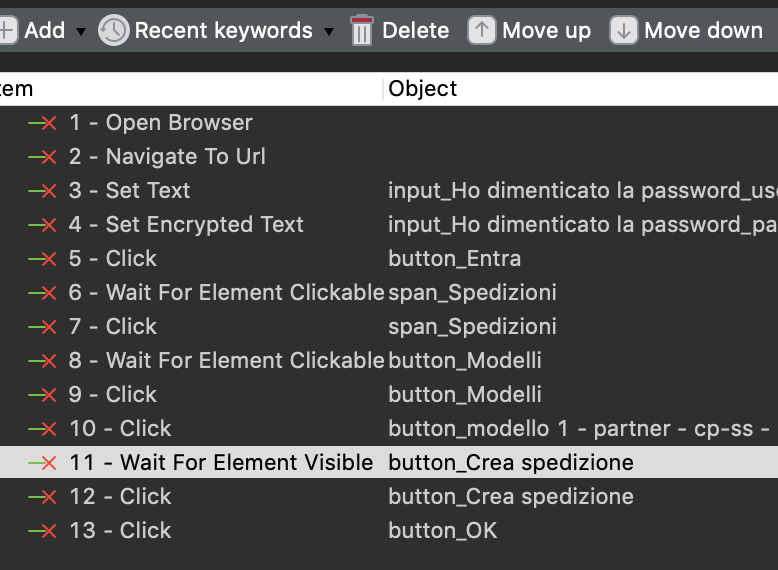
I am getting Unable to click on object error for a button. The UI is built on Angular. I have added ngwebdriver-1.1.4 to the library and added Wait For Element Clickable before the click . Also updated Chrome webdriver . But nothing seem to work.