Your result of -45 gives me thought that you should print out, or display, what two values you are working with. Are you assuming you are working with just your minutes or are you certain? Once we get you your “minutes”, then replacing the semi-colon with either a period or blank and subtracting the numbers is possible or there may be Date functions that already exist to do it.
What i do is that I have stored
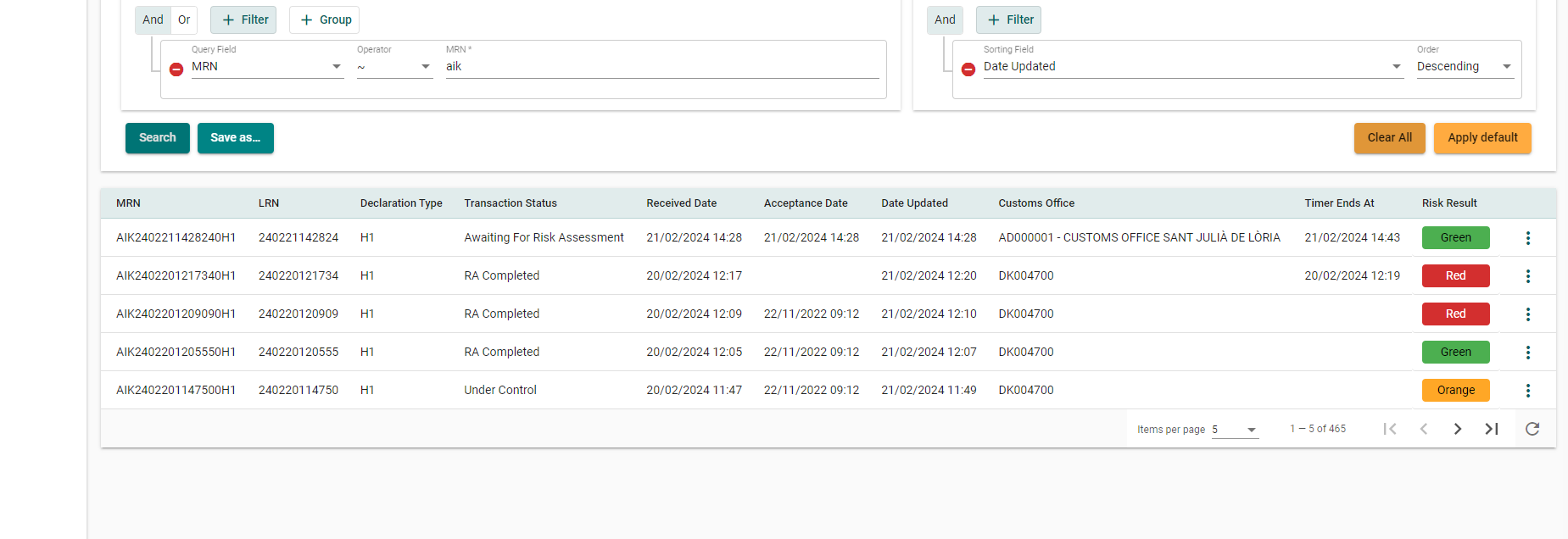
21/02/2024 14:48 and 21/02/2024 15:03 as text. See first picture.
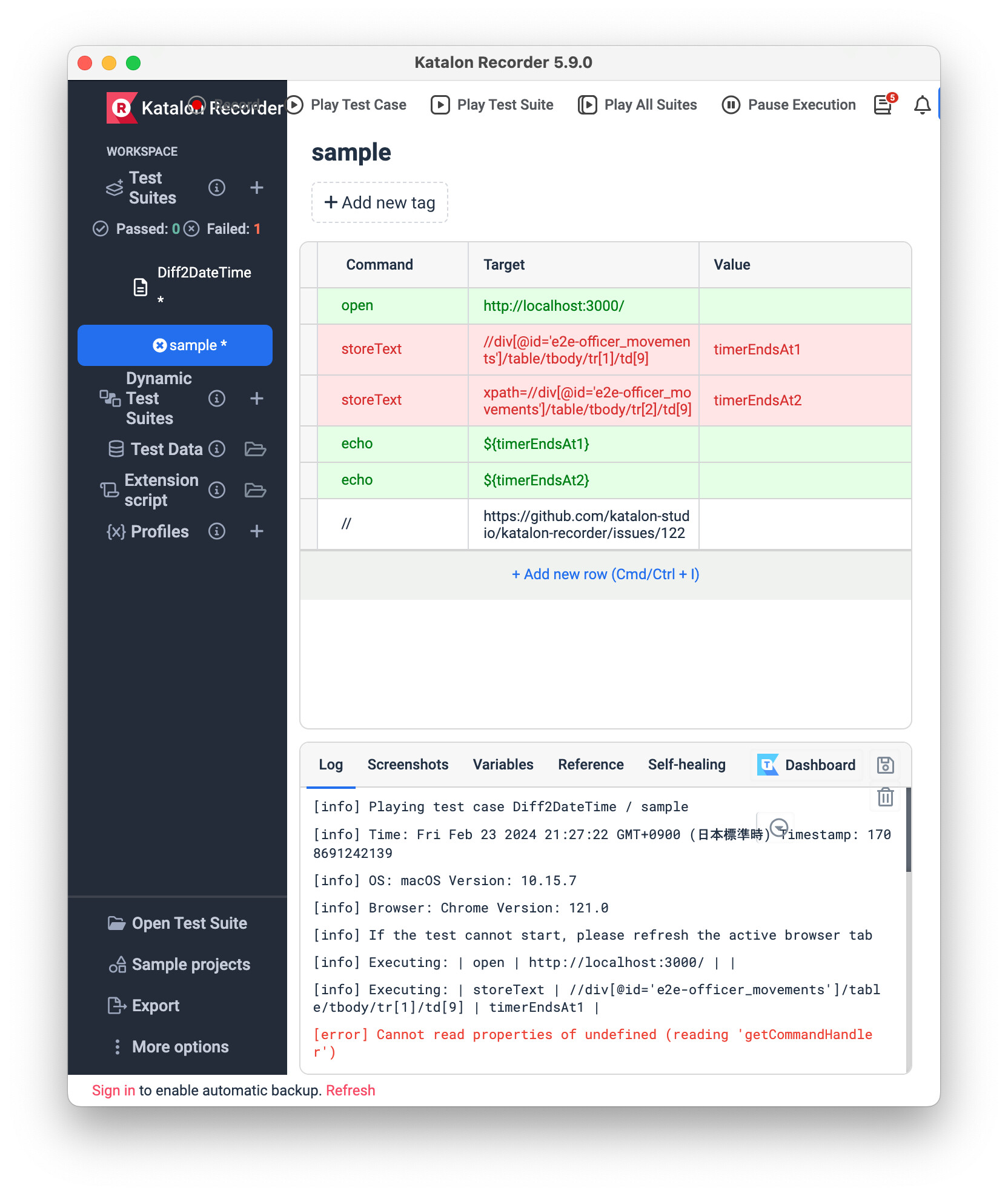
Then I use second picture to slice so i have for following:
a) 48 and 03 after slice ifunction s used.
This should give in time 15 minutes, but if i just subtract it gives 45. So is there a simple way to handle this time issue in katalon rec order ?
Katalon Recorder would not help you much. You have to write good JavaScript codes to do that.
Are you capable of JavaScript programming? Do you know how to convert a string '21/02/2024 14:28' to a Date object? Do you know how to do subtraction operation between 2 Date objects?
Now you should quit Katalon Recorder. Just write a JavaScript script which starts as follows
const timerEndsAt1 = '21/02/2024 14:28'
const timerEndsAt2 = '21/02/2024 14:43'
...// more to be written
Please try to complete this script so that you get the result you want: '15'. Can you do it? If you can’t do it now, it would the best motivation for you to start learning JavaScript programming. Please do it first.
Once you could finished the js code, then you will transform the js script(s) into a format that Katalon Recorder requires. That could be done later.
I tried this way in Katalon Recorder but it never worked. The above stackoverflow post is dated 11 years ago. Probably this was talking about the previous version of Selenium IDE (Firefox Addon, already died).
I wrote a wrong information. Forgive me, please. Now I would say, I don’t know how to solve the @Amjad’s problem.
I am sure, I would be able to find an answer to this issue in Katalon Studio by scripting in Groovy language. But @Amjad wants Katalon Recorder. So it would not be satisfactory.
By the way, I made a GitHub repository to study how to write code that scrapes 2 HTML element for date string like “21/02/2024 14:48” and “21/02/2024 15:03”; calculate the difference of these 2 datetime values, report the result in minutes unit.
This repository contains 3 sub-directories: webapp, test-katalonstudio and test-katalonrecorder
The webapp directory contains a React project of a web app which listens to http://localhost:3000 to show a web page like
The test-katalonstudio directory contains a Katalon Studio project. See Test Case/TC1
import org.openqa.selenium.WebDriver

import com.kazurayam.ks.driver.chrome4testing.ChromeForTestingDriverFactory
import com.kazurayam.ks.driver.chrome4testing.Installation
import com.kms.katalon.core.webui.driver.DriverFactory
import com.kms.katalon.core.webui.keyword.WebUiBuiltInKeywords as WebUI
import com.kms.katalon.core.testobject.TestObject
import com.kms.katalon.core.testobject.ConditionType
import com.kazurayam.ks.time.UserExtensions
import java.time.LocalDateTime

TestObject makeTestObject(String id, String xpath) {
	TestObject tObj = new TestObject(id)
	tObj.addProperty("xpath", ConditionType.EQUALS, xpath)
	return tObj
}

// specify the path information of browser and driver binaries
ChromeForTestingDriverFactory df =
	new ChromeForTestingDriverFactory(Installation.mac_116_0_5793_0_mac_x64)

// open a window of "Chrome for Testing"
WebDriver driver = df.newChromeForTestingDriver()

// tell Katalon Studio to use this WebDriver instance so that the WebUI keyword can work with it
DriverFactory.changeWebDriver(driver)

//-----------------------------------------------------------------------------

// your ordinary katalon life begins here

WebUI.navigateToUrl("http://localhost:3000/")

TestObject dt1Locator = makeTestObject("dt1", "//div[@id='e2d-officer_movements']/table/tbody/tr[1]/td[9]")
TestObject dt2Locator = makeTestObject("dt2", "//div[@id='e2d-officer_movements']/table/tbody/tr[2]/td[9]")
WebUI.verifyElementPresent(dt1Locator, 10);
WebUI.verifyElementPresent(dt2Locator, 10);
WebUI.comment("dt1=${WebUI.getText(dt1Locator)}")
WebUI.comment("dt2=${WebUI.getText(dt2Locator)}")

LocalDateTime ldt1 = UserExtensions.toLocalDateTime(WebUI.getText(dt1Locator))
LocalDateTime ldt2 = UserExtensions.toLocalDateTime(WebUI.getText(dt2Locator))

long diffMillis = UserExtensions.betweenMillis(ldt2, ldt1)
long diffSeconds = UserExtensions.betweenSeconds(ldt2, ldt1)
long diffMinutes = UserExtensions.betweenMinutes(ldt2, ldt1)
long diffHours = UserExtensions.betweenHours(ldt2, ldt1)
WebUI.comment("dt1 - dt2 in millis: ${diffMillis}")
WebUI.comment("dt1 - dt2 in seconds: ${diffSeconds}")
WebUI.comment("dt1 - dt2 in minutes: ${diffMinutes}")
WebUI.comment("dt1 - dt2 in hours: ${diffHours}")

WebUI.closeBrowser()
And “Include/scripts/groovy/com/kazurayam/ks/time/UserExtensions.groovy”
well, this is what i managed to find up to now.
but if the toy is broken and Katalon teams don’t care, why shoul we bother?
looks like this is just abandoned for my eyes and despite is opensourced i won’t spend anymore time on it.
Just a question, on your line of “gotoif”, are you trying to state, “Not Equal”? If so, it likely should be !=
I have just never seen the symbol, !==, before.