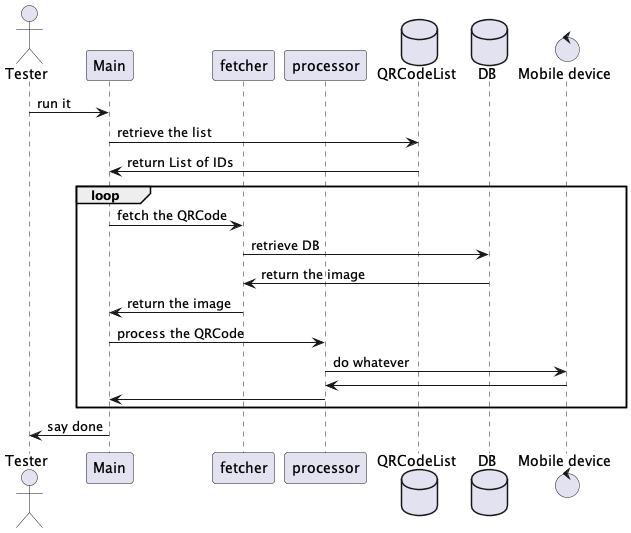
By reading your description, I understand you have only a single QR code to test. You want to test the QR code with 2 seperated Test Cases: “Test A” and “Test B”. Then I suppose that Test A and Test B must run sequentially. It does not make sence to run Test A and Test B in parallel at random order.
Therefore you do not need any parallelism for the Test A and Test B. I wonder why you are questioning about parallel execution of Test Suites.
Here I assume you have hundreds of QR codes to test. I think you need to write a new Test Case “Test C” that does what Test A does plus what Test B does in a sequence. And you want to create Test Suite 0, Test Suite 1, Test Suite 2, … each of which iterates over subsets of QR codes ([qr0,…,qr99], [qr100,…,qr199], [qr200, …, qr299], …). Each Test Suite repeatedly calls Test Case C to process each indivisual QR code. And you want the Test Suites to run in parallel.
Do you expect that a parallel run will be faster than a sequential run?
According to my experience, running multiple Test Suites in a Test Suite Collection in Katalon Studio in parallel on a single PC will not be faster than a sequential run. It could be even worse — slower than sequential. In my humble opinion, the parallel execution feature of Katalon Studio gives you no benefit. It makes things just messed up. You should not use it.
If you want to process a big bulk of QR codes faster, then you should divide the bult into smaller portions and distribute processings to multiple computing nodes (4 PCs or multiple machine instances on cloud such as AWS EC2) and execute your tests on each nodes. Tests on multiple nodes run in parallel, but the test steps inside each node run sequentially. The more number of computing nodes you allocate, the faster the processing time will get.
If I were to process a bulk of QR code stored on S3 storage and want to verify them as fast as possible, I must make my code as efficient as possible. So I would pay special attention to the following points.
I should do open/close browser only once. I should never repeat opening/closing browser multiple times for each QR codes, because it is time consuing.
I should fetch all of QR code from S3 to the local file early, and refer to the list of QR codes from the local file. I should never repeat opening/closing connection to S3 because it is time consuming.
I should open/close a mobile apk only once. I should never repeat opening/closing the apk because it is time consuming.
If my test code is not efficient enough, it will be slow even if I spelled myTest Suite Collection with “Execution mode: parallel” and “Max concurrent instances >= 2”.
Hello, thank you for answering, let me explain better:
First i run Test B to get the URL of the QR code, this needs to be on mobile
Then with the URL i got from test B i run Test A to open the web browser and get the QR code, this needs to be on the PC
Finally Test B will read the QR code and continue with the testing.
As far as i understand, in order to run both mobile and pc web testing i would need to do it in parallel, if that is not the case then i would welcome any recommendation on how to do it
it is not a matter of speed, for now we are trying just to see if what we need can be achieved with Katalon since the QR code testing is not a solved issue yet…
What i really want is to access a QR code that is in a DB ( this can be done in a browser) and read it with a camera on a phone while it does the rest of the testing, as far as i know this can only be done by parallel testing, one test on a pc and one test with a mobile, if there is any other way i would love to hear options
I’m with @kazurayam – you don’t need to run parallel. Why? It’s in your language choice: (my emphasis)
First → Then – that’s a sequence.
It’s difficult for us to dig into this scenario – we could spend lots of time heading in the wrong direction. What I can offer you is some broad advice about your approach.
The User Story Approach
Consider each problem you need to solve as it would appear to a single human user. Write it down as a “user story”. Write a single Test Case that completely covers each user story. Repeat until you have covered ALL user stories by Test Cases.
Repeat → (User Story → Test Case)
When you have all the stories lined up in sequence (perhaps 2 test cases, or 7 test cases, or even 246 test cases) put them in a single Test Suite and run that.
The Main retrieves a list of IDs of QRCodes from a local CSV file
The Main iterates over the the list, repeats calling sub-test cases for each ID:
The qrcode_fetcher fetches an PNG image from database (in fact, a local folder)
The qrcode_processor process the QRCode image (in fact, print it.toString() to console)
This is just a skeletal implementation that demostrates how Test Cases in Katalon Studio can be structured. You should be able implement your own test scenario refering to this.
My current version of fetcher is:
import java.awt.image.BufferedImage
import java.nio.file.Path
import java.nio.file.Paths

import javax.imageio.ImageIO

import com.kms.katalon.core.configuration.RunConfiguration

Path projectDir = Paths.get(RunConfiguration.getProjectDir())
Path qrcodeDir = projectDir.resolve("Include/qrcodeImages")

// make sure the "id" is passed from the Main
assert id != null

Path image = qrcodeDir.resolve(id + ".png")
BufferedImage img = ImageIO.read(image.toFile())

return img
You should be able to extend the “fetcher” so that it talk to browser to fetch QRCode image from the database while utilizing “WebUI.*” keywords. If you can specify the URL to S3 bucket, the “fetcher” can get access to the storage immediately through AWS API, or AWS CLI through command line.
My current skeletal processor is:
import java.awt.image.BufferedImage

import com.kms.katalon.core.mobile.keyword.MobileBuiltInKeywords as Mobile
import com.kms.katalon.core.webui.keyword.WebUiBuiltInKeywords as WebUI

// make sure the id is given by the Main
assert qrcodeId != null

WebUI.comment("processing ${qrcodeId}")


// make sure the image is given by the Main
assert image != null

// make sure the image is an instance of BufferedImage
assert image instanceof BufferedImage

// you can do whatever you like
Mobile.comment("${qrcodeId}: " + image.toString())
You should be able to extends the “processor” so that it sends the QRCode image into a Mobile device and let it consume as you like.
Please find that my processor script uses both of a WebUI.* keyword and a Mobile.* keyword together and it works. You can use both packages mixed in a single test case. There is no restriction as long as you write a Groovy code manually by text editor (not by Manual mode).
You seem to have an misunderstanding that a Test Case in Katalon Studio must be designated to one of the Project Type (WebUI, WebService, Mobile, Windows, …) and you must choose which package (WebUI, WS, Moble, Windows) of built-in keywords to call in a test case script. But, it is not right. In fact, you can call any packages of built-in keywords in a Test Case script in a Katalon project regardless whichProject type it belongs to.
Most of Katalon users misunderstand the same. It is due to the poor documentation by Katalon; it does not clearly explain what the project type is designed for.
The Project Type property of a Katalon’s project is significant only for the GUI of Katalon Studio. It is not significant for your test scripts. The Studio’s GUI refers to the project type to decide which GUI components (labels, buttons, drop-downs, …) to be displayed on GUI windows. A GUI of WebUI project will display a menu for WebUI but won’t display a menu for Mobile. A GUI of Mobile project will display a menu for Mobile but won’t display a menu for WebUI. That’s the sole reason why the project type property is there.
I believe that you can implement what you want in a single test case like the Main in my demo project. You do not need any parallelism.