Hi, if your device manager shows the generic pnp monitor or generic non-pnp monitor, it means the monitor driver is not installad correctly.
Try to unplug your monitor and re-plug it again to see if it solved.
You can right-click the generic non-pnp monitor > update driver to update it.
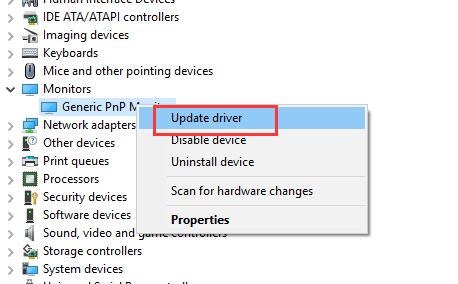
Or if this cannot help, you can try to right-click the generic non-pnp monitor > uninstall device to uninstall it at first, and then go to the monitor official site to download its driver and install it manually.
If this cannot solve your problem, try to install within a compatible way. Right-click the generic non-pnp monitor > update driver > Browse my computer for driver software > Let me pick from a list of device drivers on my computer > check show compatible hardware and install it. Here is the detail: https://windows10skill.com/fix-generic-pnp-monitor-issue-on-windows-10/