I’m getting an error in a test running through TestOps / TestCloud that passes as expected when running locally. The failure occurs when attempting to upload a file that is part of the repository. This test has previously worked on TestOps / TestCloud and there were no changes to repo between the below two results shown below. Has there been a change to TestOps / TestCloud that now makes this not possible or am I missing something?
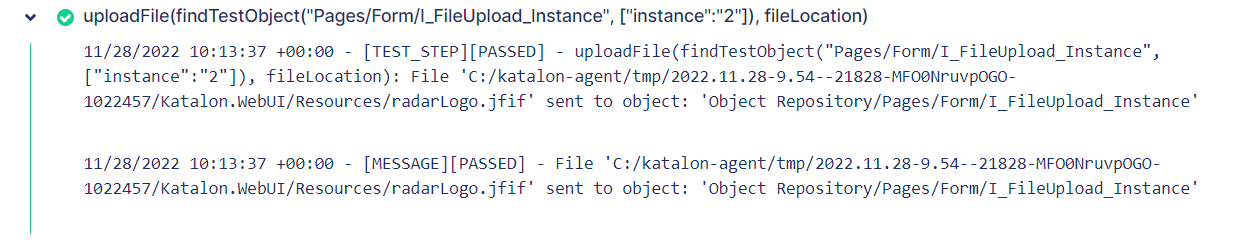
Here is a log of the instance where the test was passing:
And here is a log of the instance where the test isn’t passing with the full error log beneath:
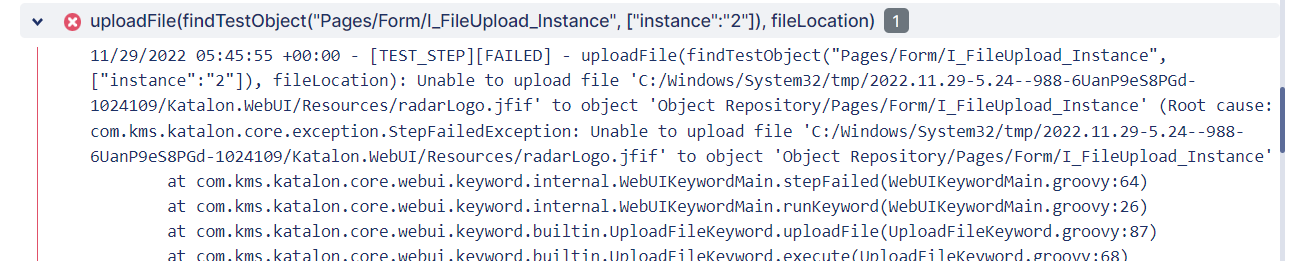
11/29/2022 05:45:55 +00:00 - [TEST_STEP][FAILED] - uploadFile(findTestObject("Pages/Form/I_FileUpload_Instance", ["instance":"2"]), fileLocation): Unable to upload file 'C:/Windows/System32/tmp/2022.11.29-5.24--988-6UanP9eS8PGd-1024109/Katalon.WebUI/Resources/radarLogo.jfif' to object 'Object Repository/Pages/Form/I_FileUpload_Instance' (Root cause: com.kms.katalon.core.exception.StepFailedException: Unable to upload file 'C:/Windows/System32/tmp/2022.11.29-5.24--988-6UanP9eS8PGd-1024109/Katalon.WebUI/Resources/radarLogo.jfif' to object 'Object Repository/Pages/Form/I_FileUpload_Instance'
	at com.kms.katalon.core.webui.keyword.internal.WebUIKeywordMain.stepFailed(WebUIKeywordMain.groovy:64)
	at com.kms.katalon.core.webui.keyword.internal.WebUIKeywordMain.runKeyword(WebUIKeywordMain.groovy:26)
	at com.kms.katalon.core.webui.keyword.builtin.UploadFileKeyword.uploadFile(UploadFileKeyword.groovy:87)
	at com.kms.katalon.core.webui.keyword.builtin.UploadFileKeyword.execute(UploadFileKeyword.groovy:68)
	at com.kms.katalon.core.keyword.internal.KeywordExecutor.executeKeywordForPlatform(KeywordExecutor.groovy:74)
	at com.kms.katalon.core.webui.keyword.WebUiBuiltInKeywords.uploadFile(WebUiBuiltInKeywords.groovy:4031)
	at com.kms.katalon.core.webui.keyword.WebUiBuiltInKeywords$uploadFile$23.call(Unknown Source)
	at FormInputs_Attachment.run(FormInputs_Attachment:35)
	at com.kms.katalon.core.main.ScriptEngine.run(ScriptEngine.java:194)
	at com.kms.katalon.core.main.ScriptEngine.runScriptAsRawText(ScriptEngine.java:119)
	at com.kms.katalon.core.main.TestCaseExecutor.runScript(TestCaseExecutor.java:448)
	at com.kms.katalon.core.main.TestCaseExecutor.doExecute(TestCaseExecutor.java:439)
	at com.kms.katalon.core.main.TestCaseExecutor.processExecutionPhase(TestCaseExecutor.java:418)
	at com.kms.katalon.core.main.TestCaseExecutor.accessMainPhase(TestCaseExecutor.java:410)
	at com.kms.katalon.core.main.TestCaseExecutor.execute(TestCaseExecutor.java:285)
	at com.kms.katalon.core.main.TestCaseExecutor.execute(TestCaseExecutor.java:369)
	at com.kms.katalon.core.main.TestCaseExecutor.execute(TestCaseExecutor.java:369)
	at com.kms.katalon.core.main.TestCaseExecutor.execute(TestCaseExecutor.java:369)
	at com.kms.katalon.core.common.CommonExecutor.accessTestCaseMainPhase(CommonExecutor.java:65)
	at com.kms.katalon.core.main.TestSuiteExecutor.accessTestSuiteMainPhase(TestSuiteExecutor.java:151)
	at com.kms.katalon.core.main.TestSuiteExecutor.execute(TestSuiteExecutor.java:106)
	at com.kms.katalon.core.main.TestCaseMain.startTestSuite(TestCaseMain.java:185)
	at com.kms.katalon.core.main.TestCaseMain$startTestSuite$0.call(Unknown Source)
	at TempTestSuite1669699697043.run(TempTestSuite1669699697043.groovy:36)
Caused by: org.openqa.selenium.InvalidArgumentException: invalid argument: File not found : C:/Windows/System32/tmp/2022.11.29-5.24--988-6UanP9eS8PGd-1024109/Katalon.WebUI/Resources/radarLogo.jfif
  (Session info: headless chrome=103.0.5060.53)
Build info: version: '3.141.59', revision: 'e82be7d358', time: '2018-11-14T08:25:53'
System info: host: 'DESKTOP-21FAVR0', ip: '10.0.2.2', os.name: 'Windows 10', os.arch: 'amd64', os.version: '10.0', java.version: '1.8.0_282'
Driver info: com.kms.katalon.selenium.driver.CChromeDriver
Capabilities {acceptInsecureCerts: false, browserName: chrome, browserVersion: 103.0.5060.53, chrome: {chromedriverVersion: 103.0.5060.53 (a1711811edd7..., userDataDir: C:\Users\ADMINI~1\AppData\L...}, goog:chromeOptions: {debuggerAddress: localhost:51070}, javascriptEnabled: true, networkConnectionEnabled: false, pageLoadStrategy: normal, platform: WINDOWS, platformName: WINDOWS, proxy: Proxy(), setWindowRect: true, strictFileInteractability: false, timeouts: {implicit: 0, pageLoad: 300000, script: 30000}, unhandledPromptBehavior: dismiss and notify, webauthn:extension:credBlob: true, webauthn:extension:largeBlob: true, webauthn:virtualAuthenticators: true}
Session ID: 35e2eeed0b5d31ced70a7f768489f0d6
	at org.openqa.selenium.remote.http.W3CHttpResponseCodec.createException(W3CHttpResponseCodec.java:187)
	at org.openqa.selenium.remote.http.W3CHttpResponseCodec.decode(W3CHttpResponseCodec.java:122)
	at org.openqa.selenium.remote.http.W3CHttpResponseCodec.decode(W3CHttpResponseCodec.java:49)
	at org.openqa.selenium.remote.HttpCommandExecutor.execute(HttpCommandExecutor.java:158)
	at org.openqa.selenium.remote.service.DriverCommandExecutor.execute(DriverCommandExecutor.java:83)
	at org.openqa.selenium.remote.RemoteWebDriver.execute(RemoteWebDriver.java:552)
	at com.kms.katalon.selenium.driver.CChromeDriver.execute(CChromeDriver.java:19)
	at org.openqa.selenium.remote.RemoteWebElement.execute(RemoteWebElement.java:285)
	at org.openqa.selenium.remote.RemoteWebElement.sendKeys(RemoteWebElement.java:106)
	at org.openqa.selenium.support.events.EventFiringWebDriver$EventFiringWebElement.lambda$new$0(EventFiringWebDriver.java:404)
	at com.sun.proxy.$Proxy14.sendKeys(Unknown Source)
	at org.openqa.selenium.support.events.EventFiringWebDriver$EventFiringWebElement.sendKeys(EventFiringWebDriver.java:429)
	at com.kms.katalon.core.webui.keyword.builtin.UploadFileKeyword$_uploadFile_closure1.doCall(UploadFileKeyword.groovy:80)
	at com.kms.katalon.core.webui.keyword.builtin.UploadFileKeyword$_uploadFile_closure1.call(UploadFileKeyword.groovy)
	at com.kms.katalon.core.webui.keyword.internal.WebUIKeywordMain.runKeyword(WebUIKeywordMain.groovy:20)
	at com.kms.katalon.core.webui.keyword.builtin.UploadFileKeyword.uploadFile(UploadFileKeyword.groovy:87)
	at com.kms.katalon.core.webui.keyword.builtin.UploadFileKeyword.execute(UploadFileKeyword.groovy:68)
	at com.kms.katalon.core.keyword.internal.KeywordExecutor.executeKeywordForPlatform(KeywordExecutor.groovy:74)
	at com.kms.katalon.core.webui.keyword.WebUiBuiltInKeywords.uploadFile(WebUiBuiltInKeywords.groovy:4031)
	at com.kms.katalon.core.webui.keyword.WebUiBuiltInKeywords$uploadFile$23.call(Unknown Source)
	at Script1660742781132.run(Script1660742781132.groovy:35)
	... 16 more
)