Hello,
I just got a update forced by my administrator and when I want to start the execution of a TestSuite I get the error Failed to load extension from … Smart Locator.

What can I do to make the execution again possible?
Johan
Dear Johan,
Thanks for reporting this! To help our team look into the issue more effectively, could you please share a few details:
In the meantime, I have reported your case to our team, support is on the way
Bella
Once we have this information, we’ll be able to guide you toward the right fix or forward it to our technical team if needed.
Dear Johan,
In restricted environments, unpacked extensions are disabled as a security feature. In that case, when you use the Spy, Record, and Smart Wait with Chrome, Katalon Studio might prompt this error message:
Loading the unpacked extension is disabled by the administrators. Therefore to resolve this issue, please follow the below steps:
Specially, please consider moving the Chrome profile to Desktop/Downloads folder as it is recommended due to a Change in Chrome policy, as mentioned here: [https://katalon-inc.my.site.com/support/article/Issue-with-Chrome-135-Causing-Browser-to-Hang-on-Launch-in-Katalon-Studio]
Once setup, please close all the current Chrome browser windows in your laptop and then start recording on KSE.
Katalon Studio Recording Engine - Chrome Web Store
The Katalon Studio Recording Engine enhances recording, supports complex scenarios, and simplifies setup for enterprises.
Katalon Compact Utility for Katalon Studio | Katalon Docs
Katalon Compact Utility for Katalon Studio is no longer maintained. For packed extension support in Katalon Studio, we highly recommend that you use Katalon Recorder Plus.
Please let us know if this helps,
Bella
Which Katalon Studio version are you using? : 9.6.0.
Did you recently update or reinstall the product before seeing this error? Automatic forced windows update yesterday. Before update I could run my Test Suites without any problem, after update at the start of the execution of same Test Suite I get error about Smart Locator. When clicking OK I get similar error about Smart Wait.
Can you confirm your operating system (Windows/macOS + version)? Windows 11 Enterprise version 10.0.22631 Build 22631
If possible, please include a screenshot of the error message or console logs.
Have you installed or modified any browser extensions or Smart Locator settings recently? No, but I suspect that the windows update now blocks the use of the Smart Locator and Smart Wait extensions.
Hi Johan,
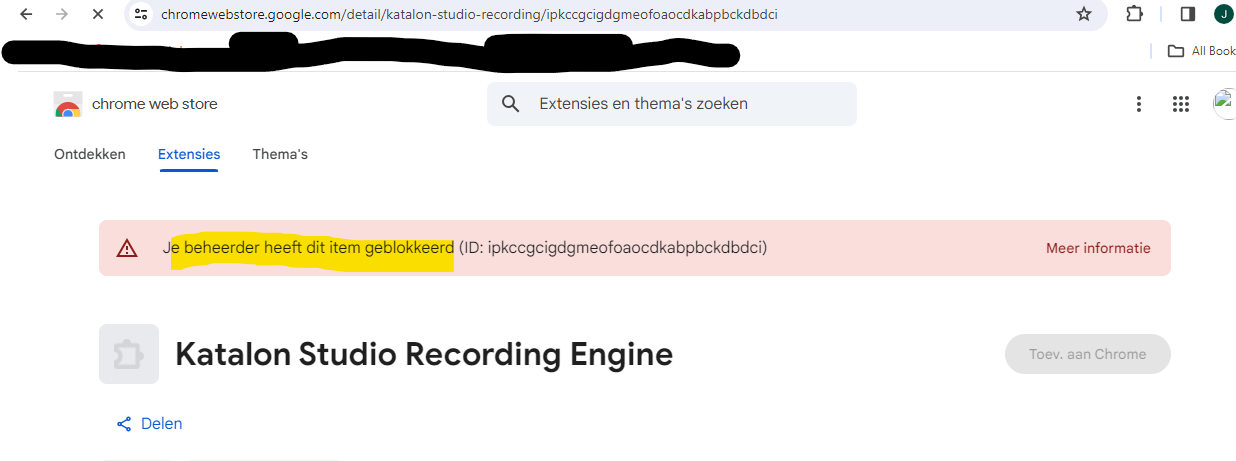
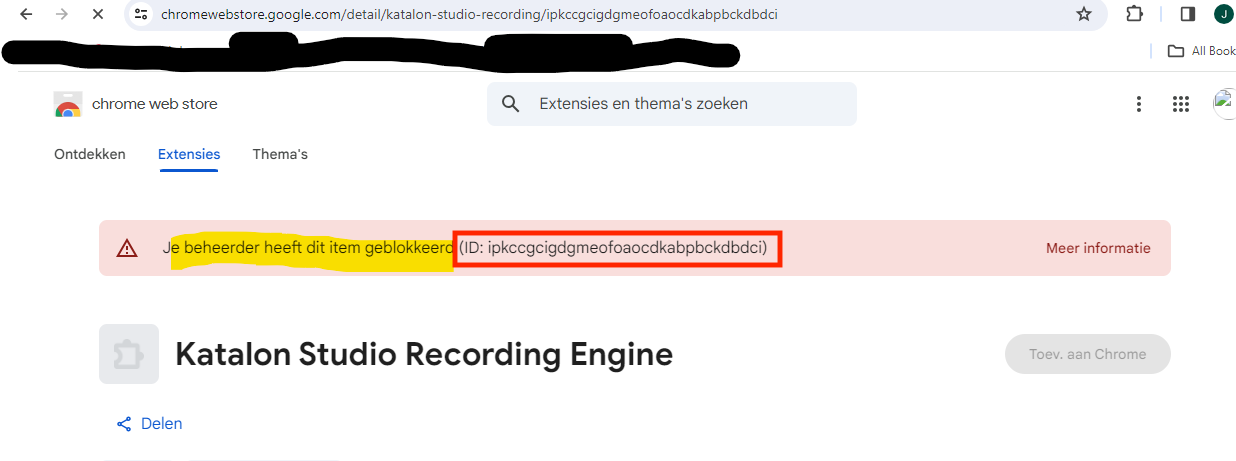
We have double checked, and it seems the extension is currently blocked by your IT team, so there’s nothing we can do from our side.
Please reach out to your IT department and ask them to unblock the extension, then try again.
Thanks for your understanding!
Bella
Hi Bella,
I already reached out to our IT-team.
The instructions can from high up to exclude all extensions.
Their looking at it to allow your extension but for the moment they consider the risk too high.
Does Katalon has arguments / certifications (?) to prove that this extension is free of risks?
Without this extension Katalon is useless for me as this Smart Locator and Smart Wait is used for every interaction on the screens.
Would switching to Edge solve the problem or is the same extension also used?
Johan
Hi Bella,
Just a question : Do you have an alternative?
If our IT department doesn’t want to unblock the extension because they find the risk too high, then Katalon because useless, isn’t it?
Johan
Hi Johan,
To use this feature, your IT team needs to allow the Katalon Recording Engine extension to be installed in the browser. Without that, the recorder won’t be able to capture actions properly.
If your organization doesn’t allow all browser extensions, please ask your IT team to whitelist the specific Extension ID shown in the screenshot from Katalon Studio Recording Engine.
For your team’s reassurance, Katalon provides full security and compliance documentation, all extensions are verified and scanned. You can view our certifications here:
 Security and Privacy FAQ | Katalon Docs
If your IT team chooses not to whitelist it, unfortunately, there’s no other workaround — the extension is required for recording to function. 
Hope this helps clarify things!
— Bella
Katalon Community Team
Hi Bella,
The problem I have is not with the recorder but with the execution of the test cases.
I rarely use the recorder; I figure out manually the XPath to use and put it in the object repository. Up to now this worked perfectly.
Other question: Will using Edge solve this problem as there are no Chrome extensions needed?
Johan
Hi Johan,
If you just need to run your tests, please try this:
Go to Project Settings > Execution > WebUI and disable the two options:
Once you disable them, the extension error should no longer appear.
However, please note that with Smart Wait turned off, your test scripts should include Verify or Wait steps to ensure objects are fully loaded, otherwise, they may fail more easily.
This applies to both Edge and Chrome.
Hope this helps,
Bella
Hi,
I’ve disable Smart Wait and Smart Locator.
I also got the permission to install the extension Katalon Studio Recording Engine.
The Test Suite starts without a problem, pages are loaded.
On the login page of the application I can fill in values with WebUI.setText(findTestObject(‘Object …’), GlobalVariable.user …
However on another page in the Log viewer I get the information Text … is set on object but on the page itself no value is filled in.
Is there a setting I need to change?
You say there is “another page”, so do you have your “wait*” statements in place to ensure your code does not race ahead of your browser’s refresh. As an example:
//move to next page
WebUI.click(findTestObject('…'))
WebUI.waitForPageLoad(10)

WebUI.waitForElementVisible(findTestObject('…'), 10)
WebUI.setText(findTestObject('…'), GlobalVariable.user)
WebUI.verifyElementAttributeValue(findTestObject('…'), "value", GlobalVariable.user, 10)

//while on this page, you may not need any further "wait*" statements
// unless hidden items become visible
// or a web table exists based on some input
Additionally, it would be up to you to ensure your pathway is unique for each object. We can help, but we would need to see the HTML.
Perhaps, @johan.delaat’s test case script has no “wait*” statements coded. It relied on Smart Wait to manage timing issues.
Why?
If you disable Smart Wait, your test case will fail due to the timing-issues because it lacks the “waitFor*” statements. If you want to stop relying on Smart Wait, you have to change your test case script so that it properly perform “wait*” actions explicitly. But possibly you do not want to change it.
Now that your IT team allowed you to install the extensions into browsers, @johan.delaat has no reason to disable Smart Wait and Smart Locator. Any other reason to disable them still?
@johan.delaat should turn Smart Wait and Smart Locator enabled.
Hi @johan.delaat,
Have you got your issue resolved? If yes, please share how you do. If no, feel free to share more information with us for better support. Thank you
No the problem is not resolved.
I got the permission to install the extension Katalon Studio Recording Engine in the Chrome Browser. and I did so.
I’ve also enabled in Project Settings /Execution/WebUI the Default Smart Wait and Default Smart Locator.
Under Project Settings / Desired Capabilities/Web UI/Chrome I’ve added Name = “extensions” / Type = “List” / Value = “C:\Users\ext_jola\AppData\Local\Google\Chrome\User Data\Default\Extensions\ipkccgcigdgmeofoaocdkabpbckdbdci\1.0.12_0.crx”.
But when starting a TestSuite I get the error : Caused by: org.openqa.selenium.SessionNotCreatedException: session not created: cannot process extension #1
What is the version of your browser and of your Katalon web driver? Can you confirm if they are the same?