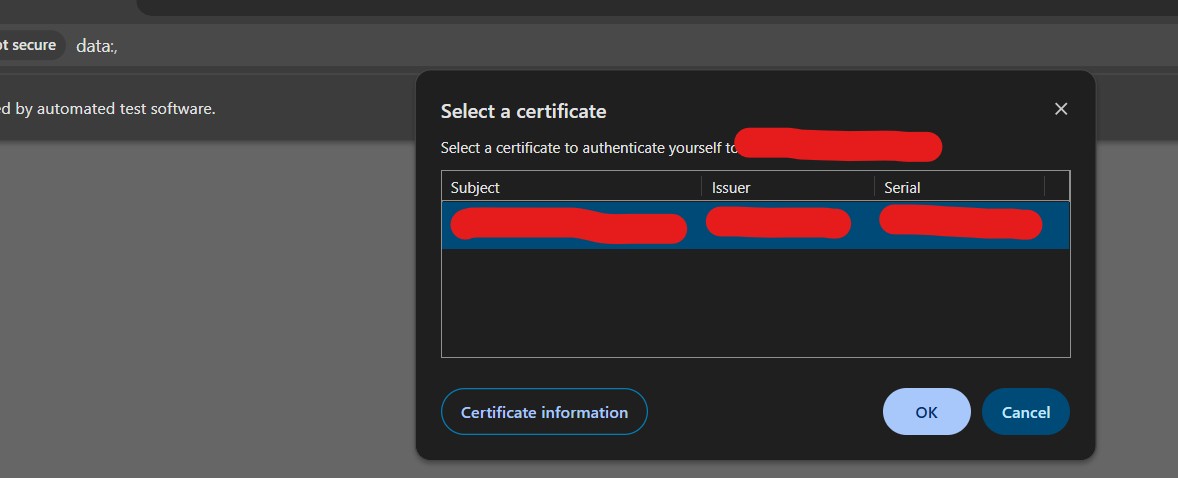
I need to perform SAP Fiori WebUI test automation (yes, SAP has some API and thus is available on the web now). Issue comes fast with a system certificate selection popup (see attachment) and I know these “system” popups are not easily / not at all interactable using selenium and generally avoided / workarounded using browser options (former desired capabilities).
Manually it’s fine, incognito browsing + click on “cancel” on the certificate popup and I can access a standard login screen with standard HTML login / password / submit elements etc…
When trying using browser options though, using some tips recently shared on this forum (because desired capabilities setting menu is crashing errors in 10.4.0 so I had to programmatically set options, I set a lot of them ) and recapped below, it does not skip the certificate popup…
import java.awt.Robot
import java.awt.event.KeyEvent

WebUI.navigateToUrl('https://SAPURL')

Robot robot = new Robot()
robot.delay(2000) // wait for popup to appear

// Example: press TAB twice and then ENTER to select default option
robot.keyPress(KeyEvent.VK_TAB)
robot.keyRelease(KeyEvent.VK_TAB)
robot.delay(500)

robot.keyPress(KeyEvent.VK_TAB)
robot.keyRelease(KeyEvent.VK_TAB)
robot.delay(500)

robot.keyPress(KeyEvent.VK_TAB)
robot.keyRelease(KeyEvent.VK_TAB)
robot.delay(500)

robot.keyPress(KeyEvent.VK_ENTER)
robot.keyRelease(KeyEvent.VK_ENTER)
It could work if katalon was not hanging in the “navigateToUrl” step indefintely… I changed execution / webUI project settings to 10 seconds for both “default wait for element timeout” and “wait time when IE hangs”, even tried to encapsulate navigateToUrl in a try catch, with no result.
Any trick to have the equivalent of a timeout for navigateToUrl ?
In organizations, IT can pre-import and set the certificate preferences in the browser (e.g., Chrome, Edge) profiles, or use group policies to always “select no certificate” or auto-select a default so no popup appears.
Starting the browser with a prebuilt user profile where certificate selection is “remembered” or bypassed may help.
Dedicated Network/Proxy Bypass:
Use a proxy server or middleware that terminates SSL and reissues a certificate internally, so the popup never appears for automation traffic.
3 Alternate Login Flows:
Some SAP Fiori landscapes have an alternative login URL or subdomain without certificate enforcement for automation/testing—ask your SAP/Web admin if this is supported.
Ask Your Admin:
For compliance, request a “test” SAP system or test login flow that can be executed without mandatory certificate authentication.
OK thanks for your advices. I will check alternate login flows with SAP team.
I will also check what happens when running tests from our “test dedicated” machine with Jenkins / docker / KRE, surely from docker instance with KRE no certificate will be installed / will be proposed and maybe I will need a manual workaround when running test locally only. I will let you know.
Thank you community memebers for your support, you rock!
Hello, a dirty workaround in my opinion but here it is.
Locally from KSE
Manual workaround. When I run WebUI.openBrowser(URL) it shows the certificate popup with my name certificate because it’s my corporate machine / setup. The openBrowser remains in progress due to this, and I have to manually click cancel on this system popup for the openBrowser operation to complete and redirect to the standard login page. Then automatically rest of instruction (setText….) are run and login is ok.
It’s for local run / script / debug anyway, so fine with his.
Remotely from KRE
I initially had an error page “Your connection is not private” and NET::ERR_CERT_AUTHORITY_INVALID even after I added again the chrome options part
So I tried to configured the exact same parameters but as desired capabilities in katalon project settings, which I know are not supposed to work anymore with selenium 4 and should be deprecated, yet it worked! Since remotely we use Katalon latest docker image with standard browser / driver / no additional configuration, and with the above desired capabilities to bypass most errors and certificate related checks, script was able to direclty access login page and ran successfully.
Conclusion
Mixed approach : manual workaround for local debug run and fully automated simple solution for remote run.
Warning : this is another example of something I already mentioned on this forum which is that desired capabilities still work even with latest version of Katalon here 10.4.0 whereas there are not supposed to due to selenium 4. Also these so called new “browser options” never worked for us, continue not to work here is another example, so we continue to rely on desired capbilities and cross our fingers very hard because we have the impression it can stop working any moment and we would be without backup plan.
 ) and recapped below, it does not skip the certificate popup…
 When I run WebUI.openBrowser(URL) it shows the certificate popup with my name certificate because it’s my corporate machine / setup. The openBrowser remains in progress due to this, and I have to manually click cancel on this system popup for the openBrowser operation to complete and redirect to the standard login page. Then automatically rest of instruction (setText….) are run and login is ok.