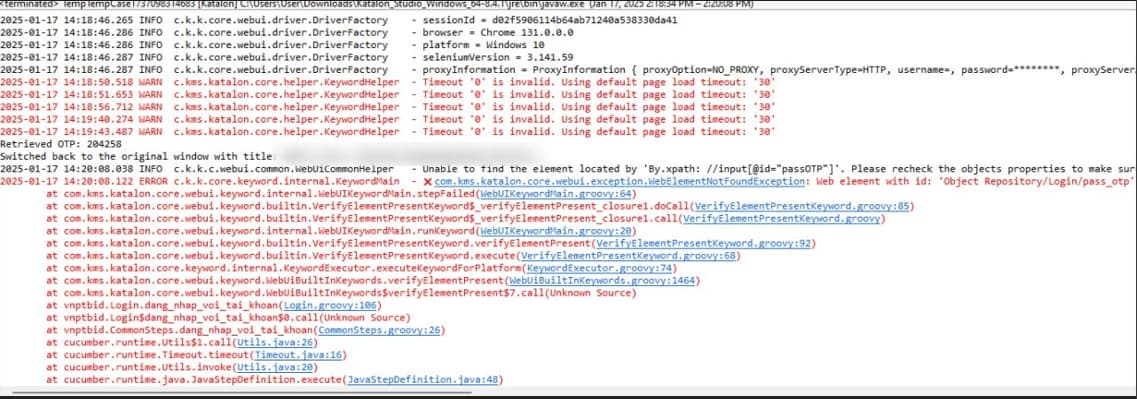
I am using the code of the WebAuthenticator.groovy file
link below:
to fix the error that cannot be processed on Google Authenticator and it works then I use MightyText to get the OTP then Can’t switch windows to paste OTP on the website
are you able to fetch right window handle?
how about using WebUI.switchToWindowTitle('') to switch between tabs?
or you can try this one to switch to tab on the right:
int currentWindow = WebUI.getWindowIndex()
WebUI.switchToWindowIndex(currentWindow + 1)
What is that?
not works , i try switch window or JS but not works
can you share the error message
find window count and then iterate for each window and see if it works
You might need something like below:
"open new tab"
WebUI.click(findTestObject('a'))
WebUI.waitForPageLoad(10)

"move into the new tab"
WebUI.switchToWindowIndex(1)

"verify element within the new tab"
WebUI.waitForElementVisible(findTestObject('b'), 10)
WebUI.verifyElementVisible(findTestObject('b'))
and then, depending if your additional tabs close or not, you can:
'close the second tab'
WebUI.closeWindowIndex(1)

'switch back to default content'
WebUI.switchToDefaultContent()
@lethienhsr2401 did it work
Please try the below:
WebUI.switchToWindowTitle(‘name of the window title’)
change the name of the window title
Hi @Anthony2 and @lethienhsr2401,
Have you guys figured out the solution to your problems? If yes, please help provide solution so that others can refer to. If no, feel free to try the suggestions above, provide more information or close it if you no longer work on it.
Thank you