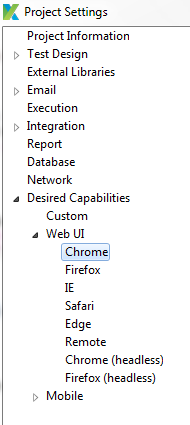
Now we’re getting into a “give a man a fish vs. teach a man to fish” situation…  I’ve given you the tools that you need, but it’s up to you to do the work. I will give you an idea of how we solve this problem, but there are any number of ways to do this, and it really depends on the nature of your project in particular.
We use a utility class we’ve called DownloadManager, which is tasked with handling files downloaded from the AUT:
public class DownloadManager {

	private static final String downloadPath = "C:/katalon_test_downloads";

	private DownloadManager() {}

	public static File getLastDownloadedFile() {
		File downloadDirectory = new File(downloadPath);
		File[] downloadedFiles = downloadDirectory.listFiles();
		if(downloadedFiles == null || downloadedFiles.length == 0) {
			return null;
		}

		File lastModifiedFile = downloadedFiles[0];
		for(int i = 1; i < downloadedFiles.length; i++) {
			if(lastModifiedFile.lastModified() < downloadedFiles[i].lastModified()) {
				lastModifiedFile = downloadedFiles[i];
			}
		}
		return lastModifiedFile;
	}

	public static File getDownloadedFile(final String fileName) {
		boolean downloaded = isFileDownloaded(fileName);
		if(downloaded) {
			return new File(downloadPath + File.separator + fileName);
		}
		else {
			return null;
		}
	}

	public static boolean isFileDownloaded(final String fileName) {
		File downloadDirectory = new File(downloadPath);
		File[] downloadedFiles = downloadDirectory.listFiles(new FilenameFilter() {
					public boolean accept(File dir, String name) {
						return name.equals(fileName);
					}
				});
	}

	public static void waitForDownload() {
		File downloadDirectory = new File(downloadPath);
		int fileCount = downloadDirectory.listFiles().length;
		int expectedFileCount = fileCount + 1;
		long startTime = System.currentTimeMillis();
		while(fileCount < expectedFileCount && (System.currentTimeMillis() - startTime) < 300000) {
			fileCount = downloadDirectory.listFiles().length;
			Thread.sleep(1000);
		}
	}
}
In here, you have a bunch of useful methods that your script can call to retrieve files for processing. The general workflow in your script would look something like:
1.) Download your file from the app. If you’ve followed my Desired Capabilities config from above, you know where this file will ultimately end up, regardless of which machine it’s running on.
2.) Wait for the download to be complete. We do this by calling the waitForDownload() method in the util class from above. All it does is wait for the number of files in the target directory to increment.
3.) Once you’re sure the file is done downloading, call either of the get methods to retrieve the file. Since you said the filename is dynamic in your case, I would use the getLastDownloadedFile() method, which just scans the directory for the file with the most recent ‘Date modified’ value and returns it.
4.) Your script should now have a File object to work with, which is where Apache POI comes in.
Caution: The DownloadManager utility is NOT thread safe! If you’re running tests in parallel, and any two tests are downloading files, you may not get the desired behavior…