In http://forum.katalon.com/t/verify-image-and-take-screen-shot-keyword-doesnt-work/108573/4, @ashraf.madina wrote:
On your apple logo page, can you do a
transform: rotateY(180deg);and see if your test passes or fails - i’m thinking it will pass cuz it might only be verifying the resolution/size of the img, not the actual img.
Here I will demonstrate my solution to this type of requirement. I created a demo project on GitHub:
I will quote a section from its doc
Comparing HTML elements between the production and the development environment
Selenium WebDriver provides a basic support of capturing screenshot of web pages. See Guru99 article for how to. The AShot library extends it to take screenshots of arbitrary HTML elements (such as <div>, <table>,<img>, <svg>). But taking screenshot is just the start of fatigues. I want to take 2 screenshots and compare them to find the difference. I want to compile a report of the source images and the diff image for a lot of targets. I want my test to fail if the image difference exceeds the degree I set. For example, if the image difference is greater than 5%, the test should fail.
My Inspectus library provides the framework to enable such visual inspection of HTML elements. Let me show you an example.
I would use the following 2 URLs as testbed:
Please visit these 2 sites and have a look. You would find them quite similar. The pages show a variations of an apple image, like this:

There are small differences in the pages — the apple is transformed: resized, rotated. I want to compare these slightly different apple images in this pair of web sites programatically.
The following is the procedure:
-
You need Java, Katalon Studio, Gradle installed. Please follow the instruction.
-
Download the zip of the sample project from the Release page.
-
In the commandline, run
$ cd <sample project dir>
$ gradle drivers
-
start Katalon Studio, open the project
-
open the “Test Cases/AppleTwinsDiff”, and run it
-
In the
<projectDir>/storedirectory, the test case will create an HTML namedAppleTwinsDiff-yyyyMMdd_hhmmss.html. The HTML will look, for example, like this:
Let me add some descriptions:

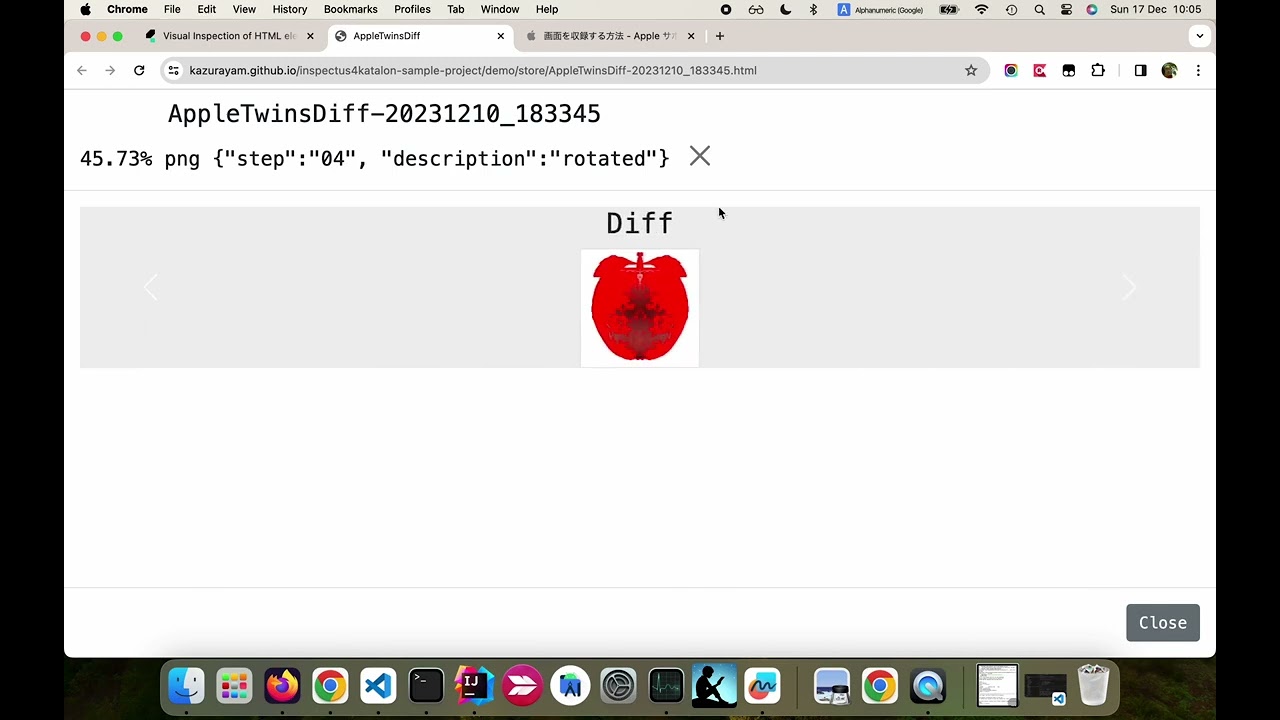
Please click the button labelled Show Diff in Modal. Then you will see the following Diff page:

This page shows a “carousel”. By clicking the left side or the right side of the page you can slide the page into the Left and the Right:


The left apple and the right apple look similar but different. Can you see how? Yes, it’s rotated. The diff image shows the different pixels painted in red.
@ashraf.madina also asked me:
On your apple logo page, can you do a
transform: rotateY(180deg);and see if your test passes or fails - i’m thinking it will pass cuz it might only be verifying the resolution/size of the img, not the actual img.
I would reply to this question.
My test detected the 45.73% pixel-wise difference between the original apple image and the rotated one. Based on the degree of diffence detected, my test possibly will FAIL.Or I can let it WARN or PASS if i want to.
<< I am not going to explain my “Visual Inspection” framework. It requires seasoned programming skill in Java. It’s too difficult to explain to non-programmers. >>