Why the name isn’t enough to idenfiy a pair of images?
Why the resolution matters to identify a pair?
To me, the resolution seems to be not necessary to identify images.
Resolution matters because pixel has been originally selected as a comparison method.
When total number of pixels of the two images are the same, then each pixel in one image is picked and compared with the one in the baseline image in order to figure out which one is different.
When total number of pixels of the two images are different, that mean those images are different. So if the resolution is ignored, the users would mostly see failed results when comparing two images.
Let me present a pair of PNG images as example.
Please find the following 2 URLs, which link to PNG images. I would name them “Left” and “Right” for short.
As these 2 images have different height (871 vs 915), Katalon’s Visual Testing feature will see these 2 images as “U” (Unresolved). The feature will refuse to compare these 2 images. The feature provides you no more information about these 2 images.
However, using a certain library, I could compare these 2 PNG images. Of course I ignored the difference of the height of the images. I could produce the following “Diff” image.
This diff image is useful for me. I can find in which portion the Left and the Right differ.
To me it is a poor idea to refuse comparing 2 images with different height.
Now I could confirm that Katalon’s Visual Testing can not produce the diff like the above. I am sure I would not use it, ever.
To me, it seems you stated that Take Full Page Screenshot as Checkpoint Keyword is just useless. No reason why it should be there.
Well, that’s is true, as long as Katalon’s Visual Testing feature refuses comparing 2 images with different height.
So if Katalon refuses to compare two images by name only, I will have to do it myself, find the Baseline look at it, then look at my new screenshot. I do not want to do it as it is again manual testing! It should go to Unresolved as Mismatch so I can review it side by side.
In addition, the issue is more complicated when it comes to baseline images:
I get the same named image as “New”, if I confirm it as “pass” and update Baseline collection, I will end up having now 2 images in my baseline having identical name. I must “pass” the “missing” baseline image on the Left so it deletes it from baseline (I must agree that I am ok with the image being missing while it is not missing, it is there - I need to find it’s “twin” manually reviewing 30+ pgaes of screenshots).
Having 2 images in baseline (if missing image was not marked as “pass”), I cannot see what the difference between the two is as baseline image does not show the resolution W x H
This is how the image looks in the baseline collection:

Latest execution on June 16 (against Baseline Collection V10):

I manually reviewed all files in the previous execution (June 14) and passed most of them (and also passed old ones to update the baseline collection):

Now 241!!! images to be reviewed again
Nothing changed in the application (between June 14 to June 16)
The resolution is different this time again!!!:
example:

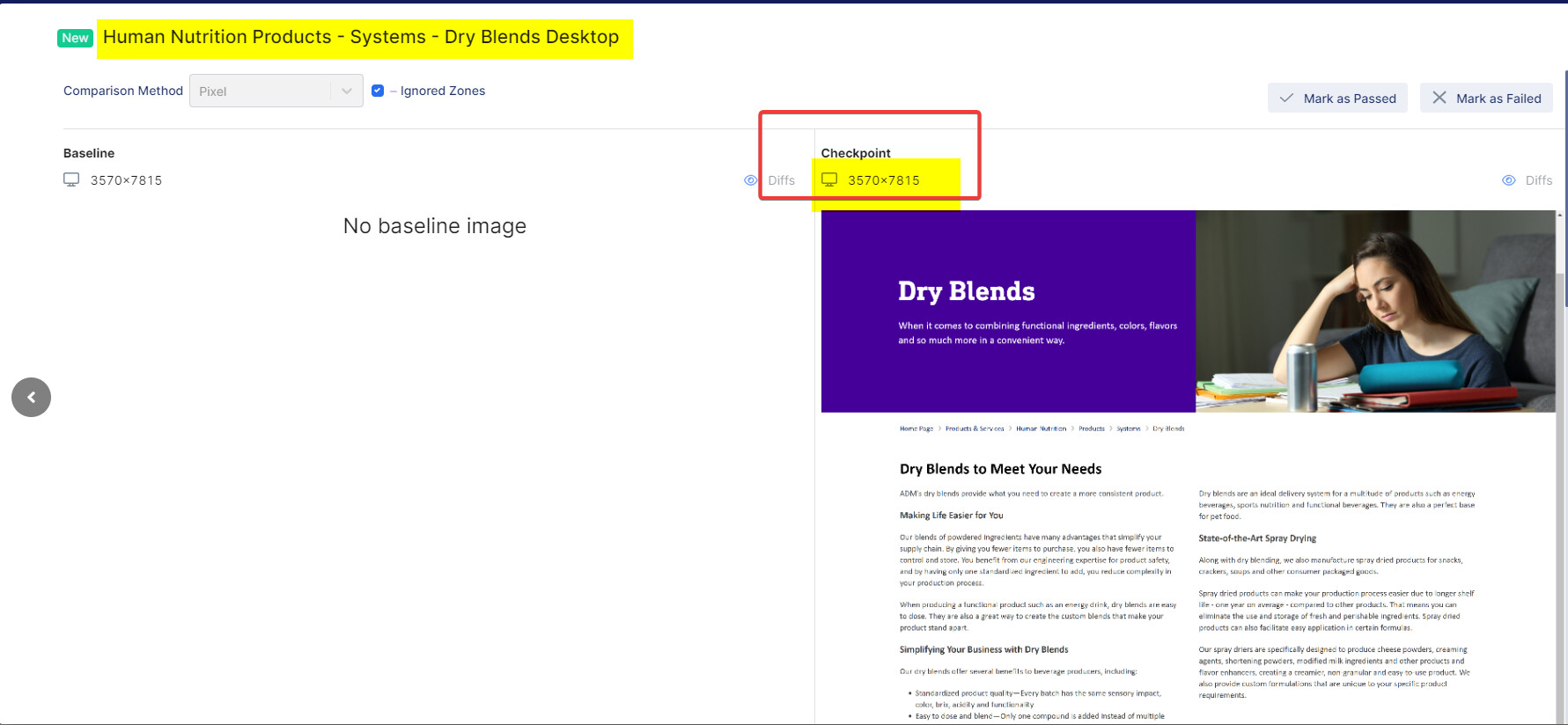
@nghi.hua Next week on June 27 I need to present to the global QA team in my company how I am using Katalon for my project, and it looks like I won’t be able to say I am pleased with it.
You shared 2 screenshots.
The 1st image has width of 3840 pixel.
The 2nd image has width of 3570 pixel.
It seems that you are not controling the width at all; or you failed to control it.
It is user’s responsibility to make the 2 images to have the same width. Katalon is not responsible for it.
Why don’t you control the image width? Don’t you know how to?
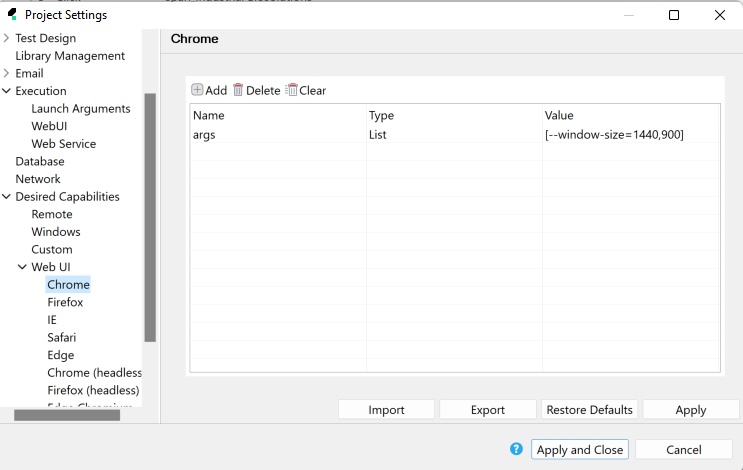
3840px with DPR=2.5 is 1536px (the width of my machine)
3579px is 1428px
not sure why it is happening, looks like window-size setup is ignored for some test cases
Have any of you tried to run such in a containerized (docker) environment or nstively on a linux headless machine, using xvfb, ofcourse?
i am just curious, but in theory, since xvfb emulates an in memory device, should not be affected by the physical device pixel ratio, therefore providing at least one constant for the purpose of automation, minimizing the needs for re-base.
I tried what you shared above (Chrome desired capability, args=[–window-size=1440, 900]).
I found it does NOT work. You need to resolve it.
I don’t know if your way is appropriate or not (setting up browsers’ options is a labyrinth). I usually just call WebUI.setViewPortSize(w,h) like:
WebUI.openBrowser('')
WebUI.setViewPortSize(800,600)
WebUI.navigateToUrl('http://forum.katalon.com')
...Lesson learned. Users sometimes fail to control the width of the browser windows, therefore the screenshot image’s width are not controlled.
To me it makes sense if Katalon’s Visual Testing feature checks the width of the images and, if the widths are different, categorize the image as “U” (Unresolved) and reject comparing to notify the user of their fault and let them fix the width at early stage. But still I personally do not it is a good idea to check the width to judge whether to do compare or not. You can just compare 2 images with different width; you will find they are different; fine. Show the difference, then it will tell user what they should do.
Still I think that Katalon’s Visual Testing feature should not check the height of the images. The height of the screenshot images tends to change according to the contents’ changes; and a diff of 2 images with different heights is useful as I explained here.
it works if you remove the space before the 900
args=[–window-size=1440,900]
It’s not useless that way. This keyword still works well if the height of the page does not change because of any newly added components.
Throughout the software development cycle, I would not imagine that height of one page is frequently changed day by day or week by week, and users should know that when the UI should be verified (like if new components are added or some web UI elements have been changed). Then they would use the Visual Testing feature to help them find out if there is any difference between the new version and the baseline.
For example:
- I have one page whose height is 1000. From Jan to March, no new component is added to the page and makes its height changed, and there are just a few WebUI elements changed within the page. So in this case, I can use the “Take Full Screenshot as Checkpoint” keyword to capture images and do the comparison.
- In April, let’s say a new component is added to the page and makes its height changed to 1300. In this case, you keep using the same keyword and use Visual Testing in finding differences, you need to make the new version of the captured image which has the new component as a new upgraded baseline image. From this moment, I use the new baseline (with H = 1300) to compare with the new captured images because now they all have the same height. This cycle keeps repeated until the height of the page is continuously changed.
this sounds perfect but both images will be not positioned side by side to let the user see the old and new image at once.
As I mentioned in my previous comment I need to find the new image separately from old image among a list of many other images… and I need to “pass” the old one as “missing” so it gets removed from the baseline, and then I need to locate the “new” one to “pass” it as well so it can be added to the baseline collection.
Also, there is no Search or filter amond the images, this would be helpful to allow viewing only these two images…
BTW “take screenshot as checkpoint” does not work for me, I need a full page.
Anyways it still looks like comparison by name only would resolve the struggle…
Do you mean, Katalon’s Visual Testing requires you to go through too much of cumbersome (difficult, complicated, …) operations?
I feel your pain. I guess, it would be a nightmare.
Are you expecting Katalon team will change their product for you very soon?
@anna.kotliarevskiy is waiting for your reply.
Now you could control the width of screenshot images, right?
What value of height the 2 screenshot images now have? Are they equal or not?


@nghi.hua can you please help with this? why is the state “analyzing” ?
Interesting.
Possibly it just takes long time for TestOps Visual Testing to finish processing more than 200 screenshots of web pages.
Do you have any idea how long approximately it takes to process 200 pages using Visual Testing?
You should be able to imagine how long it would take: the local Katalon engine takes screenshots, transfers the images (which could be as large as a few mega bytes) from the local disk to TestOps via network, and TestOps does image comparison and reporting. It could take several hours.
Please tell us later how long actually it took when it finished.
Please tell us, if possible, how large your PNG images are. I’m just curious.