*Summary
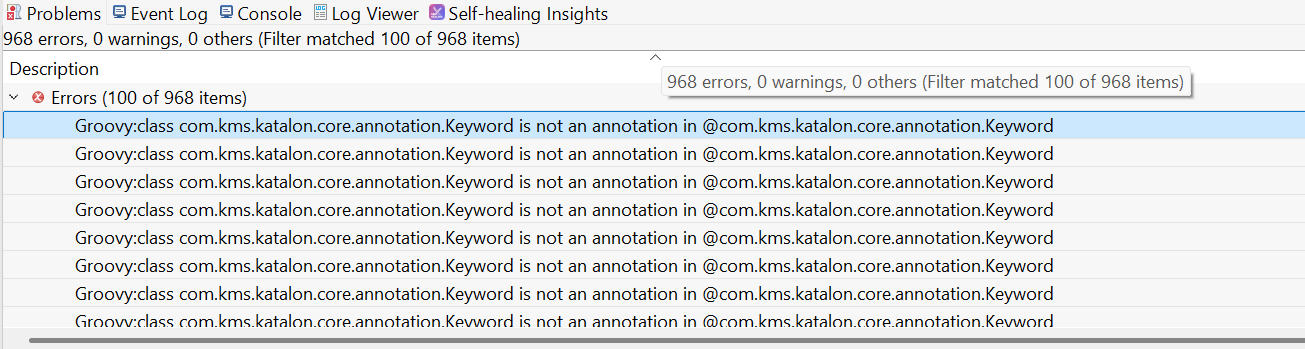
Every time I open my Katalon project, the following error appears in the Problems tab: Groovy:class com.kms.katalon.core.annotation.Keyword is not an annotation in @com.kms.katalon.core.annotation.Keyword
*Steps to reproduce
I backed up the Katalon Studio project from my old laptop (Windows) to a new Windows laptop.
After fixing that, the project opens — but now many items appear under the Problems tab, specifically the @Keyword is not an annotation error.
*Expected Results
Project opens successfully and behaves the same as it did on the original laptop.
*Actual Results
The following error is shown for every custom keyword: Groovy: class com.kms.katalon.core.annotation.Keyword is not an annotation in @com.kms.katalon.core.annotation.Keyword
in the log file you provided, I found a lot of exceptions raised, like
org.eclipse.core.internal.resources.ResourceException(/E%%Projects%2024%work%e2e%client_area_web%MIFX-WebApp.prj/Scripts)[368]: java.lang.Exception: Resource '/E%%Projects%2024%work%e2e%client_area_web%MIFX-WebApp.prj/Scripts' does not exist.
The path string like /E%%Projects%2024%work%e2e%client_area_web%MIFX-WebApp.prj/Scripts is obviously invalid. Do you have any idea why you got it?
I guess, you made some mistake when you transfered your project from the old machine into your new Windows laptop. Do you have any idea what?
Let me clarify some things and hopefully provide more insight:
Original folder location on the old laptop was: C:\Projects\2024\work\e2e\client_area_web\MIFX-WebApp.prj
On the new laptop, I placed the backup to: E:\Projects\2024\work\e2e\client_area_web\MIFX-WebApp.prj
The folder structure is exactly the same — all subfolders like Scripts, Keywords, Test Cases, etc. are present and intact.
I confirmed that Scripts/ folder does exist and was never deleted or renamed.
The path in the error log appears malformed: /E%%Projects%2024%work%e2e%client_area_web%MIFX-WebApp.prj/Scripts
I believe %20 is URL-encoded space, but the double %% makes it look like something went wrong when the project path was parsed or normalized (maybe during URI resolution or during project open).
For verification, I just tested this on a fresh install of Katalon Studio 10.2.4, with all Katalon-related folders deleted before install, but I still get the same issue when opening the project for the first time.
So in short:
The project was not corrupted or improperly copied — but the way Katalon (or Eclipse) parses a path with spaces like Projects 24 seems to break something internally, possibly when resolving classpath or building Groovy context.
Let me know if there’s a workaround to avoid this other than renaming/moving folders, or if this needs to be reported to the Katalon dev team.
Welcome to our community. Thank you for sharing your issue.
Your problem seems to be a path resolution bug in how Katalon (or underlying Eclipse/Groovy tooling) parses folder names. If you have checked all the folders’ name correct with case-sensitive, it can be problem with spaces like:
That %% is likely from double-escaping or mishandling of a file path during plugin or classpath resolution.
Katalon tries to URI-encode the workspace or project paths (like Projects 24 → Projects%2024). To prevent any mistakes, try to move the project to a path without spaces like:
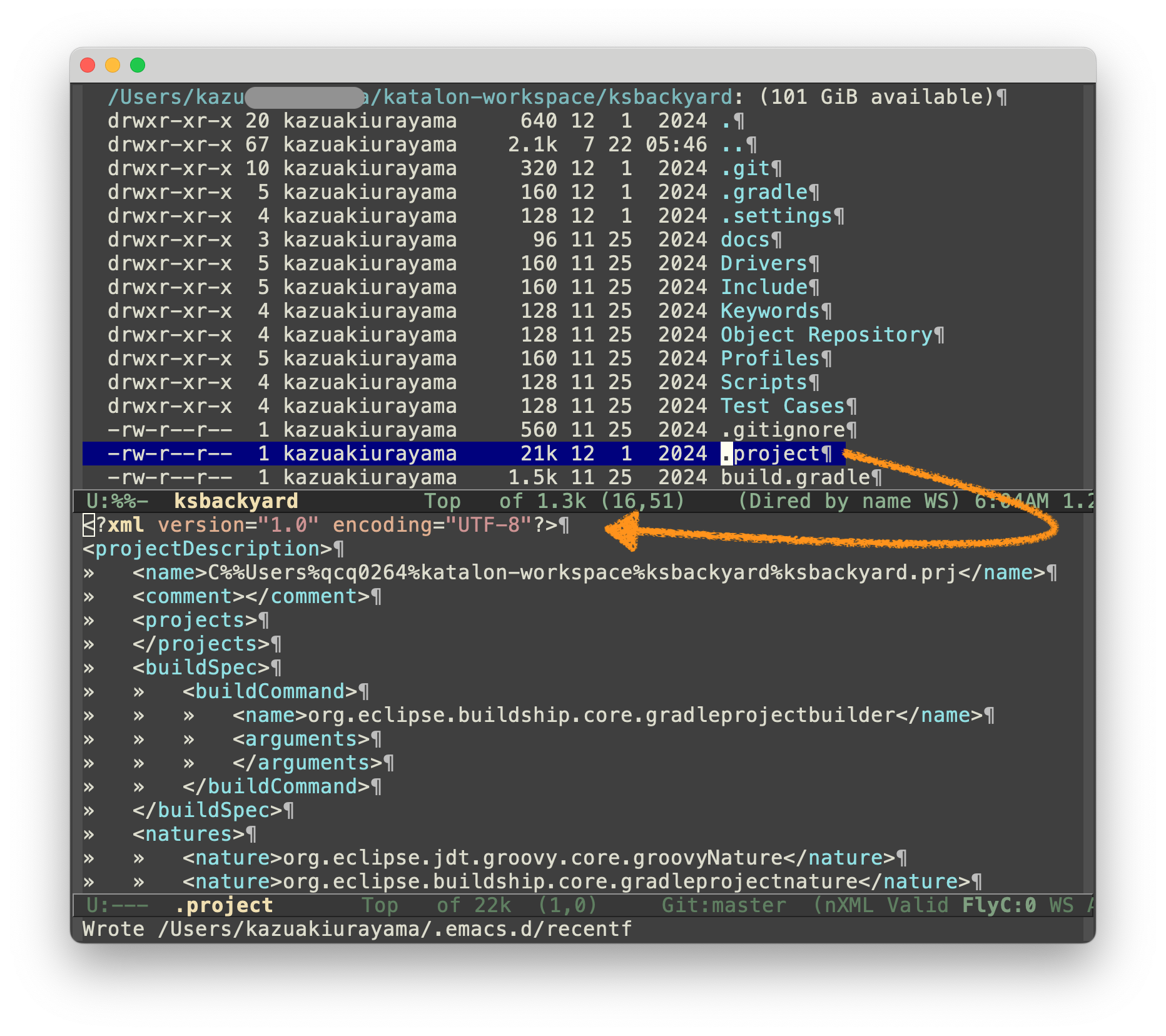
In the .project file, which is actually located at the real path on mac of /Users/kazurayam/katalon-workspace/ksbackyard/.project
, I found a string C%%User%qcq0264%katalon-workspace%ksbackyard%ksbackyard.prj
as the content of the XML element at xpath /projectDescript/name. I created the original project on a Windows machine and copied it from Windows to Mac.
I was surprised to find this! How poorly Katalon Studio is designed!
I guess, somewhere inside Katalon Studio, the content of the /projectDescription/name is refered to as the base with which relative paths are resolved to. — This must be the cause of the problem for @hardiyansah.
For example, the log of @hardiyansah shows the following Stacktrace:
!ENTRY org.eclipse.e4.ui.workbench 4 0 2025-07-28 15:29:11.858
!MESSAGE Failed to prepare entity reference index
!STACK 1
org.eclipse.core.internal.resources.ResourceException(/E%%Projects%2024%work%e2e%client_area_web%MIFX-WebApp.prj/Scripts)[368]: java.lang.Exception: Resource '/E%%Projects%2024%work%e2e%client_area_web%MIFX-WebApp.prj/Scripts' does not exist.
	at org.eclipse.core.internal.resources.ResourceException.provideStackTrace(ResourceException.java:42)
	at org.eclipse.core.internal.resources.ResourceException.<init>(ResourceException.java:38)
	at org.eclipse.core.internal.resources.Resource.checkExists(Resource.java:364)
	at org.eclipse.core.internal.resources.Resource.checkAccessible(Resource.java:238)
	at org.eclipse.core.internal.resources.Container.members(Container.java:244)
	at org.eclipse.core.internal.resources.Container.members(Container.java:231)
	at com.kms.katalon.groovy.util.GroovyUtil.getAllFiles(GroovyUtil.java:1180)
	at com.kms.katalon.groovy.util.GroovyUtil.getAllScriptFiles(GroovyUtil.java:1193)
	at com.kms.katalon.groovy.util.GroovyUtil.getAllTestCaseScripts(GroovyUtil.java:1222)
	at com.kms.katalon.composer.project.handlers.OpenProjectHandler.prepareEntityReferenceIndex(OpenProjectHandler.java:273)
	at com.kms.katalon.composer.project.handlers.OpenProjectHandler$1$1.lambda$0(OpenProjectHandler.java:213)
	at java.base/java.util.concurrent.Executors$RunnableAdapter.call(Executors.java:539)
	at java.base/java.util.concurrent.FutureTask.run(FutureTask.java:264)
	at java.base/java.util.concurrent.ThreadPoolExecutor.runWorker(ThreadPoolExecutor.java:1136)
	at java.base/java.util.concurrent.ThreadPoolExecutor$Worker.run(ThreadPoolExecutor.java:635)
	at java.base/java.lang.Thread.run(Thread.java:840)
Based on this, I guess that Katalon should review com.kms.katalon.composer.project.handlers.OpenProjectHandler$1$1.lambda$0(OpenProjectHandler.java:213). This must have some inappropriate code fragment .
You can remove the .project file. It will be silently recreated by Eclipse when you open the project in Katalon Studio UI. I guess, Katalon Studio UI will recreate the .project file based on the actual file path on your new Windows Laptop. Then, I guess, your problem will go away.
He copied the .project file from his old Laptop to his new machine. He located the project at different absolute path. So the string value of /projectDescription/name node in the .project file got out of sync with the actual file system. Therefore he got the original failures.
Rather, he should have excluded the .project file out of the copied resources.
It should not refer the /projectDescription/name node as the base with which any relative paths such as Scripts are resolved to the absolute path like: /E%%Projects%2024%work%e2e%client_area_web%MIFX-WebApp.prj/Scripts
It should change the value of /projectDescription/name node from E%%Projects%2024%work%e2e%client_area_web%MIFX-WebApp.prj to something without absolute path-dependent information; e.g. MIFX-WebApp.proj.
If @hardiyansah were using Git, he would not have got into the trouble.
Let me assume, he made a backup of his project to a remote Git repository (such as GitHub). I believe he would have a .gitignore file generated by Katalon Studio as default that contains a line:
.project
so the .project file won’t be backed up into the Git repository.
@hardiyansah will clone the remote Git repository into his new Laptop. He would not encounter any problem on his new machine, because the resources cloned out of the Git repository contains no .project file. When he opened the project on his new machine, Katalon Studio UI will silently recreate the .project file.
You should never copy all files under a Katalon project’s folder from A to B using Windows Explorer. Copying whole files under a project folder including .project file runs the risk of getting the errors like @hardiyansah.
You should prefer transferring your project using Git with a remote repository like GitHub; please mind the .gitignore setting: you should ignore the .project file out of the git repository.
It is recommended to choose Project → Close and Clean Up before moving your project to new location or upload to Github. In short the .project file should not be included.