Is it Possible to take a screenshot and then read the text present in that image and compare that text?
yes, try to look on SIKULI
https://www.guru99.com/sikuli-tutorial.html
http://doc.sikuli.org/region.html#Region.text
hello,
yes, i have done java libs for that, but need to wait to get katalon works again, license issue 
ok,
found my keywords from github
import javax.imageio.ImageIO;
import java.awt.*;
import java.awt.image.BufferedImage;
import java.io.File;
import java.io.IOException;
import internal.GlobalVariable
public class readImage {
@Keyword
public String readImageText(String imPath){

	String imagePath = imPath;
	com.image.txt.GetImageText image = new com.image.txt.GetImageText();
	String res = image.getImageText(imagePath);
	//image.getText(imagePath);
	return res;
}

@Keyword
public BufferedImage resized(BufferedImage bufImage,int x, int y){
	com.image.txt.GetImageText image = new com.image.txt.GetImageText();
	BufferedImage resized = image.scaleImage(bufImage, x, y);
	return resized;
}

@Keyword
public BufferedImage convert(BufferedImage bufImage){
	com.image.txt.GetImageText image = new com.image.txt.GetImageText();
	BufferedImage convert = image.convertImage(bufImage)
	return convert;
}
}

Hi,
these libs are needed to import, download .jar from the web and add to the project Drivers folder, restart Katalon Studio
import javax.imageio.ImageIO;
import java.awt.*;
import java.awt.image.BufferedImage;
Thanks for your prompt reply.
These libs are available in Katalon by default.

Please tell, what is this? – com.image.txt.GetImageText
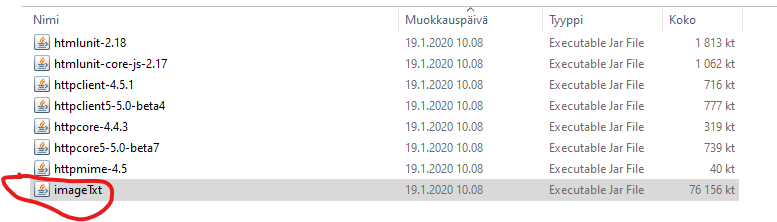
Hi @Timo_Kuisma1 Could you please share this Jar file, or the download link. I couldn’t get this JAR file in google… 
Thanks Timo… Is there any dependency jar files required. Since my script is failing. Getting the below error. I have added the libtesseract304 but still failing.
java.lang.UnsatisfiedLinkError: Unable to load library 'libtesseract304':
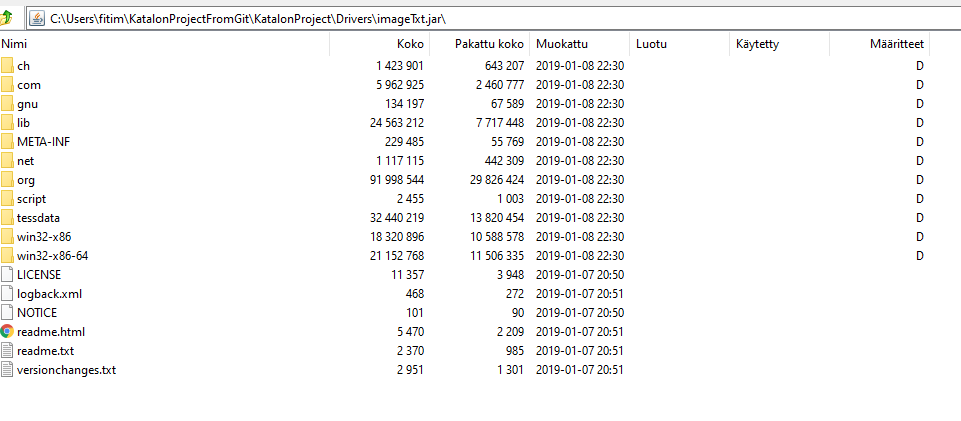
This solution worked for me:
import net.sourceforge.tess4j.;
import net.sourceforge.tess4j.util.;
import static org.junit.Assert.*;
import java.io.File;
public class TesseractUtil {
/**
 * First install Tesseract installer for Windows from https://github.com/UB-Mannheim/tesseract/wiki (tesseract-ocr-w64-setup-v5.2.0.20220712.exe (64 bit))
 * Add tess4j-5.4.0.jar from https://mvnrepository.com/artifact/net.sourceforge.tess4j/tess4j/5.4.0
 * Add all 9 Compile Dependencies https://mvnrepository.com/artifact/net.sourceforge.tess4j/tess4j/5.4.0
 * For other language support add .traineddata in C:\Users\SMO_AJ~1.VM-\AppData\Local\Temp\tess4j\tessdata
 * Issue: Conflict because jna and jna-platform jar files have different versions in Katalon(4.1.0) and Tess4j (5.3.1).
 * Workaround: In katalon jan and jna-plateform jar are replaced with 5.3.1.
 */
@Keyword
def void readImageText(String fileName){

	ITesseract instance = new Tesseract(); // JNA Interface Mapping

	/**
	 * You either set your own tessdata folder with your custom language pack or
	 * use LoadLibs to load the default tessdata folder for you.
	 **/
	//		System.setProperty("jna.library.path", "D:/Katalon/ks_enne_tps_autotests/Drivers/jna-5.3.1.jar");
	File tessDataFolder = LoadLibs.extractTessResources("tessdata");
	String dataPath = tessDataFolder.getAbsolutePath(); // point to "C:\Users\SMO_AJ~1.VM-\AppData\Local\Temp\tess4j\tessdata"
	instance.setDatapath(dataPath);
	System.out.println(dataPath);

	File imageFile = new File(fileName);
	instance.setLanguage("eng+fin");
	//instance.setPageSegMode(1);
	instance.setOcrEngineMode(1);

	try {
		//System.setProperty("jna.library.path", "D:/Katalon/ks_enne_tps_autotests/Drivers/jna-5.3.1.jar");
		//Runtime.getRuntime().loadLibrary("D:/Katalon/ks_enne_tps_autotests/Drivers/jna-5.3.1.jar");
		String result = instance.doOCR(imageFile);
		System.out.println(result);
	} catch (Throwable e) {
		e.printStackTrace();
	}
}
}