This is how I open the browser before starting my test:
'Open de browser'
WebUI.openBrowser(GlobalVariable.URL['applicatie'])

'Set viewport size 703x347'
WebUI.setViewPortSize(703, 347)

'Webdriver fixen'
WebDriver driver = DriverFactory.getWebDriver()

'Zet de timezone in DevTools'
Map<String, Object> params = new HashMap<>()
params.put("timezoneId", "Europe/Amsterdam")
driver.executeCdpCommand("Emulation.setTimezoneOverride", params)
/*ChromeOptions options = new ChromeOptions()
Map<String, String> env = new HashMap<>()
env.put("TZ", "Europe/Amsterdam")
options.setExperimentalOption("env", env)
WebDriver newDriver = new ChromeDriver(options)
DriverFactory.changeWebDriver(newDriver)*/

'Monitor kiezen (voor demo doeleinden)'
driver.manage().window().setPosition(new Point(GlobalVariable.SchermPositie['x'], GlobalVariable.SchermPositie['y']))

WebUI.maximizeWindow()

WebUI.takeScreenshot()
These are my TestCloud project settings:
This is my test case:
WebUI.click(findTestObject('Clientportaal/BK/div_EenAfspraakMaken'))

WebUI.waitForPageLoad(GlobalVariable.TimeOut['normaal'])

WebUI.click(findTestObject('Clientportaal/BK/Afspraak maken-verzetten/div_eersteAfspraakResultaat'))

String datumAfspraak = WebUI.getText(findTestObject('Clientportaal/BK/Afspraak maken-verzetten/Afspraak bevestigen/span_DatumWaarde'))

String tijdAfspraak = WebUI.getText(findTestObject('Clientportaal/BK/Afspraak maken-verzetten/Afspraak bevestigen/span_TijdWaarde'))

//Dit is nodig tot dat er in clientportaal de juiste tijden worden getoond bij afpsraak zoeken, nu toont die 2 uur eerder dan daadwerkelijke afspraak moment
if (System.getenv().containsKey('TESTOPS_SESSION_ID')) {
    tijdAfspraak = CustomKeywords.'screening.Universeel.pasTijdAan'(tijdAfspraak, 2, 0)
}

String straatnaamAfspraak = WebUI.getText(findTestObject('Clientportaal/BK/Afspraak maken-verzetten/Afspraak bevestigen/span_StraatnaamWaarde'))

WebUI.click(findTestObject('Clientportaal/BK/Afspraak maken-verzetten/Afspraak bevestigen/button_afspraakBevestigen'))

WebUI.waitForElementPresent(findTestObject('Clientportaal/BK/Afspraak maken-verzetten/Afspraak bevestigen/label_emailadres'),
    GlobalVariable.TimeOut['kort'])

WebUI.setText(findTestObject('Clientportaal/BK/Afspraak maken-verzetten/Afspraak bevestigen/input_Emailadres'), lv_email)

WebUI.click(findTestObject('Clientportaal/BK/Afspraak maken-verzetten/Afspraak bevestigen/button_bevestigingEmail'))

if (WebUI.verifyElementPresent(findTestObject('Clientportaal/BK/Afspraak maken-verzetten/Afspraak bevestigen/a_GeenSms'),
    2, FailureHandling.OPTIONAL)) {
    WebUI.click(findTestObject('Clientportaal/BK/Afspraak maken-verzetten/Afspraak bevestigen/a_GeenSms'))
}

WebUI.click(findTestObject('Clientportaal/BK/Afspraak maken-verzetten/Afspraak bevestigen/a_slaOver'))

WebUI.waitForPageLoad(GlobalVariable.TimeOut['kort'])

String getoondeDatumTijd = WebUI.getText(findTestObject('Clientportaal/BK/span_AfspraakDatumTijd'))

String getoondeLocatie = WebUI.getText(findTestObject('Clientportaal/BK/span_AfspraakAdresLocatie'))

String afspraakDatumZonderJaar = datumAfspraak.substring(0, datumAfspraak.lastIndexOf(' '))

assert getoondeDatumTijd.contains(afspraakDatumZonderJaar)

assert getoondeDatumTijd.contains(tijdAfspraak)

assert getoondeLocatie.contains(straatnaamAfspraak)

return [('afspraakDatum') : datumAfspraak, ('afspraakTijd') : tijdAfspraak, ('afspraakLocatie') : straatnaamAfspraak]
The issue is with getoondeDatumTijd, which is 11:00 o’clock when stored in the variable tijdAfspraak but 9 o’clock when displayed in the UI.
This is how it looks like in the UI:
Which looks like this in React:
<SearchResultAfspraken
							key={index}
							className={styles.result}

							col1={["", placeNonBreakingSpaceInDate(formatDateWithDayName(afspraakOptie.datumTijd)), `${formatTime(afspraakOptie.datumTijd)} uur`]}
							col3={["Locatie", afspraakOptie.adres, `${afspraakOptie.postcode} ${afspraakOptie.plaats}`]}

							onHoverText={getString(properties.searchresult.hovertext)}
							onClickAction={() => afspraakGekozen(afspraakOptie)}
						/>,
formatTimeis a function from the date-fns node module.
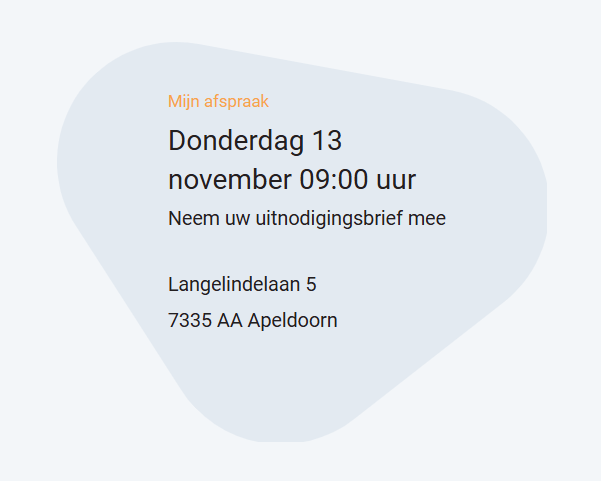
The asserted date looks like this in the UI:
This string is parsed by Java like this:
var huidigeAfspraakDto = new MammaHuidigeAfspraakDto();
final Locale LOCALE_NL = Locale.forLanguageTag("NL-nl")
final DateTimeFormatter LOCAL_DATE_TIME_WEERGAVE_CLIENTPORTAAL_FORMAT_INCL_DAG = DateTimeFormatter.ofPattern("EEEE d MMMM HH:mm", LOCALE_NL);
var datum = DateUtil.toLocalDateTime(huidigeAfspraak.getVanaf());
var weergaveDatum = datum.format(LOCAL_DATE_TIME_WEERGAVE_CLIENTPORTAAL_FORMAT_INCL_DAG);	huidigeAfspraakDto.setWeergaveAfspraakMoment(StringUtils.capitalize(weergaveDatum));