Hi,
I have tried below 3 scenarios to make Katalon click Choose File object, but didn’t succeed. Please let me know if I’m missing something and thank you for trying to help me out.
Scenario 1
I have used Record, but have also tried Spy to save the object. Both ways led me to Xpath: //input[@id=‘_FOpt1:_FOr1:0:_FOSritemNode_tools_migration_fnd1:0:_FOTsr1:0:r1:0:if1::content’]
When running the test, even though I land on “Incoming” page and Choose File is visible, Katalon is unable to Click on object.
CSS Selected Locator is empty by default when using Record/Spy.
Scenario 2
2.1 Have navigated to locate my desired object (Choose File) with Inspect Page > right-click highlighted area > Copy > Copy Xpath:
//*[@id=“_FOpt1:_FOr1:0:_FOSritemNode_tools_migration_fnd1:0:_FOTsr1:0:r1:0:if1::content”]
Then copy/pasted into Katalon as Xpath Selected Locator, run the test, but still unable to click the object.
2.2 Inspected page again, this time to identify CSS selector, right-click highlighted area > Copy > Copy Selector:
#_FOpt1:_FOr1:0:_FOSritemNode_tools_migration_fnd1:0:_FOTsr1:0:r1:0:if1::content
Copy/pasted into Katalon as CSS Selected Locator, run the test, still unable to click the object.
Scenario 3
Have installed SelectorGadget Chrome Extension and went again through scenarios 2.1 and 2.2.
This got me identifying same Xpath and CSS selectors as when using Inspect.
If my test case successfully clicks the Choose File button, I expected windows file to get opened like this:
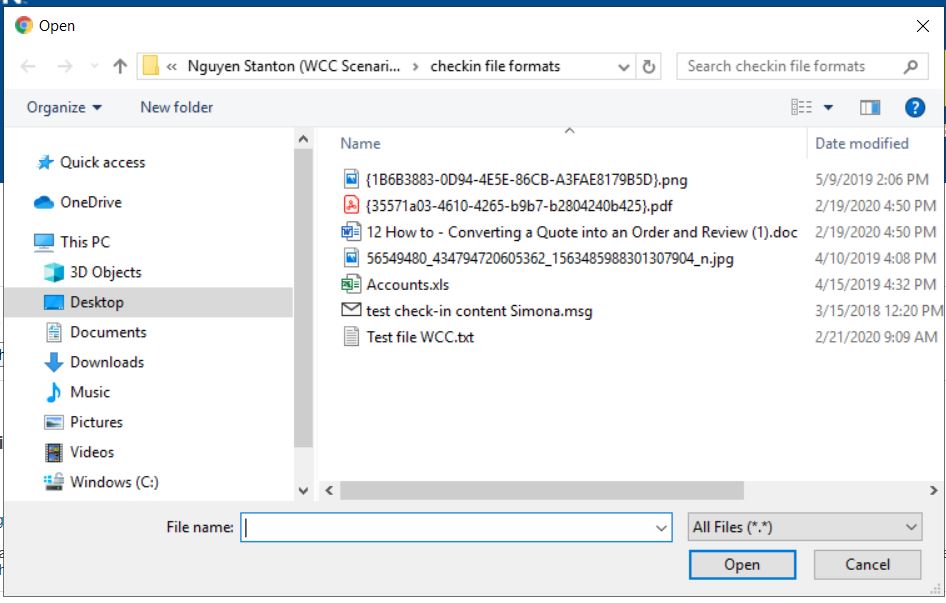
I don’t have script for next step (click to select specific file). Was planning to investigate how to do that after I get Katalon click on Choose File. (suppose I can use Record Windows Action functionality?)
I’m looking now into Chrome DevTools that you sugested, hope I can make use of it.