Stale element not found, is this relate to using same Object?

@kazurayam Thanks a lot for your effort and time troubleshooting my issue.

Prior moving to next information, I found that Default Smart Wait = Enable. I’m not sure that this option was Enabled will impact to your troubleshooting or not. It’s my mistake does not them twice prior post my result to you. @kazurayam, I’m sorry for my mistake.

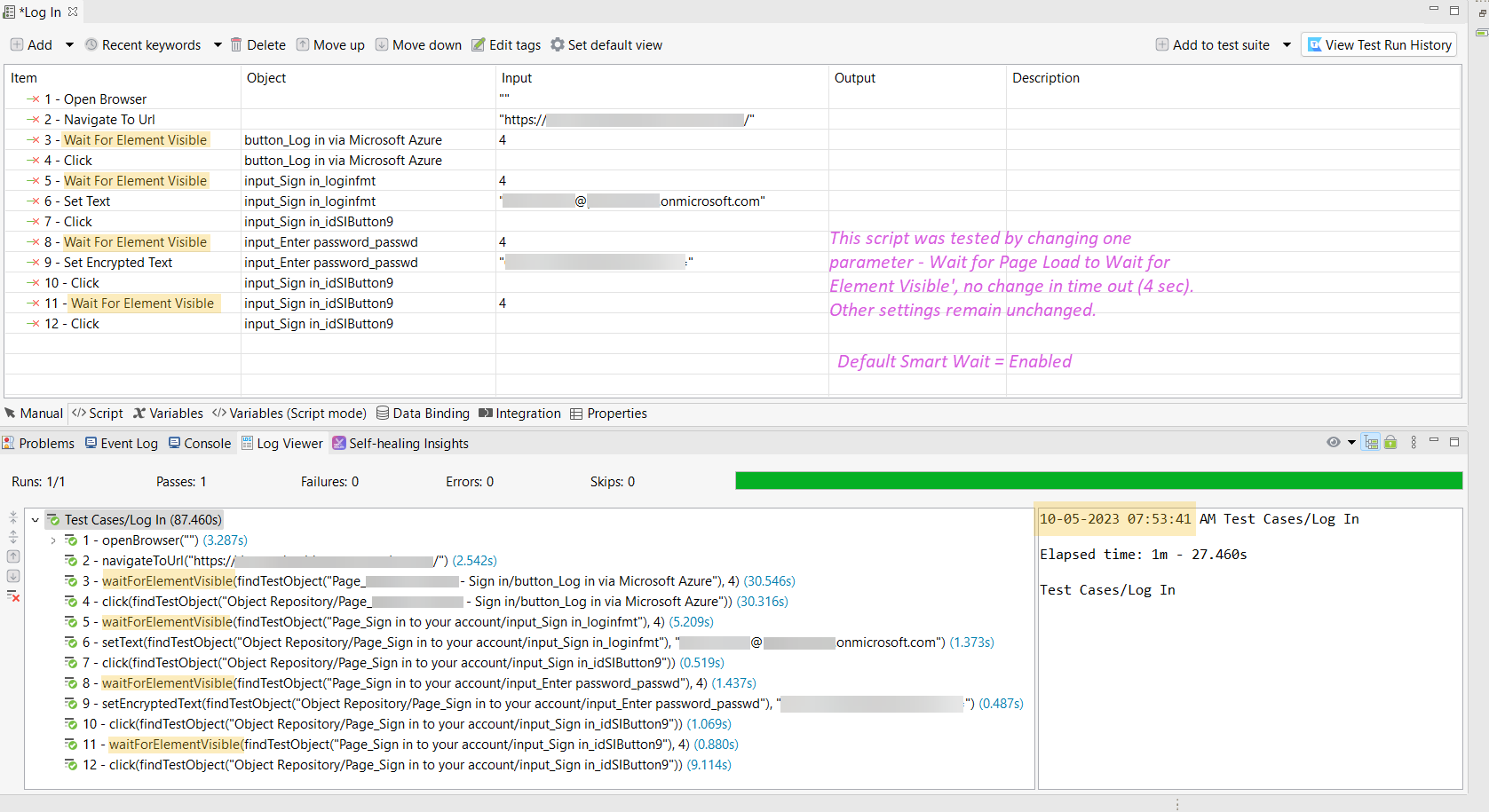
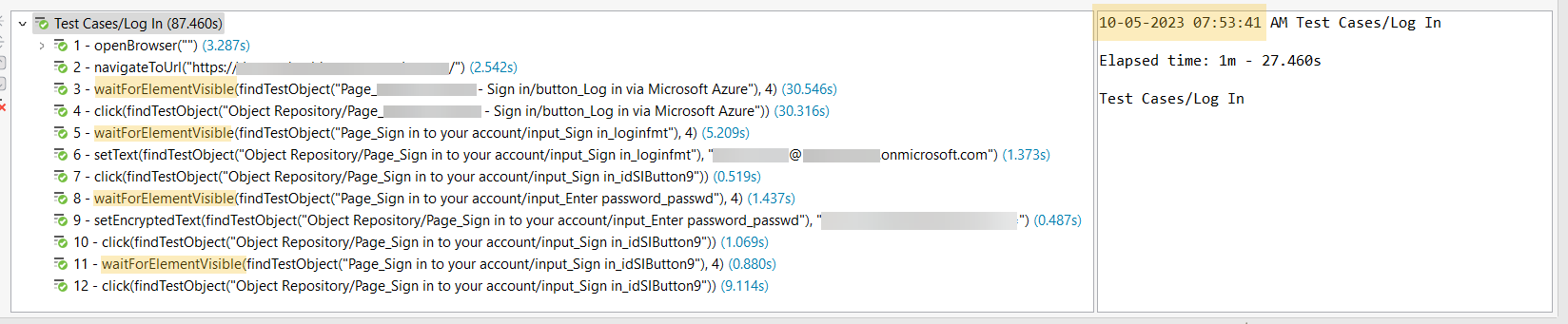
To proof your understanding, I place my test script into 2 variances. Test results shown below

  1. Wait for Page Load + Smart Wait = Enable / Disable

    Image#1.1: wait for page load + smart wait = enable, Result = Passed

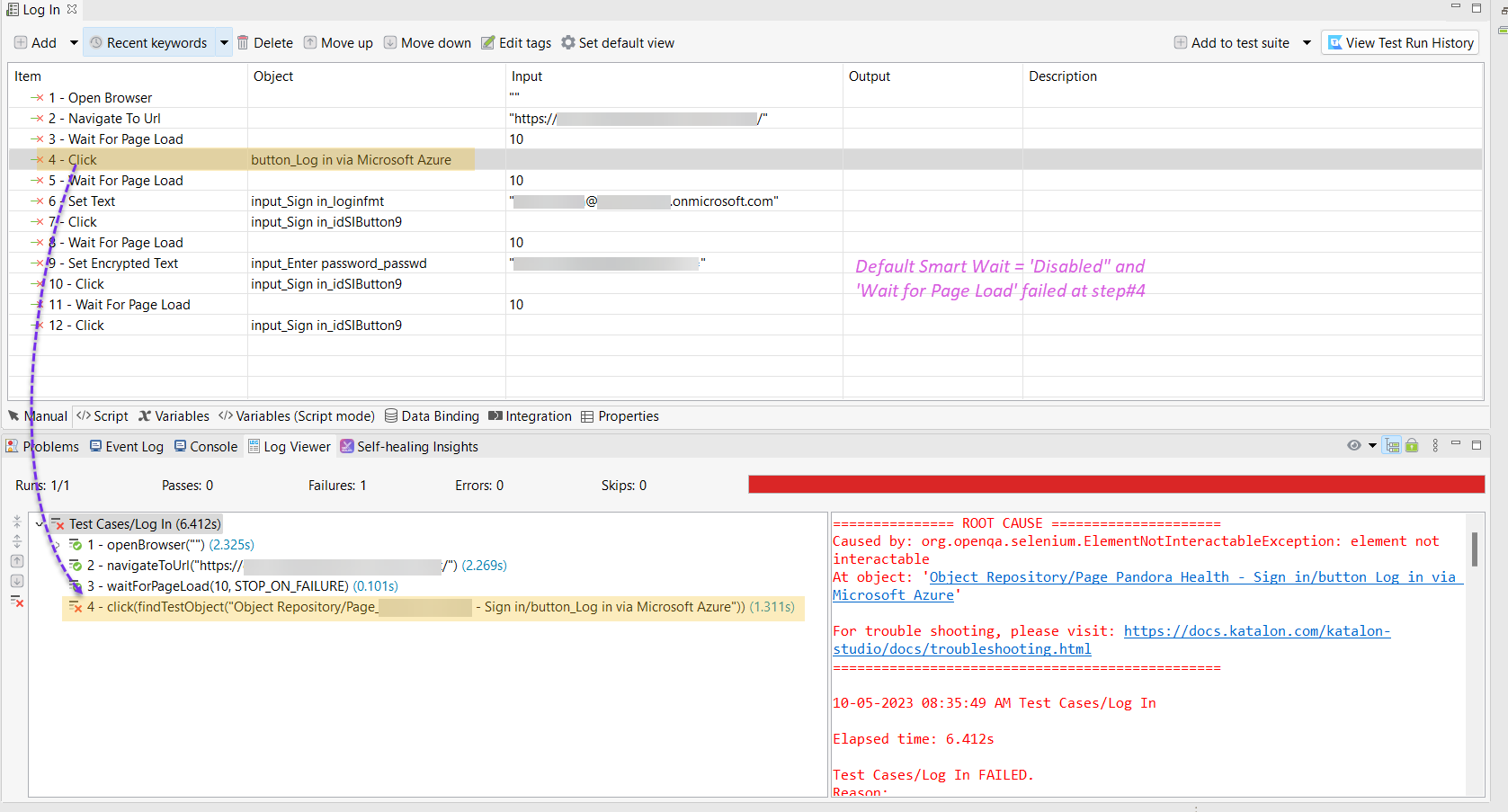
 Image#1.2: wait for page load + smart wait = disable, Result = Failed
 <div data-theme-slick="1">

  1. Wait for Element Visible + Smart Wait = Enable / Disable

    Image#2.1: wait for element visible + smart wait = enable, Result = Passed

Image#2.2: wait for element visible + smart wait = disable, Result = Failed

why disabled the Smart Wait cause my test case failed, in both cases, error shown in different message. One with “Wait for Page Load”, failed with element not interactable while another with Wait for Element Visible, failed with stale element not found. The above test result in this reply were executed in Katalo Studio 8.6.6-65709cbd version.

The Smart Wait does a trick behind the scene. It tries to cover-up your mistakes as much as possible. I guess, the errors in your test case is catched by Smart Wait and erased; it injects some “waits” silently and tries the find the target element applying its varous “Forces”.

Are you positive for Smart Wait? or negative against it? It is up to each user’s preference.

I personally never use Smart Wait. Why? Because Smart Wait disturbes me. I believe Smart Wait is too kind. It spoils users more than helps.

1 Like

@Monty_Bagati
@vu.tran

So, this thread was hot because of the naughty Smart Wait!

I would request Katalon team to disable the Smart Wait as default.

Otherwise, sooner or later, another boy/girl would raise a post where he/she asks us a difficult question like this. Again and again.

3 Likes

Smart Wait seems like implicit wait, am I correct? I do prefer to turn if off. From my understanding as you explained, Smart Wait seems like Implicit Wait in Selenium IDE.

Hi,

I have created a ticket for this to investigate more on Smart Wait as well as Stale element not found error. Thank you so much for all of the inputs.

3 Likes

Honestly I don’t know. I have never seen any Katalon documentation that explains how Smart Wait works.

1 Like

@jirayu.s Hi, It would be great if you could summarize the solution/workaround you have worked through in 1 reply and we can mark it solution for later reference from other people. As far as I understand, Smart Wait enabled should be workable in your case, right?

1 Like

@Elly_Tran from my point of view, I don’t think it still have interim solution. Why? If carefully view my screenshot, longer elapsed time spent when you enable Smart View. Like @kazurayam said, I also don’t know how Smart Wait works.

You can keep this thread temporarily locked until having more explanation or solution. I’m willing to involve your testing, if any.

2 Likes

Ok, thank you. I will ask my team and update the description in more detail about Smart Wait’s work. Otherwise, thank you all for great discussion

Hi,

My team suggests this document: https://docs.katalon.com/docs/create-tests/record-and-spy/webui-record-and-spy-utilities/smart-wait-function#ariaid-title1 with its description and how to disable it. Please review it. Thank you!

2 Likes

I looked at the source for this feature a long time ago, so maybe it has changed, but if not, here’s what russ and I found:

Since this topic doesn’t have a solution marked, and since I don’t want to read through the entire history (that has appeared to have devolved into a fight :expressionless: ), I’ll just link this discussion in regards to the StaleElementReferenceException:

I think it’s important to understand how/when this exception occurs in order to properly mitigate it.

1 Like

Hi @Brandon_Hein,

I’m totally agree with you that it’s important to understand how and when this exception occurs. I re-run my script again and again, I noticed 2 things,

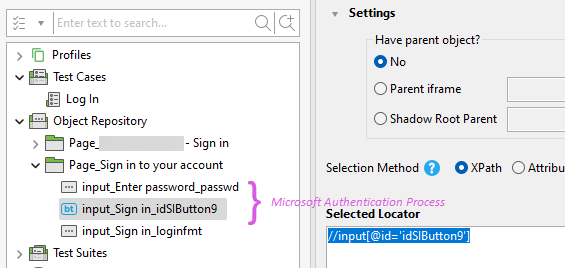
  1. such exception occur during Microsoft Authentication process
    user account input [OK] -----> user credential input [Failed]

  2. different object (from visual) but use same locator, details in below images.
    user account input [NEXT button] xpath = //input[@id=‘idSIButton9’]
    user credential input [SIGN IN button] xpath = //input[@id=‘idSIButton9’]

Another image below, shown that during the authentication process through Microsoft Authentication page, same object were used in 3 different locations/pages (Next button, Sign in button, Stay signed in YES button).

1 Like

@Elly_Tran @kazurayam @Brandon_Hein

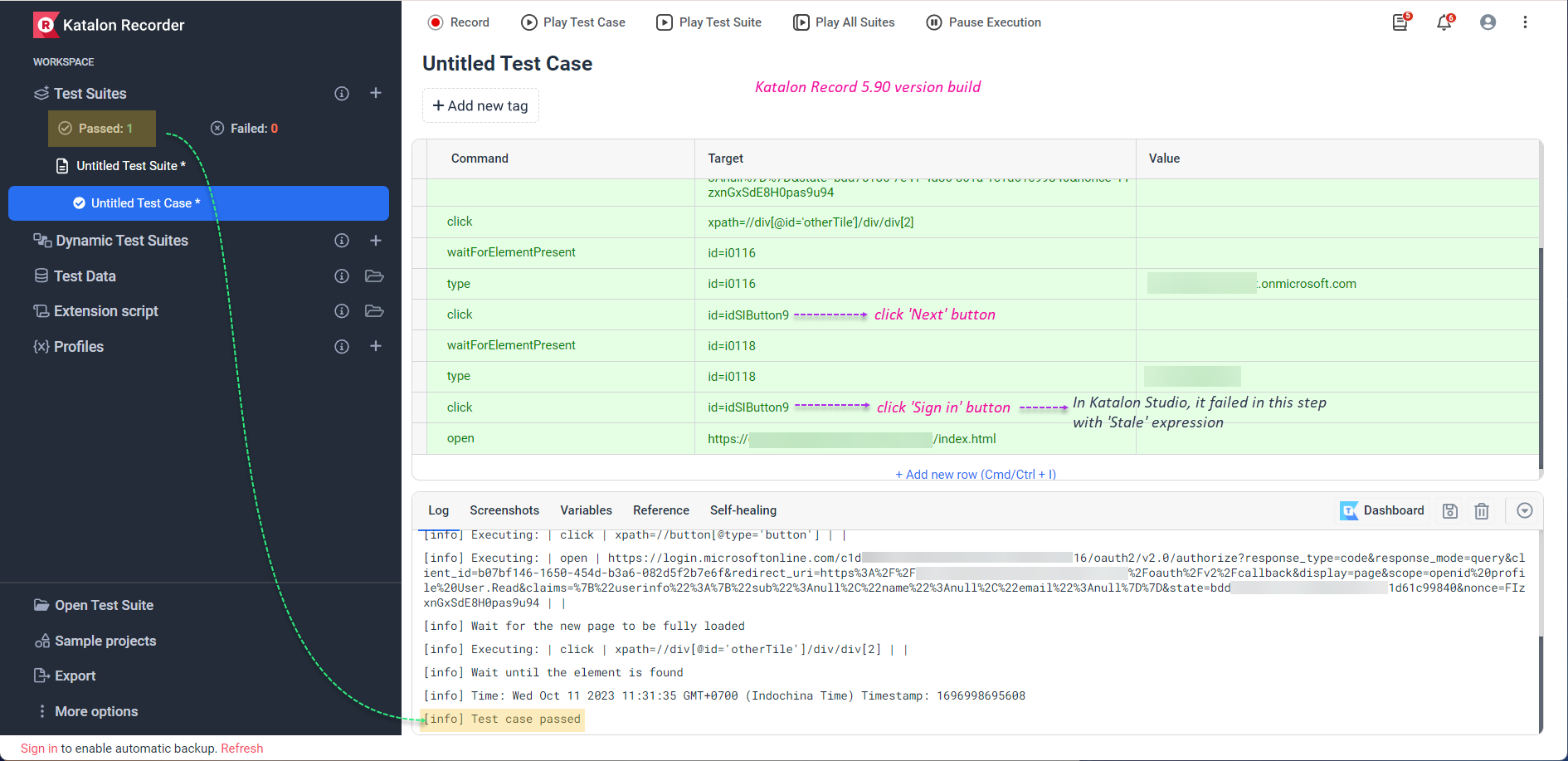
I did record my login steps through Katalon Recorder 5.90 on my machine, it was successfully run all steps as image below.

2023-10-11_11-32-01

Below was excerpted log from Katalon Recorder, I masked confidential data with xxx

[info] Playing test case Untitled Test Suite / Login
[info] Time: Wed Oct 11 2023 11:50:51 GMT+0700 (Indochina Time) Timestamp: 1696999851059
[info] OS: Windows Version: 10
[info] Browser: Chrome Version: 117.0
[info] If the test cannot start, please refresh the active browser tab
[info] Executing: | open | https://xxx-xxxxxxxxx.xxxxxxx.xxx/ | |
[info] Wait for the new page to be fully loaded
[info] Executing: | click | xpath=//button[@type=‘button’] | |
[info] Executing: | open | https://login.microsoftonline.com/c1xxxxxx-5708-4xx3-bxx6-f5xxxx1cff16/oauth2/v2.0/authorize?response_type=code&response_mode=query&client_id=b07bf146-1650-454d-b3a6-082d5f2b7e6f&redirect_uri=https%3A%2F%2Fxxx-xxxxxxxxxx.xxxxxxxx.xxx%2Foauth%2Fv2%2Fcallback&display=page&scope=openid%20profile%20User.Read&claims={“userinfo”%3A{“sub”%3Anull%2C"name"%3Anull%2C"email"%3Anull}}&state=bdd75186-7e41-4d86-801a-1c1d61c99840&nonce=FIzxnGxSdE8H0pas9u94 | |
[info] Wait for the new page to be fully loaded
[info] Executing: | waitForElementPresent | xpath=//div[@id=‘otherTile’]/div/div[2] | |
[info] Executing: | click | xpath=//div[@id=‘otherTile’]/div/div[2] | |
[info] Executing: | waitForElementPresent | id=i0116 | |
[info] Executing: | type | id=i0116 | xxx@xxxxxxxxxx.onmicrosoft.com |
[info] Executing: | click | id=idSIButton9 | |
[info] Executing: | waitForElementPresent | id=i0118 | |
[info] Executing: | type | id=i0118 | xxxxxxxxxxxxxx |
[info] Executing: | click | id=idSIButton9 | |
[info] Executing: | open | https://xxxx-xxxxxxx.xxxxx.xxx/index.html | |
[info] Time: Wed Oct 11 2023 11:51:03 GMT+0700 (Indochina Time) Timestamp: 1696999863404
[info] Test case passed

1 Like

Is your issue resolved then? If not, can you try and add a WebUI.delay(10) between each step in your script? This can help you determine if you have a timing issue, which is usually what a StaleElementReferenceException indicates. If this does help, then we need to write you a better wait condition between clicks.

3 Likes

@Brandon_Hein adding WebUI.delay(x), my script was successfully run with no Stale expression issue.

1 Like

Just to reiterate, adding WebUI.delay() is NOT a solution. It was just to help us confirm you have a timing issue, which you do. You need a better wait condition between clicks. It looks like you’re using waitForElementVisible() currently. Try a waitForElementClickable() instead.

2 Likes

@jirayu.s

You should enable the Smart Wait. With Smart Wait enabled, your test case will run fine. Then you will be no longer bothered by “Stale element reference”.

@jirayu.s

In a previous post I recommended you to disable Smart Wait.

Now I have changed my opinion.

Smart Wait is the only pragmatic solution for you to pass the sign-in procedure of Azure DevOps.


I found that you are trying to automate the sign-in procedure into Microsoft Azure DevOps. I created my Azure DevOps account, and tried to write a Katalon Test Case that automates signing-in to it. My code is as follows:

import com.kms.katalon.core.testobject.ConditionType
import com.kms.katalon.core.testobject.TestObject
import com.kms.katalon.core.webui.keyword.WebUiBuiltInKeywords as WebUI
import internal.GlobalVariable

TestObject makeTestObject(String id, String xpathExpression) {
    TestObject tObj = new TestObject(id)
    tObj.addProperty("xpath", ConditionType.EQUALS, xpathExpression)
    return tObj
}

String url = "https://dev.azure.com/${GlobalVariable.ACCOUNT}"
WebUI.openBrowser(url)
WebUI.setViewPortSize(800, 800)

TestObject loginfmt = makeTestObject("loginfmt", "//input[@name='loginfmt']")
WebUI.waitForElementClickable(loginfmt, 20)
WebUI.sendKeys(loginfmt, GlobalVariable.EMAIL)

TestObject nextButton = makeTestObject("Next", "//input[@id='idSIButton9']")
WebUI.waitForElementClickable(nextButton, 20)
WebUI.click(nextButton)

TestObject passwd = makeTestObject("Passwd", "//input[@name='passwd']")
WebUI.waitForElementClickable(passwd, 20)
WebUI.sendKeys(passwd, GlobalVariable.PASSWD)

TestObject signinButton = makeTestObject("SignIn", "//input[@id='idSIButton9']")
WebUI.waitForElementClickable(signinButton, 20)
WebUI.click(signinButton)

TestObject yesButton = makeTestObject("Yes", "//input[@id='idSIButton9']")
WebUI.waitForElementClickable(signinButton, 20)
WebUI.click(signinButton)

WebUI.closeBrowser()

With Smart Wait enabled, this code passed.

With Smart Wait disabled, this code failed with Stale Element Reference Exceptions at several statements.


I looked at the HTML of the Azore DevOps Sign-in page and found that it is heavily JavaScript-driven.

I found that the page is driven by a rich set of JavaScript codes. And your test case script must keep in sync with the JavaScript codes running in the browser.

However, none of WebUI.waitFor*** keywords are capable to synchronize with the JavaScript in browser. Therefore we can not solve the “stale element reference” problem using any of WebUI.*** keywords. I think it is pointless to discuss how to utilize WebUI.waitFor*** and WebUI.delay(n) keywords for this case.

As @Brandon_Hein told at Stale element not found, is this relate to using same Object? - #96 by Brandon_Hein - Product Forums - Katalon Community , the Smart Wait talks to the JavaScript running inside browser and moinitor the modifications in the DOM. A Test Case script can get in sync with JavaScript runnging inside browser by enabling Smart Wait.

1 Like

or some may just listen to @Russ_Thomas advices and write proper waits and locators by using javascript (or everything else)
just saying…

sorry @Brandon_Hein for ‘ignoring’ your recent posts.
and welcome back.
grab some popcorn and enjoy the history of this topic, read everything please for now.
judge later.

1 Like