I made a github project. You can download a zip of a sample project from here.
The project contains the MHTML @1Medy_Albion provided at a folder ./tmp/Events.mhtml
It includes a Test Case Test Case/1Medy_Albion, which looks like this:
import org.openqa.selenium.WebElement

import com.kms.katalon.core.testobject.ConditionType
import com.kms.katalon.core.testobject.TestObject
import com.kms.katalon.core.webui.keyword.WebUiBuiltInKeywords as WebUI

CustomKeywords."ks.should.have.such.builtin.Keyword.openBrowserWithFile"("tmp/Events.mhtml")

WebUI.switchToFrame(byXPath("//iframe[@id='PopDiv']"), 10)
WebUI.verifyElementPresent(byXPath("//table[@id='mlist']"), 10)
List<WebElement> tableRows = WebUI.findWebElements(byXPath("//table[@id='mlist']/tbody/tr"), 10)
assert tableRows != null
WebUI.comment("number of rows of <table id='mlist'> : " + tableRows.size())
WebUI.closeBrowser()

TestObject byXPath(String xpath) {
	TestObject tObj = new TestObject(xpath)
	tObj.addProperty("xpath", ConditionType.EQUALS, xpath)
	return tObj
}
You want to execute it using Chrome browser.
This test case opens the local MHTML file in Chrome, switch to the <iframe>, find the <table>, select the <tr> set.
This emits the following output in the console.
2022-02-24 17:59:09.326 INFO c.k.k.c.keyword.builtin.CommentKeyword - number of rows of <table id='mlist'> : 15
Your question has been resolved.
OK?
Yes. The row_count is 15.
@kazurayam I am beyond grateful for your endeavour!
I am doing the merging now and also trying to understand this part:
TestObject byXPath(String xpath) {
	TestObject tObj = new TestObject(xpath)
	tObj.addProperty("xpath", ConditionType.EQUALS, xpath)
	return tObj
}
If I have questions, surely I will ask you.
@sara.leslie
@Russ_Thomas
I think I could demonstrate how a MHTML makes it easier to solve a forum topic.
Slightly better English: “I think I demonstrated how a MHTML makes it easier to solve a forum topic.”
I agree, you certainly did. My only problem is, I do not have the kind of time to spend on it that you have. 
And you surely know, had I been involved, I’d have done it with CSS selectors in a snap.
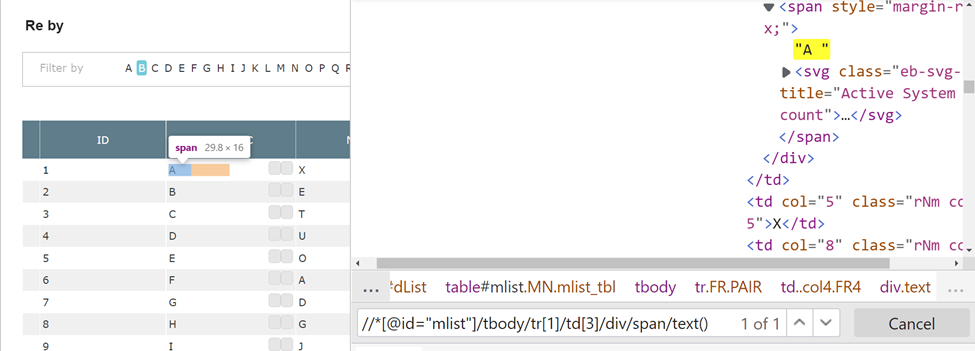
@kazurayam Having got the total number of rows as 15, I want to go to the 3rd column (APP ACC), iterate the column and search for “I”.
Codes:
for (def rowIndex=1; rowIndex<=15; rowIndex++) {
def theName = WebUI.getText(findTestObject(By.xpath("//table[@id='mlist']/tbody/tr/td[3]", ['rowIndex' : rowIndex])))
println theName

	if (theName.equals("I")) {
		String AppText=WebUI.getText(findTestObject('Object Repository/Reported By/ApplicationAccount2'))
		println (AppText)
		break
	}
else {
	println ("Name is not in the first page")
	}
}
The problem is that the following event FAILED:
theName = getText(findTestObject(by.xpath("//table[@id='mlist']/tbody/tr/td[3]", ["rowIndex":rowIndex])))
I am not able to figure out the script 1643367625129. What is it actually?
Also, why xpath is being underlined?
How about the below?
def theName = WebUI.getText(findTestObject(By.xpath("//table[@id='mlist']/tbody/tr[${rowIndex}]/td[3]")))
@grylion54 Ah I got the point. We keep col 3 fixed while the rows keeps changing.
After execution with your new code, it is giving this result:
2022-02-24 21:03:56.106 DEBUG testcase.Create Event - 1:
theName = getText(findTestObject(By.xpath(//table[@id='mlist']/tbody/tr[$rowIndex]/td[3])))
Reason:
groovy.lang.MissingMethodException: No signature of method: static com.kms.katalon.core.testobject.ObjectRepository.findTestObject() is applicable for argument types: (org.openqa.selenium.By$ByXPath) values: [By.xpath: //table[@id=‘mlist’]/tbody/tr[1]/td[3]]
Possible solutions: findTestObject(java.lang.String), findTestObject(java.lang.String, java.util.Map)
Okay. I just went with your code. How about the below?
def theName = driver.findElement(By.xpath("//table[@id='mlist']/tbody/tr[${rowIndex}]/td[3]")).getText()
or
def myCell = driver.findElement(By.xpath("//table[@id='mlist']/tbody/tr[${rowIndex}]/td[3]"));
def theName = myCell.getText();
Ok. I try the new one.
To retrieve the names, i think it’s better to use the xpath:
//*[@id=“mlist”]/tbody/tr[1]/td[3]/div/span/text()
No. The xpath you show is not valid.
//*[@id="mlist"]/tbody/tr[1]/td[3]/div/span/text()
Split it in two. Use the xpath, id("mlist")/tbody/tr[1]/td[3]/div/span to get the element, and then use getText() of the element.
It’s KO with the result:
And, katalon is underlining these words:
You need the following import statements at the top of your Test Case. If you select CTRL + SHIFT + O (oh) at the same time, the imports at the top will generally be filled in (or reduced if you have some that are not needed by your code).
import org.openqa.selenium.By as By
import org.openqa.selenium.Keys as Keys
import org.openqa.selenium.WebDriver as WebDriver
import org.openqa.selenium.WebElement as WebElement

import com.kms.katalon.core.model.FailureHandling as FailureHandling
import com.kms.katalon.core.webui.driver.DriverFactory as DriverFactory
import com.kms.katalon.core.webui.keyword.WebUiBuiltInKeywords as WebUI
And after you have opened your browser…
WebDriver driver = DriverFactory.getWebDriver();
Also, if you go with the xpath format I have above, you do not need the starting //. Remove them.
Or go back to the old format. For the id attribute, these are equivalent.
By.xpath('//*[@id="mlist"]/tbody/tr[1]/td[3]/div/span'))
The imports were well present.
Still giving error with new xpath.
See my amendment to the import list.
Make sure you put the statement outside of your for loop. You do not want to call it more than once.
I also note that you have hardcoded the tr attribute value to 1. To review all rows, this needs the loop counter as a parameter as I showed you above. If you leave it as hardcoded, you do not need the loop at all.
Yep. I wanted to see if it retrieves the first name. I change it.
You know this table is in an iframe. Where should i put the statement
WebDriver driver = DriverFactory.getWebDriver();
after the switch or just above the for loop?
It doesn’t matter. It’s just a declaration to shorten “DriverFactory.getWebDriver()” to just “driver” so we don’t have to type out the whole phrase again and again. It just has to be above the first usage of the reference “driver” on the Test Case.
I agree. Do you think i need to format the XML to solve the issue?
Reason:
groovy.lang.MissingPropertyException: No such property: driver for class: Script1643367625129
Can you post your code you have so far?