Hi there,
Attached is the sample project using the same approach I’ve given before. Before jumping into this project, make sure you read our approach carefully to understand why do we need to define these own capabilities by yourself, and have a brief read about Appium architecture
Looking at this project, some things to be noticed:
- Appium is started manually with the help of
AppiumServerutilitiy, and of course it will be terminated right after test execution. For the current instance of this project, these setup and teardown steps are placed onListenersscript. - The actual custom keyword is:
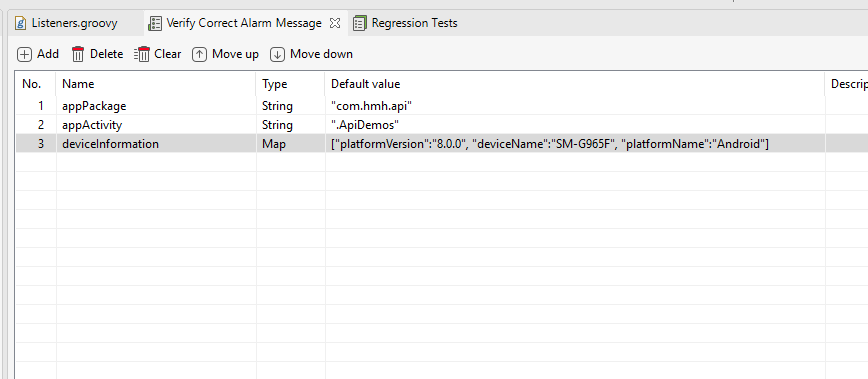
startInstalledApplicationincom.mobile.keywordspackage. Since Android and iOS are different mobile types, I separate them conditionally. This keyword also initialize necessary capabilities to start installed application (usingappPackageandappAcvititycapabilities) in the current device throughdeviceInformationparameter.
Now let’s move on why we need to do this:
- When using
Start Applicationbuilt-in keyword, Katalon Studio will automatically start an Appium server using random port. We need a static port here to hook into. - Starting installed application requires us to build Appium desired capabilities from scratch, so
startInstalledApplicationwill do all these things.
References to get capabilities:
http://appium.io/docs/en/writing-running-appium/caps/
Usage in the test case Test Cases/Verify Correct Alarm Message:
- Local variables should be created to define necessary capabilities:
- In the test script, just replace
Start Applicationkeyword with the custom keyword along with its method signature:
//Mobile.startApplication(appPath, false) CustomKeywords.'com.mobile.keywords.ApplicationBehavior.startInstalledApplication'("Android", deviceInformation, appPackage, appActivity)
=> Once Test Suite execution happens (because myListenersscript belongs to Test Suite execution phase), Katalon Studio can start an existing application in the device and furtherMobilekeywords don’t need to be maintained.
This is the most basic implementation to solve ‘How to launch an installed app using Katalon Studio’. Other adjustments can be made to applied for Test Case execution phase based on Listeners script.
mobile.zip (2.5 MB)